First of all, get the QuickTime Player; yep, nobody loves it, but we can't play the files without their wonderful codecs.
Then, in order to Play the AMR files using Winamp:
Download and install MediaLooks QuickTime DirectShow Source Filter.
It is a DirectShow filter, so, after installation, run:
C:\Winamp\Options\Preferences\Plug-ins\Input\
And double-click the Nullsoft DirectShow Decoder in order to pull up it's settings dialog.
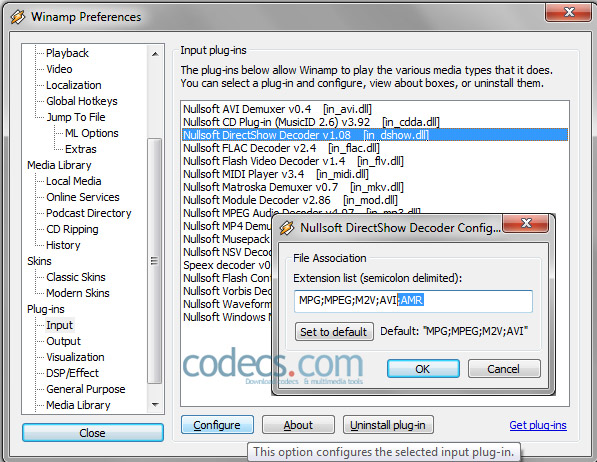
Click on Configure button and add ;AMR to the extension list.
Play the files using Windows Media Player
Download and install River Past QuickTime DirectShow Filter for WMP.


How to play FLAC files in Windows Media Playe...
@Drasko What is the error message you're seeing? Can you provide more details?
Read More →The Best Video Player for Android TV - And th...
On Android, Kodi has far the best foreign language subtitle support. Vlc and MX had issues displaying the correct ...
Read More →How to Download HEVC Video Extension for Free
我是一名中国用户,这是我第二次成功在文章指导下下载插件,这篇文章很实用!简单易懂! 我使用的是Windows 11 家庭中文版,操作系统版本 26200.8246。 2026.4.25我已成功下载并使用!感谢发布者,谢谢您!
Read More →