Codecs.com = Free-Codecs.com
 
 
 Home  ·  Audio Codecs  ·  Video Codecs  ·  Tools  ·  Codec Packs  ·  Guides  ·  Forum 


· VIDEO CODECS
FFDShow MPEG-4
DivX 7.2
Koepi's XviD Codec
DScaler MPEG Filters
DivX Free
OggDS / OGM Codec
Nic's XviD Codec
Ligos Indeo Codec

· AUDIO CODECS
MPEG Layer-3 Codec
AC3 Filter
AC-3 Decompressor
CoreVorbis Decoder
LAME DirectShow Filter
LAME MP3 Encoder
Monkey's Audio
Vorbis Ogg ACM Codec

· CODEC PACKS
XP Codec Pack
K-Lite Codec Pack
Codec Pack All in 1
Matroska Pack
Satsuki Decoder Pack
The Codecs
K-Lite Mega Codec
Lazy Man's MKV Pack

· TOOLS
Real Alternative
Media Player Classic
GSpot
WinAVI Converter
QuickTime Alternative
VLC (VideoLAN Client)
DVDFab
ConvertXtoDVD


K-Lite Codec Pack
Real Alternative
K-Lite Mega Codec
FFDShow MPEG-4
Codec Pack All in 1
QuickTime Alternative
Media Player Classic
XP Codec Pack
LAME MP3 Encoder
AC3 Filter
ACE Mega CodecS
Storm Codec
DivX 7.2
VoxWare Audio CoDec
Nero Burning ROM
Vista Codec Package
Koepi's XviD Codec
DivX Free
VLC (VideoLAN Client)
Daemon Tools

More Software  

Download movies

XP Codec Pack : Download it and enjoy your multimedia experience!

Download DivX 7


What Codecs Should I Use?
Tell a Friend about this Guide! Tell a Friend about this Guide

You have downloaded a video or audio file and you are unable to open it or it does not play properly. This can be due to a simple reason: a missing codec. But what codec(s) should i download?

• The easiest way to find out is to check the file extension. One thing to be noted is that some files can be named wrongly and some file formats such as AVI require different codecs depending on the file even if the file extension is the same.


• Other method - also very simple - to find out the proper codec for video/audio files is GSpot or AVIcodec. These small tools can help you to check what codecs you need and whether your computer is able to play the file(s).
Sometimes it would be simpler to just install most of the commonly used codecs so as to avoid having to search for one each time you download a file using a new codec. Such codec packs are available here at codecs.com, however, you must take precautions to ensure that there are no software conflicts.


Many users reported troubles with codec packs. Our advice is: Always use tools like GSpot and AVIcodec and try to install only the codecs you need. Almost all packs give you the option to select the codecs before installation.


Codecs related tools:

GSpot: is a video codec identification utility - identifies which video codec and audio compression method is used on .avi files, whether the matching codec is installed, and more.
AVIcodec: gives detailled information, especially the codecs needed to play the file...
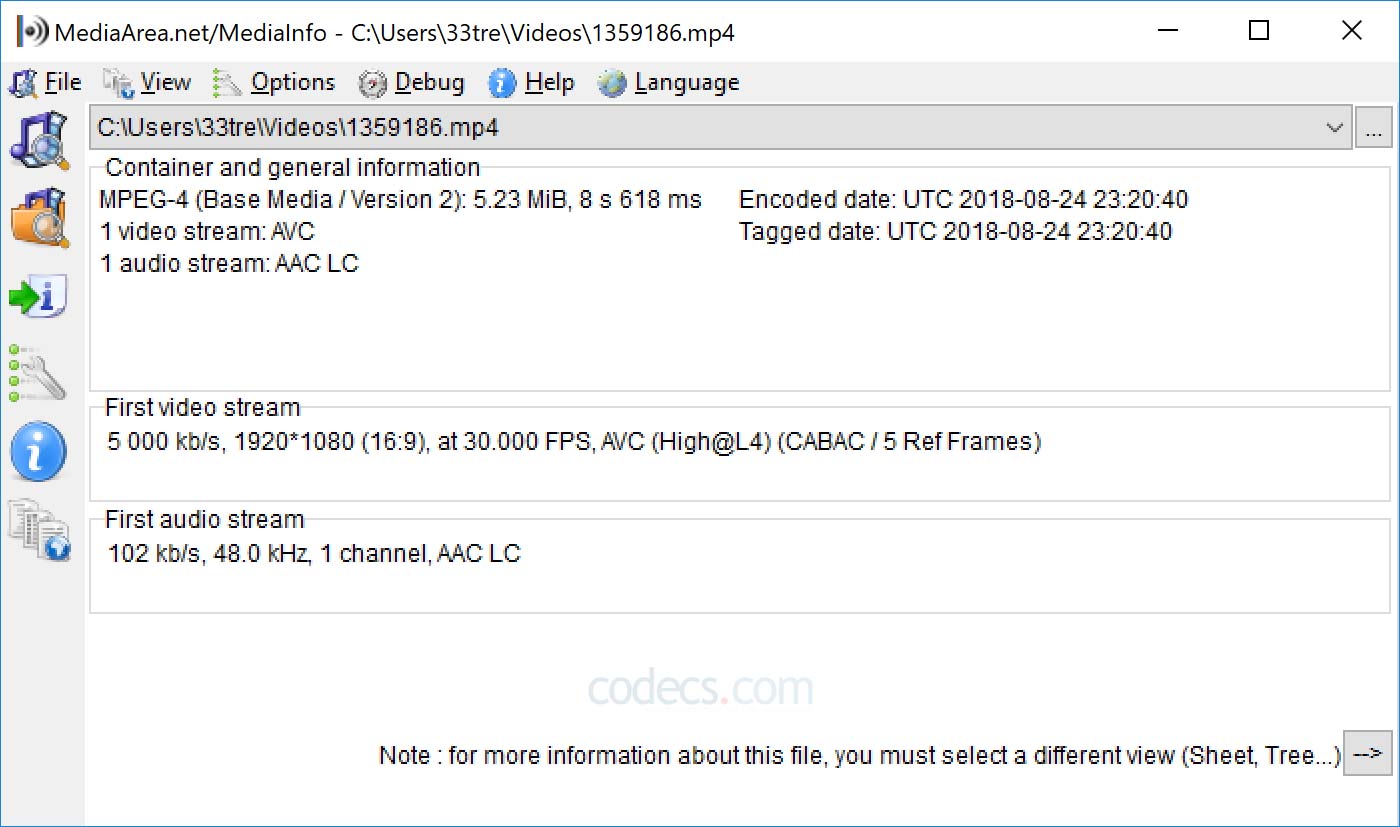
MediaInfo: supplies information about multimedia files.
Sherlock - The Codec Detective!: The Codec Detective helps to determine the codecs installed on computer and check to see if any of the codecs are broken.
Windows XP Video Decoder Checkup Utility: this utility helps you determine if an MPEG-2 video decoder is installed on your Windows XP computer...
MMCompView: displays the details of all installed multimedia components (codecs, ActiveX filters) and allows you disable/enable specific components.
CodecViewer: is a little tool, which tells you which audio and video codecs you need for an avi file.
DXMan: allows you to add or remove video and audio codecs and plugins.

Complete list with codec identifiers and managers in Codec Identifiers section.


• Related links:
- What you need to know about codecs
- How to (re)install Default Codecs in Windows XP/2000
- Adding and Removing Default Codecs (and MCI) in Windows 95/98/Me
- How to Get the Codecs Downloaded Automatically to Windows Media Player
- Checking Installed VIDEO and AUDIO Codecs In Windows XP
- Please use the Forum to report problems related to codecs & codec packs.


» AnyDVD & AnyDVD HD
remove the protection of encrypted movie DVDs.
» 20% OFF for DVDFab Platinum/Gold/Mobile
copy DVD to DVDR, iPod, PSP, PS3... Remove all copy protections!
» AVS Video Converter
convert DVD AVI MP4 DIVX MPG MOV FLV XVID WMV HD & more!
» Movavi Video Converter
easily convert from one video format to another...

More Offers  


Sitemap :: Privacy Policy :: Disclaimer :: Links :: Link to Us :: Wallpapers :: Trailers :: Special Offers :: Contact :: Advertising
Codecs.com is known also as: Free-Codecs.com : CodecsDownload.com
All website graphics, design, logo and layout are Copyright © 2004-2009 Codecs.com
Yep