Codecs.com = Free-Codecs.com
 
 
 Home  ·  Audio Codecs  ·  Video Codecs  ·  Tools  ·  Codec Packs  ·  Guides  ·  Forum 


· VIDEO CODECS
FFDShow MPEG-4
DivX 7.2
Koepi's XviD Codec
DScaler MPEG Filters
DivX Free
OggDS / OGM Codec
Nic's XviD Codec
Ligos Indeo Codec

· AUDIO CODECS
MPEG Layer-3 Codec
AC3 Filter
AC-3 Decompressor
CoreVorbis Decoder
LAME DirectShow Filter
LAME MP3 Encoder
Monkey's Audio
Vorbis Ogg ACM Codec

· CODEC PACKS
XP Codec Pack
K-Lite Codec Pack
Codec Pack All in 1
Matroska Pack
Satsuki Decoder Pack
The Codecs
K-Lite Mega Codec
Lazy Man's MKV Pack

· TOOLS
Real Alternative
Media Player Classic
GSpot
WinAVI Converter
QuickTime Alternative
VLC (VideoLAN Client)
DVDFab
ConvertXtoDVD


K-Lite Codec Pack
Real Alternative
K-Lite Mega Codec
FFDShow MPEG-4
Codec Pack All in 1
QuickTime Alternative
Media Player Classic
XP Codec Pack
LAME MP3 Encoder
AC3 Filter
ACE Mega CodecS
Storm Codec
DivX 7.2
VoxWare Audio CoDec
Nero Burning ROM
Vista Codec Package
Koepi's XviD Codec
DivX Free
VLC (VideoLAN Client)
Daemon Tools

More Software  

Download movies

XP Codec Pack : Download it and enjoy your multimedia experience!

Download DivX 7


The easiest way(s) to capture images from Windows Media Player
Tell a Friend about this Guide! Tell a Friend about this Guide

Pressing the "Print Screen" key while playing a movie file in Windows Media Player will not allow you to save the current frame. However, you can do it without spending money on shareware image capture software. Just follow the next steps:

1. Open your Window Media Player and click Options on the Tools menu.

2. On the Performance tab, click on the Advanced... button.
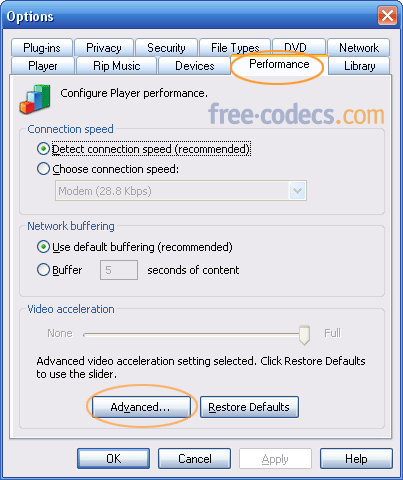
Performance tab


3. Uncheck Use overlays from DVD video, click OK and restart the player.
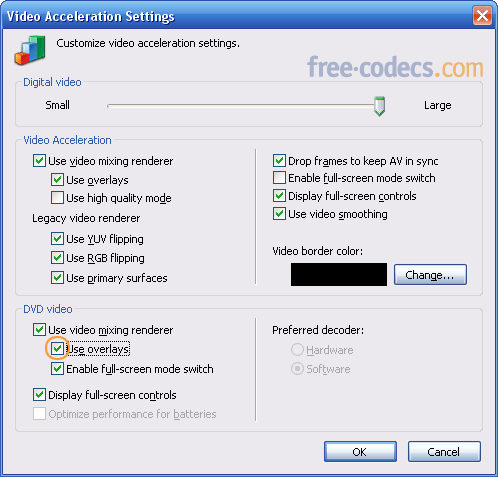
Video Acceleration Settings


Now you can capture images from any movies played in Windows Media Player using Print Screen (PrintScrn) key (or ALT + PrintScrn key). Once copied, the image can be pasted into Microsoft Paint (Start > All Programs > Accessories > Paint) or other image editor.

Note: If you have problems taking screenshots from a playing movie try to pause it first, then "print" the image.


OTHER METHODS:

• Go back to Performance tab (see step 1, 2) and click Restore Defaults button.
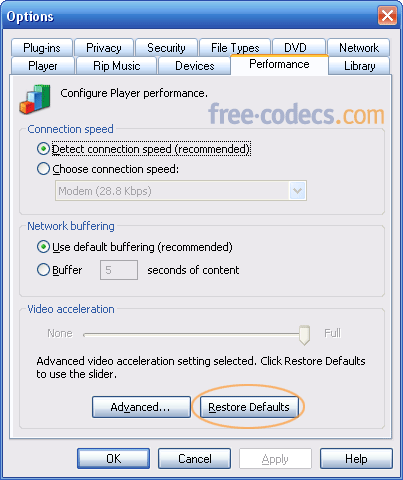
Restore Defaults


Now, move the Video acceleration slider to None and restart the Windows Movie Player.
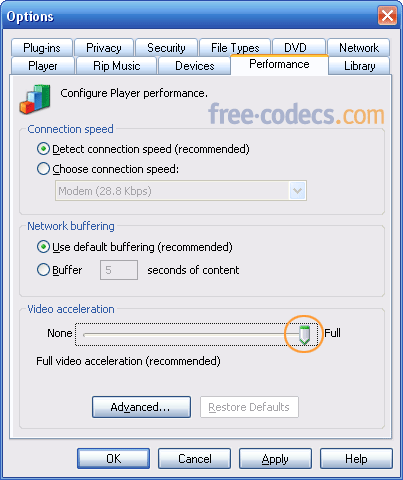
Video Acceleration slider


Don't forget to move the Video acceleration slider back to Full when you are done, because this makes videos play smoother and look better.

• Or just try the Ctrl + I combination which seems to work for many people.


• Related links:
- How to capture images from movies using Media Player Classic
- Codecs Supported by Windows Media Player for Windows XP
- How to Get the Codecs Downloaded Automatically to Windows Media Player


» AnyDVD & AnyDVD HD
remove the protection of encrypted movie DVDs.
» 20% OFF for DVDFab Platinum/Gold/Mobile
copy DVD to DVDR, iPod, PSP, PS3... Remove all copy protections!
» AVS Video Converter
convert DVD AVI MP4 DIVX MPG MOV FLV XVID WMV HD & more!
» Movavi Video Converter
easily convert from one video format to another...

More Offers  


Sitemap :: Privacy Policy :: Disclaimer :: Links :: Link to Us :: Wallpapers :: Trailers :: Special Offers :: Contact :: Advertising
Codecs.com is known also as: Free-Codecs.com : CodecsDownload.com
All website graphics, design, logo and layout are Copyright © 2004-2009 Codecs.com
Yep