HALAC and HALIC are two of the fastest lossless compressors anyone has written, and there is a good chance neither of them is for you.
Both come from the same developer, both are free, and both do exactly what they claim.
The problem is not the compression, which is excellent.
It is what happens afterwards, and no page selling these codecs seems to mention it.
What the Two of Them Actually Are
HALAC is High Availability Lossless Audio Compression, a Windows command-line encoder that spreads its work across every CPU core instead of using one. HALIC is its image counterpart, High Availability Lossless Image Codec.
Lossless means what it says. Decode either one and you get the original file back bit for bit, with nothing thrown away and nothing approximated.
Neither has a window, a button or an installer wizard. You type a command, or you write a script that types it for you thousands of times.
If that already sounds wrong: stop here and use FLAC instead. It is lossless, it is free, and every device you own can play it. Our GUI versus command line guide explains the difference if the distinction is new.
What HALAC Is Genuinely Good At
Speed, and by a margin that is hard to argue with. Most lossless audio encoders compress on a single thread, so on a sixteen-core machine fifteen cores sit idle while one does everything.
HALAC uses all of them, and version 0.6.1 closed most of the compression gap that used to be the price of that. On the developer's own multichannel benchmark it lands within a quarter of a percent of Monkey's Audio at its slowest setting, and around seventeen percent below FLAC at its highest, in a fraction of the time.
On plain stereo the gap narrows a lot, as you would expect. Multichannel is where it pulls away, and the full benchmark table sits on the HALAC download page.
The Catch Nobody Mentions
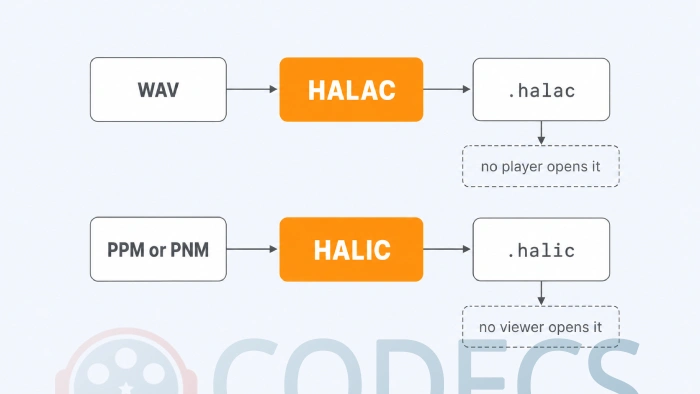
No music player opens a .halac file. Not foobar2000, not VLC, not your phone, not your car.
There is a player API in the source for developers, but there is no plugin you can install today. That makes HALAC an archive format rather than a listening format, which is a completely reasonable thing to be as long as you know it going in.
The workflow that works: compress your masters to HALAC, keep a FLAC copy for everyday listening, and decode from HALAC when you need the original back. What does not work is converting your music library and expecting to press play.
What HALIC Will and Will Not Open
HALIC has a narrower door than most people expect. It reads PPM and PNM images, with greyscale PGM added in version 0.7.2, and that is the list.
It does not take JPEG, PNG, TIFF, HEIC or camera RAW. So the common advice to point it at a photography archive or a folder of medical images skips a conversion step that is bigger than the compression job.
It is also single-threaded, unlike HALAC, with no SIMD or GPU acceleration. The speed comes from the design rather than from spreading the work out.
Worth knowing before you download. Nothing opens a .halic file either - no image viewer, no browser, no photo manager. As with HALAC it is a container for storage, and you decode back to PPM to look at anything.
So Is Either One For You?
Two honest lists. Most readers land in the second one, and that is fine.
HALAC is worth your time if:
- You have a WAV archive measured in thousands of files, especially multichannel, and encoding time is a real cost.
- You are comfortable in PowerShell or a batch file, and you keep a separate playback copy anyway.
- You have cores sitting idle and you remember leaving an encoder running overnight.
Use something else if:
- You want to rip a CD and listen to it - FLAC plays on everything you own and HALAC plays on almost nothing.
- You want the smallest possible files and do not care how long it takes - OptimFROG still holds that crown.
- You want one file that plays lossily and restores to lossless - only WavPack does that, with its hybrid mode.
- Your images are JPEGs or RAW files - convert-everything-first is not a workflow, and the graphics tools category has more practical options.
If You Do Want to Try It
Rip to bit-perfect WAV first with Exact Audio Copy, which handles offset correction and AccurateRip verification.
Then encode with a numbered compression level. HALAC uses -m 0 through -m 5, where -m 3 is the sensible default and -m 5 is the setting the benchmarks use.
The older Normal, Fast and Ultra Fast names were retired in version 0.5.7, so any script or guide still using them will fail. Verify a decode before you delete a single original.
Quick questions
Can I play .halac files in my music player?
No. There is no support in any mainstream player and no plugin available to install, so treat HALAC as an archive format and keep a FLAC copy of anything you want to listen to.
Is HALAC better than FLAC?
On multichannel compression and on speed, yes, and by a clear margin as of version 0.6.1. On everything else that matters day to day - playback, hardware support, tagging, streaming - FLAC wins and will keep winning.
What image formats does HALIC accept?
PPM and PNM, plus greyscale PGM since version 0.7.2. It does not read JPEG, PNG, TIFF, HEIC or camera RAW, so anything else has to be converted first.
Are they free, and is there a catch?
Both are free to download and use. The catch is not money, it is support: command line only, and nothing opens the output files.
Do they run on Windows 7?
HALAC does not. It targets Windows 10 and 11, and users have reported it will not install on Windows 7. HALIC has Windows and Linux builds.
Is the compression really lossless?
Yes, in both cases. Decoding returns the original data bit for bit, and the trade-off against better-known formats is compatibility rather than quality.
These are impressive tools built by one developer, and the honest recommendation is a narrow one: archive with them if that is your problem, and reach for something ordinary if it is not.
Download HALAC if a large WAV archive is what you are staring at, or tell us how it went if you have already put it to work.


I thought that when it was fast, the compression ratio was too low.
It definitely has a good compression ratio and it takes just one press of the button to complete the process. Total madness!