Spotify does not stream one format any more - it streams three, and which one reaches you depends on whether you are in the app, in a browser, or listening on Lossless.
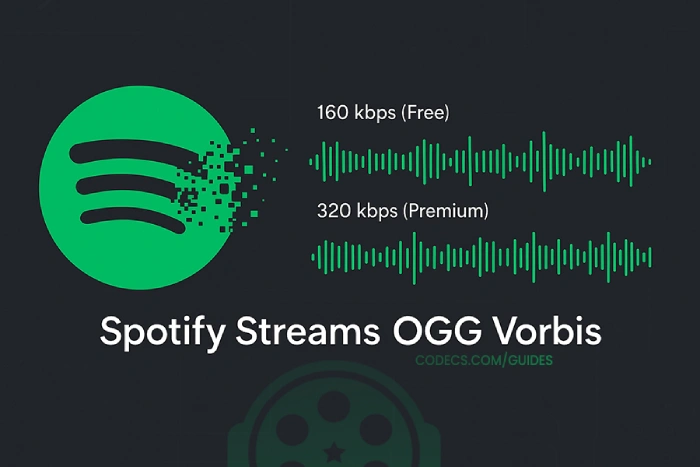
For years the answer was simply Ogg Vorbis, and most articles still say so.
That stopped being the whole picture in September 2025, when Spotify added lossless FLAC streaming to Premium.
Here is what you are actually getting, and which setting is worth changing.
Three codecs, one account
The same subscription sends you different formats depending on how you listen, which is why the same track can sound slightly different in a browser than in the desktop app.
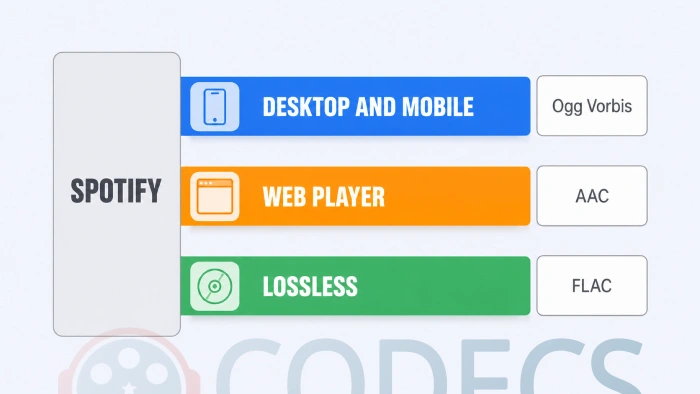
| Where you are listening | Codec | Top quality |
|---|---|---|
| Desktop and mobile apps | Ogg Vorbis | Around 320 kbps on Premium |
| Web player in a browser | AAC | Around 256 kbps on Premium |
| Lossless, on Premium | FLAC | Up to 24-bit, 44.1 kHz |
Free accounts sit lower on the same ladder - roughly 160 kbps in the apps and 128 kbps on the web - and cannot reach the top setting at all.
Why the web player's lower number is not the downgrade it looks like
People compare 320 against 256, conclude the browser is worse by a fifth, and switch apps over it. The arithmetic does not work that way.
Bitrate only means something alongside the codec doing the compressing, and AAC is more efficient than Vorbis. A 256 kbps AAC stream and a 320 kbps Vorbis stream land far closer together than the numbers suggest.
If you want the underlying idea rather than the Spotify specifics, our guide to speech codecs and music codecs covers why different formats need different bitrates to sound the same.
What Lossless actually changed
Lossless streams FLAC at up to 24-bit and 44.1 kHz, which means the file is mathematically identical to the master rather than a clever approximation of it.
It arrived with Premium at no extra charge on the individual, duo and family plans, on desktop, mobile and a growing set of Connect devices, rather than as the paid add-on people had expected for years.
Availability is uneven and it is not your settings. Lossless rolled out market by market and device by device, and Spotify notifies accounts as it reaches them. If the option is not in your quality menu, waiting is the fix rather than reinstalling anything.
Which setting to choose
The quality menu sits in Spotify's settings under audio quality, and the choice is less dramatic than it looks.
- On a phone, on data. High is the sensible default - the difference above it is small and the difference in data used is not.
- On wifi, on decent headphones. Very High or Lossless, since bandwidth is not costing you anything.
- Automatic. Fine for most people, though it will drop quality on a weak connection without telling you.
- For offline downloads. Remember these are stored at whatever quality you set, so a phone full of Very High tracks fills up considerably faster.
Whether you can hear the top of the range is a separate question from whether you can stream it, and it depends far more on your headphones and your surroundings than on your subscription. Our guide on whether hi-res is worth it is honest about that.
Why Vorbis in the first place
Spotify's choice made a lot of sense in 2008 and it is still the reason Vorbis carries the middle of the stack today.
Ogg Vorbis is open and patent-free, so there were no licence fees to pay per stream or per user - a serious consideration for a service planning to serve billions of them. It also beat MP3 at the same bitrate, which mattered when bandwidth was the binding constraint.
The technical case has narrowed since. Newer codecs are more efficient again, and the licensing landscape has softened. But there is little reason to re-encode a catalogue that already works.
Your own music, in Spotify
Spotify's local files feature lets you add tracks you already own and see them alongside your playlists, which is the part of this subject readers can actually act on.
It reads common formats directly, so most libraries need nothing done to them. Where conversion helps is with older or unusual files that the app will not list.
- In the browser, nothing to install. Our Audio Converter handles MP3, FLAC, WAV, OGG and more without uploading anything.
- On the desktop, for a whole library. Helium Audio Converter processes folders in one pass, and there is a guide on how to use it.
- Not sure what a file even is. Drop it into the Codec Finder and it will tell you.
Always convert from the best copy you have. Going from a lossless source keeps every option open; going from an MP3 you already compressed once just compounds the losses.
What you cannot do
Offline downloads are not files in any usable sense. They live in the app's own encrypted storage, they cannot be copied out or opened in another player, and they go when the subscription does.
That is a licensing condition rather than a technical limitation, and no setting changes it. If you want music that is genuinely yours, buying it is the route - and a player like foobar2000 handles a local library properly, including streaming music in foobar2000 if you want both in one place.
Quick questions
Does Spotify still use Ogg Vorbis?
Yes, in the desktop and mobile apps below Lossless. The web player uses AAC and Lossless uses FLAC, so all three are in play at once.
Is Spotify Lossless an extra charge?
It launched as part of Premium at no additional cost on the standard plans. Spotify has since been testing higher tiers in a small number of markets, so check what your own plan says.
Why can I not see the Lossless option?
It rolled out gradually by market and by device, and Spotify notifies accounts as it becomes available. Its absence is not a fault on your end.
Is 320 kbps the same as CD quality?
No, it is a lossy approximation that most people cannot distinguish in normal listening. Lossless is the setting that is genuinely equivalent to the source.
Does higher quality use much more data?
Yes, and Lossless considerably more again. It is the main reason to leave a phone on High when you are away from wifi.
Can I get my downloaded songs off Spotify as files?
No. Offline tracks are held in encrypted app storage under the terms of the licence, and they are removed if the subscription lapses.
Set the apps to Very High or Lossless on wifi, leave a phone on High when you are out, and stop worrying about the web player's smaller number.
Download Spotify if you are setting it up fresh, or leave a comment telling us which quality setting you settled on and what you listen through.
More encoders, decoders and conversion tools sit in the Audio Codecs section, and FLAC against MP3 covers the lossless question in general.


Latest comments
AllFree M3U Playlist for TiviMate: Legal Lists That Load Cleanl...
The link isn't working. https://www.free-codecs.com/guides/free-epg-urls-for-iptv.htm
The New Fire TV Stick 4K Can't Run Kodi - Here's Which Fire ...
The Vega OS shift is the biggest Firestick story of 2026. Anyone buying now needs to know: 4K Max = sideloading ...
JPEG XL Is Back in Chrome: What It Means and How to Open JXL...
Brave just enabled it by default for stable users yesterday (1.97). Not specified is chromeOS will be passively gaining decode ...