YouTube has a setting that tells it to serve you AV1, the codec that fits the same picture into roughly half the data of H.264. Turning it on takes a minute - whether you should turn it all the way up depends on your hardware.
AV1 is the royalty-free codec behind most of what YouTube streams today.
It looks better at the same bitrate than VP9 or H.264, and it costs less bandwidth to get there.
The catch is that decoding it is hard work, and older machines do that work on the processor rather than the graphics card.
This guide covers turning the setting on, proving it took, and deciding how far to push it.
YouTube already serves AV1 automatically to anything that can handle it. The setting only shifts how eagerly it does so.
If your browser or device cannot decode AV1, no setting will conjure it up - YouTube will quietly fall back to VP9 and carry on.
Turn AV1 on in your YouTube settings
The option lives in your account settings rather than the player, so you need to be signed in.
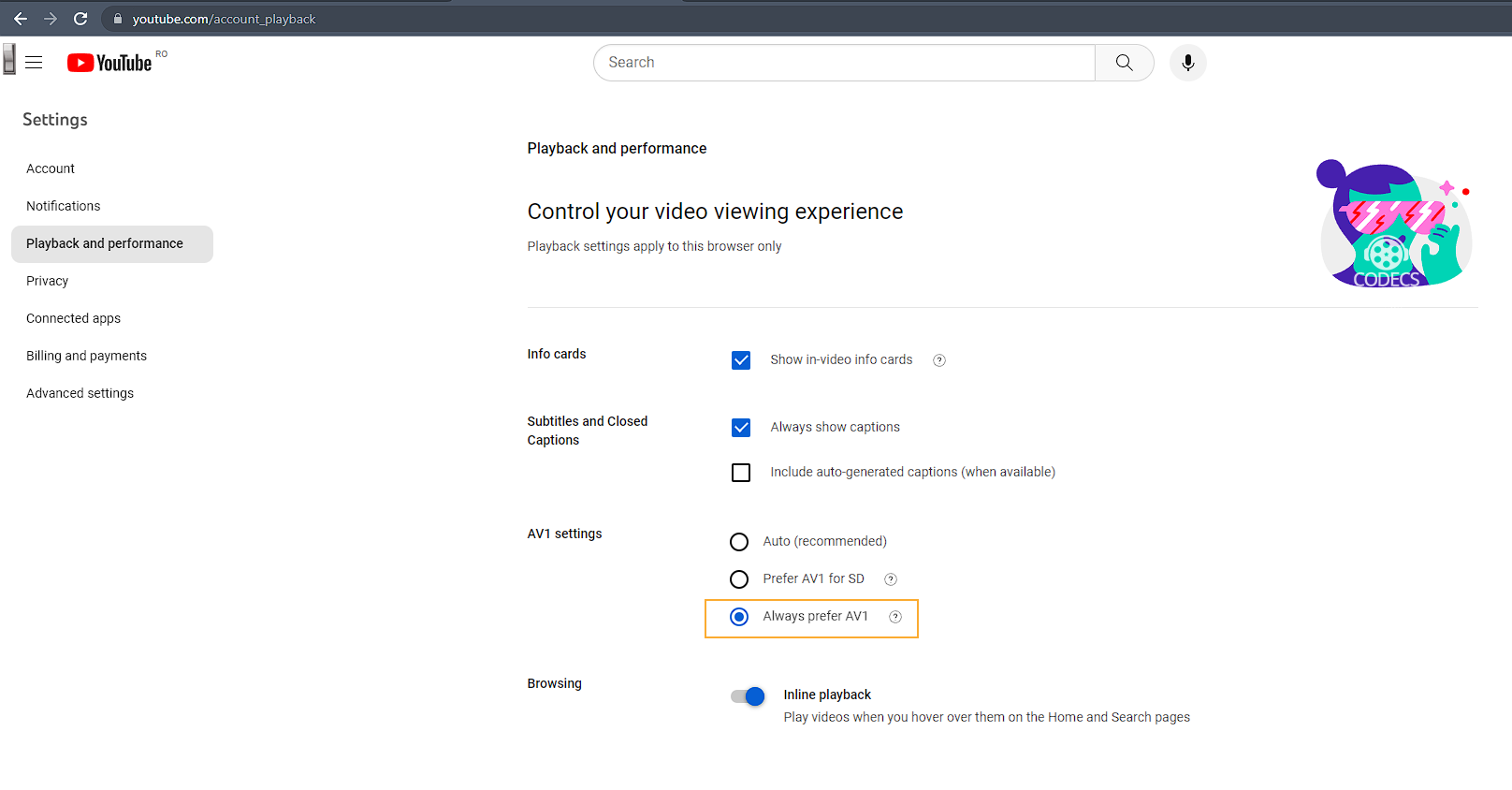
- Open your YouTube playback and performance settings while signed in.
- Find the AV1 settings section on that page.
- Pick one of the three options, using the table below to decide.
| Option | What it does | Pick this if |
|---|---|---|
| Auto | YouTube decides, based on what your device reports | You are not sure - this is the right answer for most people |
| Prefer AV1 for SD | AV1 only at low resolutions, where decoding is cheap | Your connection is slow, or your machine is older and struggles |
| Always prefer AV1 | AV1 at every resolution, including 4K, whatever your hardware | Your graphics card decodes AV1 in hardware - see the next section |
Before you choose "Always prefer AV1"
This is where most guides give you bad advice, so it is worth being specific.
Without a hardware AV1 decoder, your processor does the decoding in software. At 1080p that is usually survivable; at 4K it means dropped frames, loud fans and a laptop battery that empties in a couple of hours.
"Always prefer AV1" forces AV1 at every resolution regardless, so on the wrong machine it makes playback worse rather than better.
Hardware AV1 decoding arrived with Intel 11th generation processors, NVIDIA RTX 30 and 40 series cards, and AMD RX 6000 and above. On Apple silicon it is M3 and newer, plus the A17 Pro.
To check on Windows, play a 4K AV1 video and open Task Manager. Under Performance > GPU, watch the Video Decode row - activity there while the CPU stays calm means hardware decoding is doing its job.
No movement in that row, and a CPU pegged near the ceiling, means you are decoding in software. Choose Auto and let YouTube make the call.
Check it is actually working
YouTube will tell you which codec it is using for the video in front of you.
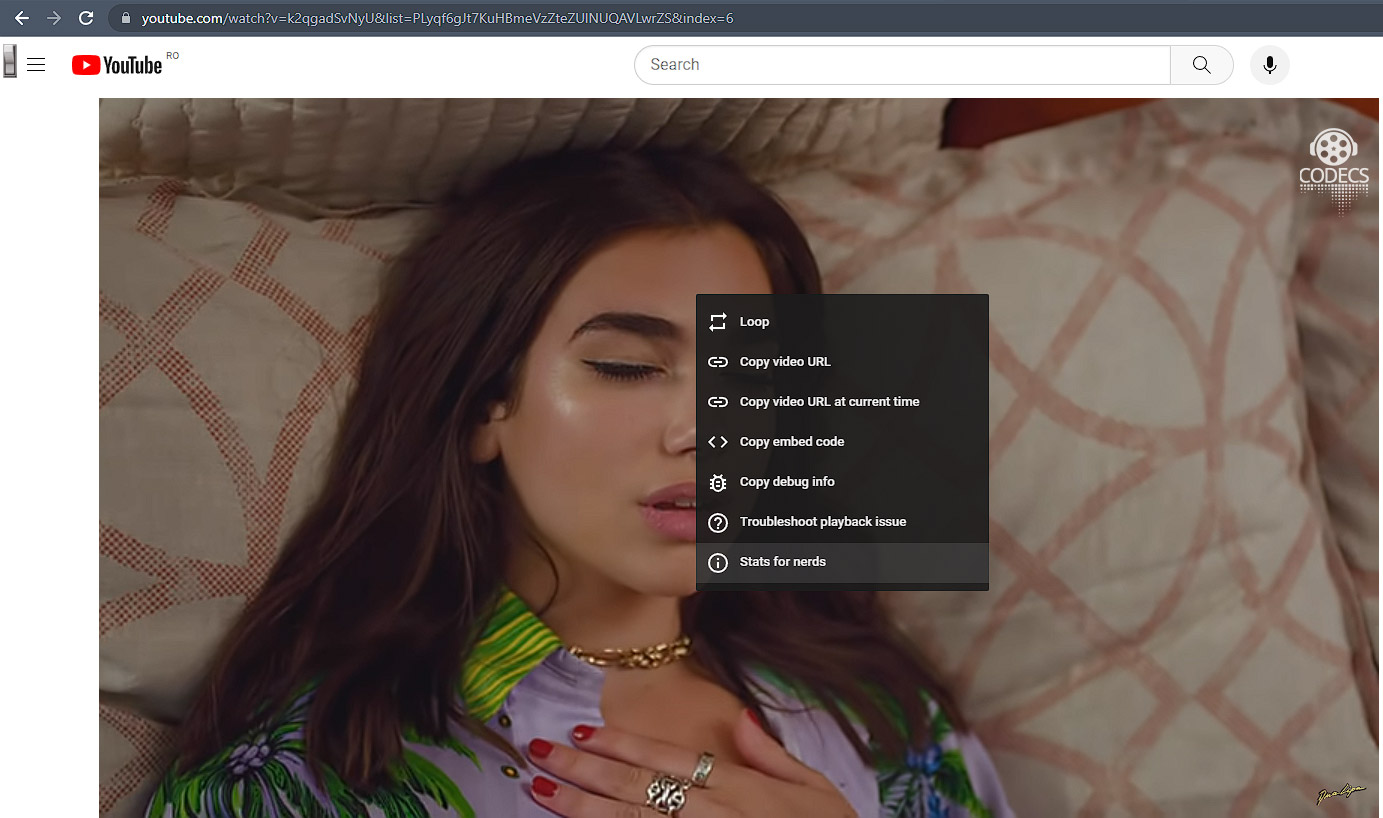
- Right-click the playing video.
- Choose Stats for nerds.
- Read the Codecs line in the panel that appears.
The first part of that line is the video codec, and there are only three answers you are likely to see.
| Codecs line starts with | Codec in use | What it means |
|---|---|---|
| av01 | AV1 | Working - this is what you turned the setting on for |
| vp09 | VP9 | The usual fallback, either by choice or because AV1 is unavailable |
| avc1 | H.264 | The oldest fallback, common on very short or very old uploads |
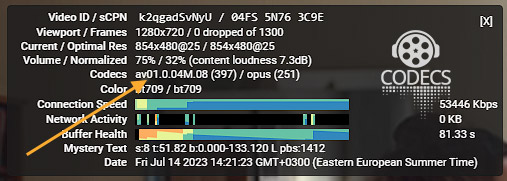
Seeing vp09 on one video is not a fault. Not every upload has an AV1 version, particularly older ones and anything very short.
Browser support, and the Safari catch
AV1 playback needs the browser to support it, and support arrived at very different times.
- Google Chrome since version 70, and any Chromium browser built on that or later.
- Firefox since version 67, and Edge since version 75.
- Safari since version 17, and only on Apple hardware that has an AV1 decoder - iPhone 15 Pro and newer, M3 and newer Macs, M4 and newer iPad Pro.
Safari is genuinely the awkward one. Beyond the hardware requirement it will not accept AV1 inside a WebM container, which is how YouTube usually ships it, so even a qualifying Mac may keep landing on VP9.
If AV1 matters to you on a Mac, Chrome is the reliable route. Older devices simply fall back to VP9 or H.264 on their own, with nothing to configure and nothing broken.
Do I need to install a codec for this?
Not for YouTube. Chrome and Firefox carry their own AV1 decoder built on dav1d, so the browser handles it with nothing added.
Where Windows does need help is everywhere else: local AV1 files, the Photos app, Movies and TV, and DirectShow players all come up empty because Windows ships no AV1 decoder of its own.
The free AV1 Video Extension from Microsoft fixes that system-wide in about two minutes, and it adds AVIF image support at the same time. Our guide to playing AV1 files on Windows 11 covers that side of things.
- VLC Media Player has included dav1d since 3.0.8 and needs nothing extra for local AV1 files.
- LAV Filters brings AV1 to MPC-HC, MPC-BE and any other DirectShow player, with hardware acceleration.
- The K-Lite Codec Pack bundles all of it, and our codec setup for Windows 11 walks through a clean install.
- On Windows N editions, Media Foundation Codecs has to go on first or the extension has nothing to attach to.
For tuning AV1 decoding inside a specific player rather than system-wide, our guide on configuring AV1 decoding per player goes deeper than this page needs to.
Why AV1 is worth the trouble
AV1 is the Alliance for Open Media's royalty-free codec, backed by Google, Netflix, Amazon, Apple and Microsoft. That last part is why it won: nobody has to pay to use it.
In compression terms it runs roughly 30% ahead of VP9 and HEVC at the same visual quality, and it needs around half the data of H.264 for the same picture.
In practice that means less buffering on a weak connection, less mobile data spent on the same video, and a cleaner image in the busy scenes where older codecs smear. YouTube now encodes over 75% of its library in AV1, which our news pieces on YouTube's move to AV1 and AV1 across streaming in 2026 put in context.
If AV1 will not appear
- No AV1 section in your settings. Update the browser - the option only shows on versions that support the codec, and it needs you signed in.
- Playback turned choppy after you changed it. Switch from "Always prefer AV1" to Prefer AV1 for SD or Auto, because your hardware is decoding in software.
- Stats for nerds still shows vp09. Not every upload has an AV1 version, so test against YouTube's AV1 test playlist before concluding anything.
- Everything is fine in Chrome but not Safari. That is expected rather than a fault, for the container and hardware reasons above.
Wondering what a downloaded file is encoded with rather than a stream? The online codec finder identifies it in seconds without installing anything.
Quick questions
Should I choose "Always prefer AV1"?
Only if your graphics card decodes AV1 in hardware. On anything older, it forces software decoding at 4K and playback gets worse, not better.
Do I need to install a codec for YouTube to use AV1?
No. Chrome and Firefox include their own AV1 decoder. The AV1 Video Extension is for local files and Windows apps, not the browser.
Why does Stats for nerds show vp09 instead of av01?
Either that particular video has no AV1 version, or your browser and device cannot decode AV1 so YouTube fell back. Both are normal.
Does AV1 work in Safari?
Only from Safari 17, only on Apple hardware with an AV1 decoder, and even then not in a WebM container. Chrome is the dependable route on a Mac.
Will AV1 save me mobile data?
Yes, meaningfully - roughly 30% less than VP9 and around half of H.264 for the same picture, though your device still has to be able to decode it.
Which codec should I use when uploading to YouTube?
A different question with a different answer - our guide on the best codec to upload to YouTube covers the trade-offs.
Set AV1 to Auto and YouTube gets it right on its own for almost everybody. Push it to "Always prefer AV1" only once you have confirmed your graphics card decodes AV1 in hardware, then check the Codecs line reads av01.
The rest of the video codecs section covers the formats around AV1 and what each one needs.
For AV1 files on your own machine rather than YouTube, download the AV1 Video Extension free, or tell us how you got on if you have already set this up.




Latest comments
AllXMediaRecode gives only the option to Copy (No convert) in Audio Mode drop down. I am trying to convert/recode the EAc3 ...
Guide: How to Convert EAC3 Audio to AC3 or AAC With XMedia Recode 1 commentTo view major football league live
Guide: Free Popular IPTV Playlist: Where to Get Fresh, Legal M3U Links in 2026 19 commentsThe link isn't working. [link]
Guide: Free M3U Playlist for TiviMate: Legal Lists That Load Cleanly 1 comment