A DVD that refuses to play is almost never a broken disc - it is one of four locks built into the format, and every one of them has a workaround.
The quick version: if the disc plays on a standalone player but not on your PC, you are missing a decoder, and VLC Media Player fixes that for free.
If it plays on one machine but not another, you have hit a region lock, and the rest of this guide is about what that is and how to get past it.
The four locks are CSS encryption, region coding, a studio add-on called RCE, and the old PAL versus NTSC split.
Here is what each one does, how to tell which one you are looking at, and which free tool clears it.
Lock 1: CSS, the Scrambling on Every Commercial DVD
Content Scramble System, or CSS, is the encryption applied to nearly every commercial DVD-Video disc. The video is scrambled with a disc key and up to 99 title keys, one per section of the disc, and a player needs the keys to unscramble it.
The keys are stored on the disc in encrypted form, and a licensed player or drive proves it is trusted before it is handed them. That is why an unlicensed program used to see nothing but garbage, and why a plain file copy of a DVD folder produces files that will not play.
CSS was designed in 1996 and broken in 1999, when a 40-bit key turned out to be small enough to crack on a home PC. The open-source library that does this, libdvdcss, ships inside VLC, so VLC plays CSS discs without any licence at all.
This matters more than it used to, because Windows 10 and Windows 11 do not include a DVD decoder. Insert a movie disc, open it in Windows Media Player, and you get either silence or an error, not because of CSS but because nothing on the machine knows how to decode MPEG-2 video from a disc.
The fix for PC playback: install VLC Media Player, insert the disc and choose Media, then Open Disc. VLC brings its own MPEG-2 decoder and its own CSS handling, so nothing else needs to be installed.
Lock 2: Region Codes, or Why a US Disc Refuses a UK Player
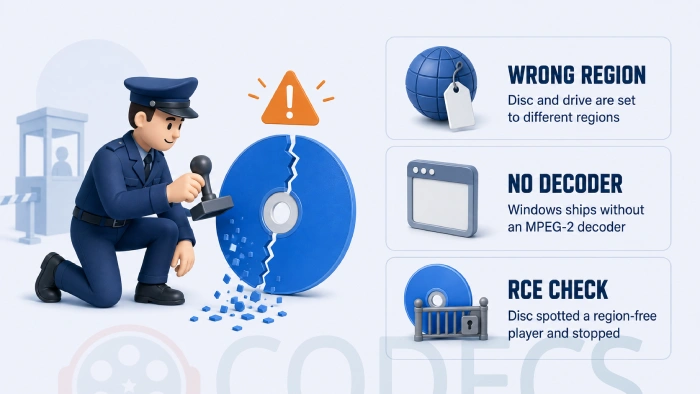
Region coding was added so studios could release a film on disc in one part of the world while it was still in cinemas in another. The disc carries a region flag, the player carries a region setting, and if they do not match the player shows a message and stops.
It has nothing to do with CSS. A disc can be region coded without being encrypted, and encrypted without a region code, but in practice almost every commercial release has both.
| Region | Where it applies | Worth knowing |
|---|---|---|
| Region 1 | United States, Canada, US territories | NTSC discs; the most common import into Europe |
| Region 2 | Europe, Japan, Middle East, South Africa, Egypt, Greenland | PAL in Europe, NTSC in Japan - same region, different video system |
| Region 3 | Southeast Asia, South Korea, Taiwan, Hong Kong | NTSC |
| Region 4 | Australia, New Zealand, Latin America, Pacific and Caribbean islands | PAL in Australia and NZ, NTSC in most of Latin America |
| Region 5 | Russia, Eastern Europe, India, most of Africa | Mostly PAL |
| Region 6 | Mainland China | PAL |
| Region 0 or ALL | Everywhere | No region flag set; plays on any player |
| Regions 7 and 8 | Reserved, and international venues such as aircraft and cruise ships | You will not meet these in a shop |
The region is printed on the back of the case, either as a small globe icon with the number inside it or spelled out in the small print. A disc marked "ALL" or "Region 0" plays anywhere.
On a PC the region lives in the DVD drive, not in Windows. Open Device Manager, expand DVD/CD-ROM drives, right-click the drive, choose Properties and open the DVD Region tab to see which region it is set to.
The five-change limit is real. Nearly every DVD drive made since 2000 lets you change its region five times, and the fifth setting is permanent. Windows shows the remaining count on that tab, and there is no supported way to reset it once it reaches zero, so do not burn changes on a disc you will only watch once.
Lock 3: RCE, the Trick That Catches Region-Free Players
Region Code Enhancement, or RCE, was a studio response to cheap "region-free" players. Those players work by telling the disc they are set to every region at once, and an RCE disc checks for exactly that.
If the player claims to be region-free, the disc jumps to a screen telling you it is not authorised for your area, and plays nothing. A player that is set to one specific region that matches the disc passes the check as normal.
RCE appeared on some Region 1 releases from Warner, New Line, Columbia and MGM in the early 2000s and was never universal. If a disc plays the wrong-region warning on a player that handles other imports fine, RCE is the likely reason.
On a PC it is a non-issue if you use VLC or a decrypting driver, because neither of them tells the disc anything.
Lock 4: PAL and NTSC, Mostly Solved but Not Gone
The last hitch is not a lock at all. Discs in North America and Japan are mastered in NTSC, at 720 by 480 pixels and just under 30 frames a second; discs in Europe, Australia and most of Asia are PAL, at 720 by 576 and 25 frames a second.
Twenty years ago that meant a European TV might show an NTSC disc in black and white or not at all. Today every PC, every flat-screen TV made in the last fifteen years and every player with an HDMI output handles both without being asked.
The one thing you may notice is speed. A film shot at 24 frames a second is sped up by four percent on a PAL disc, so it runs a couple of minutes shorter and the pitch of the audio rises very slightly. That is normal, not a fault.
How to Play a Region-Locked DVD on Your PC
You have three routes, and the first one costs nothing and works on most drives.
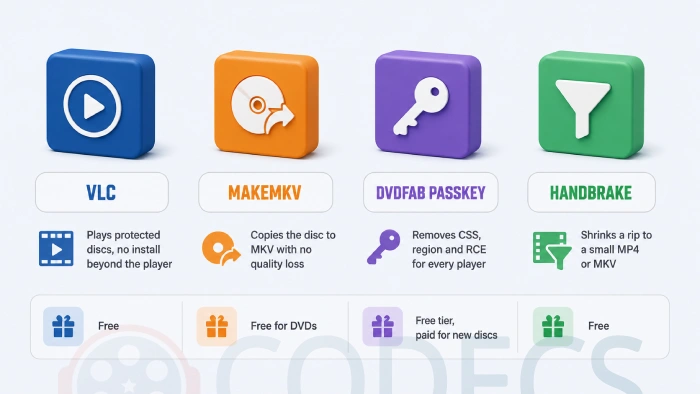
- Play it in VLC. Because VLC cracks the CSS keys itself instead of asking the drive politely, it usually plays a wrong-region disc without changing the drive's region at all - a handful of drives refuse to read the disc entirely, in which case move to step three.
- Run a decrypting driver. DVDFab Passkey sits in the background and strips CSS, region codes and RCE the moment a disc is inserted, so every player on the machine sees a clean, region-free disc - Xreveal does the same job for free, and AnyDVD is the long-running paid option.
- Rip it once and forget the disc. MakeMKV reads protected DVDs, ignores the region flag, and copies the film to an MKV file with no quality loss - and DVD ripping in MakeMKV is free permanently, no key needed.
If you prefer a player other than VLC, MPC-BE and MPC-HC both play DVD folders once a decrypting driver is running.
Neither bundles an MPEG-2 decoder of its own, so pair them with the K-Lite Codec Pack, which installs one system-wide.
Ripping and Shrinking: Which Tool Does What
MakeMKV makes an exact copy, which is the right call for a backup but leaves you with a file of four to eight gigabytes per disc.
To shrink that for a phone or a media server, hand the MKV to HandBrake or VidCoder, both of which turn it into a far smaller H.264 or HEVC file. HandBrake cannot read a protected disc on its own, which is why the two-step order matters.
If you want to keep the menus and extras rather than just the film, DVDFab and DVDFab HD Decrypter copy the whole disc structure.
The Media Backup category lists everything else we host for the job.
One caution on the older freeware. DVD43 was the standard free decrypter for years and still has a loyal following, but it has not been updated since 2013 and may not load on a current Windows install, so try Xreveal first.
On the legal side. Getting around CSS or a region lock is treated differently in different countries, even for a disc you paid for. Most people doing this are backing up their own collection, but check the rules where you live before ripping anything.
Who Should Look Elsewhere
If your laptop has no disc slot at all, none of the above helps until you add a USB DVD drive, and we cover that in why your laptop probably cannot read a disc.
If the disc is a Blu-ray rather than a DVD, the protection is a different system called AACS, the region letters are A, B and C rather than numbers, and VLC cannot handle it out of the box. MakeMKV and DVDFab Passkey both do, and the MakeMKV beta key guide covers the Blu-ray side.
And if a ripped file plays with stutter, green frames or no sound, that is a decoder gap on the playback side rather than anything to do with the disc. The Codec Troubleshooter narrows down which track is failing, and LAV Filters usually closes the gap.
Quick questions
Why does my DVD play on the TV but not on my computer?
Windows 10 and 11 ship without an MPEG-2 DVD decoder, so Windows Media Player cannot play a movie disc at all. Install VLC and open the disc from its Media menu.
Can I play a Region 1 DVD in the UK?
On a PC, yes - VLC usually plays it without touching the drive's region, and a driver such as DVDFab Passkey or Xreveal makes any player on the machine region-free. On a standalone player you need a multi-region model or a rip of the disc.
How many times can I change my DVD drive's region?
Five, counting the first setting. After the fifth change the drive locks to that region permanently, and Windows shows the remaining count in Device Manager under the drive's DVD Region tab.
What does "this disc is not authorised for playback in your region" mean?
Either the drive's region does not match the disc, or the disc carries RCE and has detected a region-free player. Both are cleared by VLC or a decrypting driver on a PC.
Is a Region 0 disc the same as region-free?
Yes. Region 0, ALL and region-free all mean no region flag is set, and the disc plays on any player in any country.
Do I still need to worry about PAL and NTSC?
Not on a PC or any modern TV, both of which play either. The only visible difference is that a PAL disc runs a film about four percent faster than the cinema version.
Most "won't play" DVDs come down to a missing decoder or a region flag, and one free download covers both.
Download VLC Media Player and try the disc again, or tell us which lock you ran into if you have been through this already.


