The codec landscape changed in 2026 - but the right answer for most creators did not. Here is what to upload, the two exceptions, and the VP9 myth still costing people quality.

For years the advice was simple: upload VP9 because YouTube is a Google platform and VP9 is a Google codec. It sounded logical. It is now wrong.
Independent 2026 VMAF testing shows VP9 uploads come out measurably worse than plain old H.264 after YouTube re-encodes them.
The codec you choose still matters - just not the way most guides tell you.
This guide gives you the one codec that works for 90% of creators, the two exceptions worth knowing, and the exact export settings that survive YouTube's compression in 2026.
Upload MP4 + H.264 (High profile) + AAC-LC audio. It is YouTube's officially recommended format, it exports from every editor, and it survives re-encoding cleanly.
Only deviate if you shoot 4K (consider H.265) or have a hardware AV1 encoder (consider AV1). Never upload VP9.
Why Your Codec Choice Barely Reaches Your Viewers
Here is the part most creators miss. Whatever you upload, YouTube throws it away.
Every upload is re-encoded into multiple delivery formats. In 2026 the primary delivery codec is AV1, with VP9 as the fallback for older devices and browsers. Your viewers almost never see your original file.
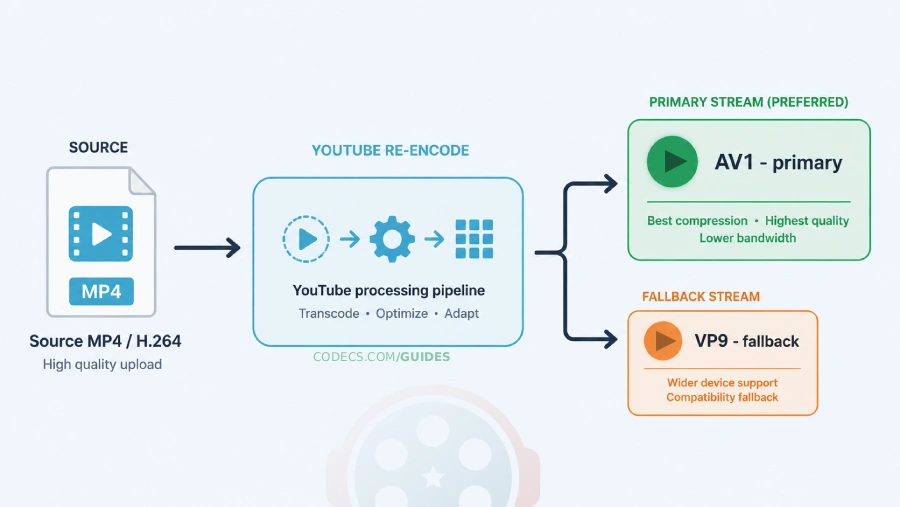
That means your job is not to pick the "best" final codec. Your job is to hand YouTube's encoder the cleanest possible source so its re-encode looks good. Think of it like a photocopy: a copy of a sharp original beats a copy of a blurry one.
This single insight reframes every decision below.
H.264: The Right Answer for Almost Everyone
H.264 (AVC) handles roughly 90% of YouTube uploads perfectly. It is YouTube's officially recommended video codec and the default export option in virtually every editing app.
For standard HD content at 1080p or below, nothing beats H.264's balance of quality, compatibility, and fast processing. When you export to MP4, your editor is almost certainly already using it.
- Best for: gaming, tutorials, vlogs, talking-head, and most standard 1080p content
- File size: medium - excellent quality retention
- Upload speed: fast encoding and fast YouTube processing
- Compatibility: works on every device, browser, and editor on the planet
If you only remember one thing from this guide, remember this codec. The x264 Video Codec is the open-source H.264 encoder that powers most of these exports under the hood.
H.265 (HEVC): Worth It Only If You Shoot 4K
Choose H.265 when you need smaller 4K files without losing source quality. It compresses roughly 40-50% smaller than H.264 at the same visual quality.
The trade-off is real: slower encoding on your machine and fewer devices that can play the file locally before you upload. For a 4K creator on a capped or slow connection, that smaller upload is often worth it.
- Best for: 4K creators who want shorter upload times
- File size: smallest mainstream option at matched quality
- Upload speed: slower to encode locally, fast once on YouTube
- Compatibility: 2016-and-newer hardware for local playback
If you also want to play H.265 files smoothly on your own Windows machine before uploading, grab the HEVC Video Extension so previews do not stutter.
AV1: The New Quality Champion (With a Catch)
This is the biggest change since the old version of this guide. In independent 2026 testing, AV1 at around 60 Mbps produced the best VMAF scores of any upload codec - beating H.265 and crushing VP9.
There is one catch. AV1 software encoding is slow. To make this practical you need hardware AV1 encoding, which is built into recent Nvidia, AMD, and Intel GPUs.
If you own that hardware and want the absolute highest quality ceiling, AV1 is now the top choice. For everyone else it is an advanced workflow you do not need - H.264 still gets you 95% of the way there.
- Best for: creators with hardware AV1 encoders chasing maximum quality
- File size: smallest possible at matched quality
- Upload speed: very slow without GPU encoding, fast on YouTube
- Compatibility: growing fast, since AV1 is now YouTube's primary delivery codec
VP9: Why You Should Stop Uploading It
Here is the myth, dismantled. The logic was "Google made VP9, YouTube is Google, so VP9 must get special treatment".
YouTube does serve a lot of video as VP9. But what it serves and what you should upload are two different things.
In current VMAF testing, uploading a high-bitrate VP9 file produced noticeably worse results than the same content uploaded as H.264 or H.265. Fast-motion footage suffered the most.
There is no priority processing, no quality bonus, and no upload-speed advantage for VP9 in 2026. If a tutorial still tells you to upload VP9 for "Google优先" treatment, it is repeating outdated advice.
Where VP9 still matters: playback, not upload. Since YouTube streams VP9 to older devices, the VP9 Video Extension is still useful for smooth local playback of VP9 content on Windows - just do not encode your uploads in it.
The Quick Decision Framework
- Most creators (1080p, mixed audience): H.264, MP4 container. Done.
- 4K creators on slow connections: H.265 to cut upload time.
- Hardware AV1 encoder + quality obsession: AV1 at high bitrate.
- Anyone tempted by VP9: use H.264 instead. Every time.
The Export Settings That Survive Re-Encoding
The codec is only half the battle. These settings give YouTube's encoder the headroom it needs so the final stream still looks like your original.
-
Container: MP4 with "Fast Start" / web-optimized enabled (moves the moov atom to the front so processing starts during upload). - Codec profile: H.264 High profile, CABAC on, closed GOP at half your frame rate.
- Bitrate mode: 2-pass VBR for non-live uploads - cleaner than CBR at the same target.
- Resolution: match your source, never upscale. Uploading 1440p or 4K triggers YouTube's higher-quality encode ladder even for 1080p viewers.
- Frame rate: keep the original (24, 25, 30, 50, or 60). Never conform 24 fps to 30 fps - it inflates file size with fake frames and adds nothing.
- Audio: AAC-LC at 48 kHz. Use 384 kbps for stereo, 512 kbps for 5.1. (Opus is also accepted.)
YouTube's published bitrates are minimums, not optimal values. Upload roughly 20-50% above them so the re-encode has headroom.
Practical targets: 1080p30 around 12-16 Mbps, 1080p60 around 18-24 Mbps, 4K30 around 45 Mbps, 4K60 around 60-68 Mbps. Dropping to the bare floor shows visible blocking on pans, water, and confetti.
The Free Workflow: One Tool, Done in Minutes
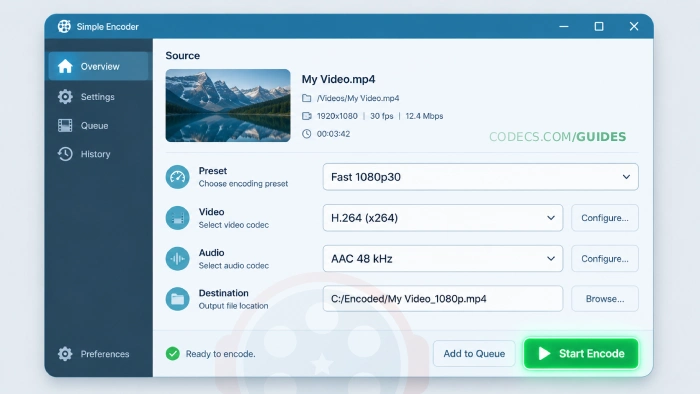
You do not need expensive software to hit every setting above. HandBrake is free, open source, and runs on Windows, Mac, and Linux.
- Install HandBrake and drag your exported master onto it.
- Pick a preset: "Fast 1080p30" for standard HD, or a 4K preset to match your source.
- Set the video codec to H.264 (x264), quality around RF 18-20 for upload-grade headroom.
- Confirm audio is AAC at 48 kHz, then click Start Encode.
For most files this finishes in minutes and produces an MP4 that sails through YouTube's pipeline. If you have a supported GPU, HandBrake can also output AV1 directly for the quality-ceiling workflow.
The right codec depends on your content, but the default is not a hard call. H.264 in an MP4 is the correct answer for almost every creator, and it will be for a long time.
4K shooters should look at H.265 to tame upload sizes. The small group with hardware AV1 encoders can chase the new quality ceiling. And the one thing everyone should do today is stop uploading VP9 - that advice expired, and it is costing you quality on every video.





Latest reviews
AllThe New Fire TV Stick 4K Can't Run Kodi - Here's Which Fire ...
5/5Really interesting news - I had no idea Amazon was switching the new Fire TV Stick 4K over to ...
Free Popular IPTV Playlist: Where to Get Fresh, Legal M3U Li...
5/5Hi! Thanks for creating this list, and I have a small question: why do the channels I used to ...
How to Stream With VLC: Open a Stream URL or Send Your Own
5/5This is amazing! I could no longer afford cable so I cut the cord and started watching Hulu, Youtube, ...