The fan spins up, the laptop gets warm, and the battery drops fast - all from one YouTube video. AV1 is probably why, and it is fixable.
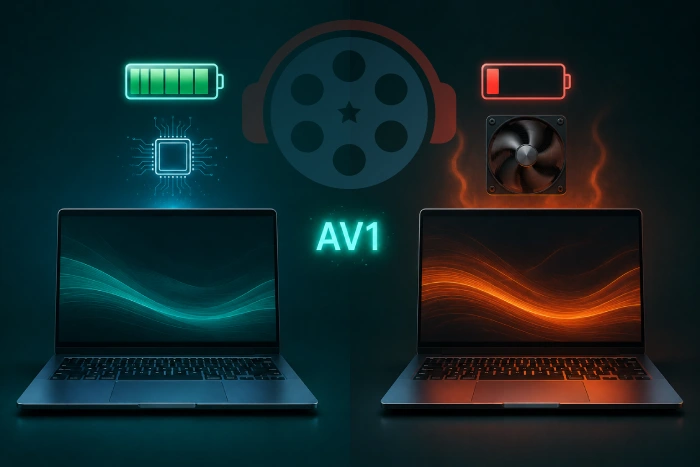
AV1 is not bad for your battery - what matters is whether your device has a chip that decodes it, and there are several ways to sidestep the problem if it does not.
What AV1 Is and Why Everyone Moved to It
AV1 is a modern video codec, which is the technology that squeezes video small enough to stream without wasting your data.
It is royalty-free, which is why YouTube, Netflix and Instagram all adopted it so quickly.
The trade is that unpacking AV1 takes more work than unpacking an older codec like H.264, and on some machines that work lands in the wrong place.
Hardware and Software Decoding Are Not Close
Every device decodes video one of two ways, and the difference is not subtle.
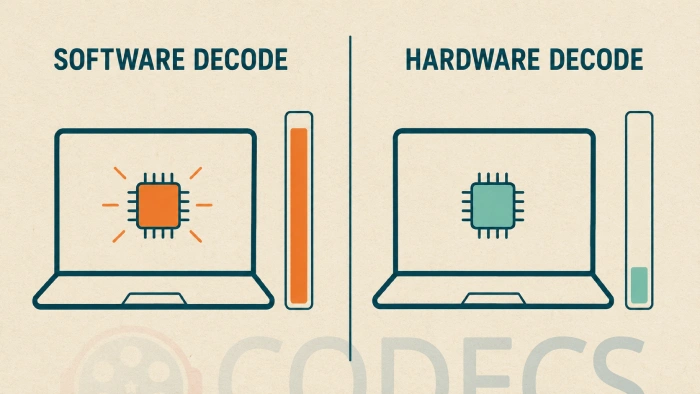
Hardware decoding uses a dedicated block on the chip built for this one job. It barely registers on the power budget, stays cool, and plays smoothly.
Software decoding is what happens when that block is missing. Your main processor picks up the work instead, runs hard, heats up and drinks power.
A careful test on a MacBook Pro using Apple's own powermetrics tool put a number on it: playing an AV1 video, decoded in software, drew around ten times the power of playing a VP9 video that the same machine could decode in hardware.
Worth being precise about that number. It compares AV1 in software against a different codec in hardware, because the test machine had no AV1 decoder at all. That is the realistic comparison for an older laptop, but it is not a like-for-like AV1 measurement.
Here is the part that surprises people. Measured software against software, AV1 is actually cheaper to decode than VP9.
So AV1 is not inherently hard on your battery. The gap exists because one codec gets a hardware path on your machine and the other does not.
Is It Happening to You?
The symptoms are obvious once you know to look. One video service, usually YouTube, makes the machine hot and loud while other video plays fine.
To confirm rather than guess, our Codec Checker tests your actual browser and GPU for AV1 hardware decode and tells you which side of this you are on.
As a rough guide, Apple added AV1 decoding with the M3 generation of Macs and the A17 Pro in iPhones, and most Windows laptops and smart TVs from around 2022 onward have it.
If your machine predates that, the drain is real and not your imagination.
The Fastest Fix: Change What YouTube Sends You
Since YouTube is where most people meet this problem, that is where the quickest win is.
YouTube has its own AV1 preference, and setting it to avoid AV1 makes the site fall back to a codec your hardware can handle. Our guide on how to enable AV1 on YouTube covers that setting from both directions, including when you actively want it on.
Dropping the resolution works too. A machine that struggles with 4K AV1 will often handle 1080p without breaking a sweat, because the decoding cost scales with pixels.
Fixes for Local Files
For video on your own drive, the answer is a player that uses your hardware decoder when one exists and a good software decoder when it does not.
VLC Media Player and MPC-HC both do this without being asked.
Both lean on dav1d, which is the fastest software AV1 decoder available, so even the fallback path is as cheap as it can be.
Make sure hardware acceleration is actually switched on in whichever player you use, because a player that has it turned off is doing the expensive thing by choice.
For system-wide support so other applications benefit too, the K-Lite Codec Pack installs LAV Filters, which handle AV1, HEVC and VP9 and will use your hardware decoder when it is there.
If you only need AV1 on Windows 10 or 11 and nothing else, the standalone AV1 codec download is the lighter option.
A bundled codec pack is the other route if you would rather install one thing and stop thinking about formats.
In Firefox, You Can Turn AV1 Off
All the major browsers enable AV1 by default now, but Firefox is the one that lets you switch it off without an extension.
Type about:config into the address bar, accept the warning, and set media.av1.enabled to false. Sites then serve you something your hardware can decode instead.
This is a blunt instrument and worth reversing once you upgrade, since AV1 on capable hardware is genuinely more efficient than the alternatives.
Choosing a Codec When You Control the File
If you are the one encoding, the calculation changes and it comes down to what your audience can decode.
Our comparison of whether AV1 is really better than H.265 covers when each wins, and the broader look at which codec to stream in weighs all four current options.
To see what a file actually contains before blaming a codec, Codec Finder reads it in the browser and MediaInfo does the same on the desktop in far more detail.
The online HEVC player is handy for sanity-checking an H.265 file without installing anything at all.
The Battery Itself
Software decoding does more than flatten a charge quickly. Sustained heat and the extra charge cycles it forces will age the cell faster over months.
That makes how you charge worth a thought as well, and our partners at VoltRated publish independent testing on using the right charger for each device rather than whatever shipped in the box.
On Other Devices
The same split applies everywhere, but the fix differs by platform.
On a desktop, our guide on how to play AV1 on Windows covers the extension you install there, and AV1 on Android explains why the answer on a phone is a player rather than a codec.
If you are considering new hardware specifically to solve this, our roundup of which GPUs decode it covers what supports AV1 in silicon.
Quick questions
Does AV1 really drain the battery faster?
Only when your device decodes it in software. On hardware with an AV1 decoder it is more efficient than older codecs, because there is less data to move.
How do I know if my laptop decodes AV1 in hardware?
Run our Codec Checker, which tests your own browser and GPU rather than guessing from the model name. As a rule, hardware from 2022 onward usually has it.
Should I turn AV1 off permanently?
Only if your hardware cannot decode it. On a capable machine AV1 saves bandwidth and power, so switching it off costs you something for nothing.
Why does only YouTube make my laptop hot?
Because YouTube serves far more AV1 than most other sites. Other services may still be sending you H.264 or VP9, which your hardware handles without effort.
Will lowering the resolution help?
Yes, and it is the fastest thing to try. Decoding cost scales with pixel count, so a machine that struggles at 4K often plays 1080p AV1 comfortably.
Is AV1 harder to decode than VP9?
In software, no - AV1 is actually cheaper than VP9 on the same processor. The problem is that many machines have a hardware decoder for VP9 and none for AV1.
AV1 on capable hardware is cool, quiet and efficient. The battery problem is only ever about your device having to do the work the wrong way.
Run the Codec Checker to find out which side of that line you are on, or tell us what your machine does with a 4K AV1 clip.


Latest comments
AllInteresting development with the Fire TV Stick 4K — losing Kodi sideloading is a big deal for a lot of users. For those ...
News: The New Fire TV Stick 4K Can't Run Kodi - Here's Which Fire Stick Still Can 3 commentsThanks genius, it worked for me. v2.4.149.0 on windows 10
Guide: How to Download HEVC Video Extension for Free 181 commentsXMediaRecode gives only the option to Copy (No convert) in Audio Mode drop down. I am trying to convert/recode the EAc3 ...
Team replied Guide: How to Convert EAC3 Audio to AC3 or AAC With XMedia Recode 1 comment