That message is naming your phone, not the file you need to fetch, and the 64-bit file it appears to be asking for has never existed.
KMPlayer prints arm64-v8a because that is the processor architecture your device runs, and the external codec it wants was only ever built for the older 32-bit one.
Re-downloading it, renaming it or moving it to a different folder changes nothing.
The underlying problem is EAC3 audio that will not decode, and that takes about a minute to solve another way.
What the Error Is Actually Telling You
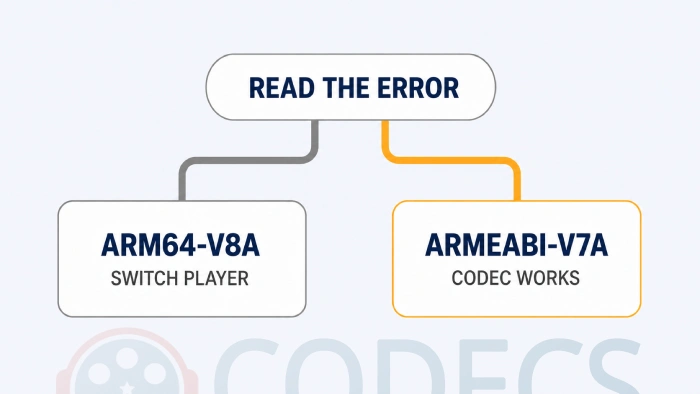
Read the message as a description of your hardware rather than a shopping list. Android reports the architecture it is running on, KMPlayer prints it, and the string that comes out is the reason the load failed rather than the name of a file to go and find.
If it says arm64-v8a, your phone is 64-bit and no version of this add-on will ever load on it. If it says armeabi-v7a, your phone is 32-bit and the add-on genuinely does work.
Practically every phone and tablet sold since about 2016 is in the first group, and anything running Android 12 or later almost certainly is. Our Android version history lines releases up against the hardware of the time if you want to place a specific device.
What Is Actually Inside the File
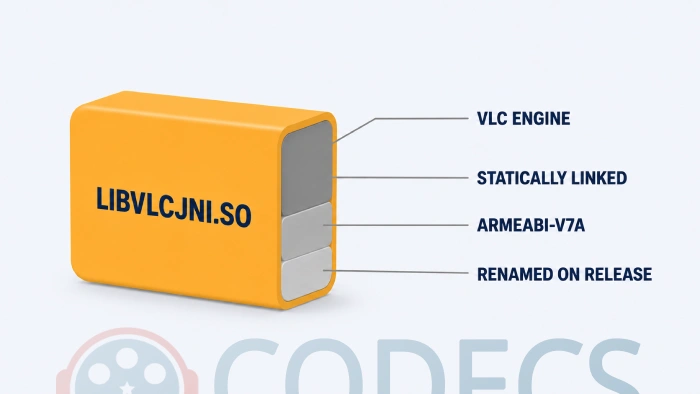
We opened it, because the answer explains everything else on this page. It is a build of VLC's decoding engine from January 2015, version 2.2.0-pre4, compiled for 32-bit ARM and never rebuilt since.
The whole player engine is statically linked inside it, which is why one file dropped into a folder works at all. It carries no companion libraries and depends on nothing but Android itself.
The file also has a different name on the inside. Its internal library name is libmmenginejni.so, after KMPlayer's own MM Engine, and it is renamed to libvlcjni.so for release.
Why Most Pages Describe It Wrongly
Search this error and nearly every result describes the download as an ARM64 codec, one of them calling it a game changer for 64-bit devices. The file is 32-bit. The error string contains the words arm64-v8a, and pages written from the error rather than from the file read that as a product name.
It matters because it sends people hunting for a file that cannot exist, and then blaming themselves when it does not work. If a page offers you a 64-bit build of this codec, whatever it is offering is not one.
Why a 64-bit Build Cannot Just Be Dropped In
There are prebuilt 64-bit copies of a file called libvlcjni.so in public code repositories, and none of them will work here. Three separate things stop them.
- The names do not match. A stock VLC build publishes its functions under VLC's own name, and KMPlayer looks for them under its own - the library loads, then every call misses.
- The interface it needs is gone. VLC rewrote this whole layer years ago, so the functions KMPlayer calls no longer exist in any current source.
- Modern builds need a second file alongside them, and the one-file-in-Downloads method has nowhere to put it.
A 64-bit app also cannot load a 32-bit library, which is the reason the original file fails rather than merely being ignored. That is why the setting stays switched on, the file stays in the folder, and the error comes back anyway.
Could Somebody Build One?
In principle yes, and the route is clear. VLC's Android code is open source, VideoLAN shipped 64-bit builds of this same engine generation in late 2015, and the licence specifically allows rebuilding and relinking it.
In practice it means reconstructing a 2015 build environment with compilers that no longer ship, matching KMPlayer's internal naming exactly, and testing on hardware. It is a serious weekend of work for one audio format in one player, using a decoder that is eleven years old.
Nobody has done it in eleven years, which is the most honest answer available about how worthwhile it is.
What to Do Instead
VLC for Android is the one-step answer. It carries its own decoders for both architectures, opens EAC3 along with AC3, DTS and TrueHD, and needs no add-on, no setting and nothing kept in sync with app updates.
If you would rather keep a player with an add-on model, MX Player is the maintained version of the same idea. Its custom codec ships 32-bit and 64-bit builds in one package, though it does have to match your app version.
That version matching is the one snag worth reading up on first, and our guides on fixing EAC3 audio in MX Player and getting a custom codec loading again both cover it.
The third route skips decoding on the phone entirely. FFmpeg Media Encoder re-encodes the soundtrack on the device without touching the video, and our guide on how to convert the audio to AC3 or AAC covers the desktop version of the same job.
For short files there is also an online audio converter here with nothing to install. If you want the players weighed against each other properly, that is what our roundup of the best EAC3 players for Android is for.
If Your Phone Really Is 32-bit
Then none of the above is necessary and the add-on does its job. Install KMPlayer for Android, then take the file and the four installation steps from our KMPlayer Custom Codec page.
Worth knowing before you rely on it: you are running a decoder from 2015, so it covers the audio formats of that era well and knows nothing about anything newer. On a device that old that is usually the right trade.
If you would rather confirm the architecture than trust the error message, run the APK through our APK Checker, and use Codec Info to list what your device already decodes on its own.
Quick questions
Where do I download the arm64-v8a version of libvlcjni.so?
Nowhere, because it does not exist. The error names your device architecture, not a file, and no 64-bit build of this add-on has ever been released.
Can I use a libvlcjni.so taken from VLC instead?
No. VLC publishes its functions under its own internal names and KMPlayer looks for different ones, so the file loads and then fails on every call.
How do I know whether my phone is 32-bit or 64-bit?
Read the error string itself, or open Settings and then About phone and look at the processor line. Anything reading arm64, aarch64 or 64-bit is the 64-bit group.
Will clearing data or reinstalling KMPlayer help?
No, and neither will renaming the file or moving it. A 64-bit app cannot load a 32-bit library, so the failure repeats every time.
What is the quickest way to get the sound working?
Install VLC for Android and open the same file in it. There is nothing to configure and it handles DTS and TrueHD as well.
Does this error mean my video file is broken?
No. The picture decodes fine and only the audio track is unsupported, which is also why you may see the video play in silence rather than fail outright. Our guide on codec is not supported covers the wider version of this.
If you are not sure which format is causing it in the first place, the Codec Finder will narrow it down, and there are more players for both architectures in our Android APK collection.
One file that cannot exist, and one player that never needed it.
Install VLC for Android and the error goes away for good, or tell us in the comments which device is still showing it.


Latest comments
AllXMediaRecode gives only the option to Copy (No convert) in Audio Mode drop down. I am trying to convert/recode the EAc3 ...
Guide: How to Convert EAC3 Audio to AC3 or AAC With XMedia Recode 1 commentTo view major football league live
Guide: Free Popular IPTV Playlist: Where to Get Fresh, Legal M3U Links in 2026 19 commentsThe link isn't working. [link]
Guide: Free M3U Playlist for TiviMate: Legal Lists That Load Cleanly 1 comment