Windows 10 support ended in October 2025, but the free security updates now run to October 2027 - which changes the answer to this question for a lot of people.
The short answer
If your PC fails only the TPM or Secure Boot check, upgrading is reasonable and thousands of people have done it without drama.
If it fails on the processor, stop - that one cannot be bypassed by any tool.
And if you are only doing this because you think Windows 10 has stopped getting security patches, you have been misinformed.
You have more time than you think
Microsoft extended the free Extended Security Updates programme for home users to 12 October 2027. It was quietly moved a year in June 2026, and a lot of advice written before then still says the deadline is 2026.
Enrolling costs nothing. You sign in with a Microsoft account and switch on Windows settings backup, or spend 1,000 Microsoft Rewards points, or pay a one-off 30 dollars if you would rather not do either. In the European Economic Area, signing in is enough on its own.
One enrolment covers up to ten devices on the same account. It is for personal PCs only - machines joined to a work domain or managed by an employer do not qualify.
This is the part that should change your decision. A patched Windows 10 for another year is a real option, not a stopgap, and it buys you time to replace the machine on your own schedule rather than Microsoft's.
The one thing that makes it a no
Windows 11 releases from 24H2 onward need two processor instructions called POPCNT and SSE4.2. That requirement lives in the operating system itself, not in the installer, so no bypass tool reaches it.
Roughly, Intel chips from 2009 and AMD chips from 2011 have both. Anything older will either refuse to install or boot to a stop code, and there is nothing to be done short of new hardware.
Everything else on the requirements list - TPM, Secure Boot, the memory floor, the approved processor list - is negotiable. This one is not, and it is worth checking before you spend an evening on the attempt.
What you actually give up
Microsoft's wording is blunt. An unsupported PC 'will no longer be supported and won't be entitled to receive updates', and damage caused by the mismatch is not covered by the manufacturer's warranty. You accept that on screen during setup.
In practice updates have kept arriving for most people running bypassed installations, including the yearly feature updates. Not entitled is not the same as blocked, and Microsoft has been careful to keep the difference.
You also get a small watermark on the desktop and a note in Settings. Neither affects anything.
The security story is more nuanced than most articles admit. BitLocker and Windows Hello still work without a TPM - what changes is where the keys live, in software rather than in a dedicated chip, which is weaker rather than absent. The one feature that genuinely needs the chip is the automatic device encryption Windows 11 otherwise turns on by itself.
When it is a yes
- Your PC fails only the TPM or Secure Boot check and has a processor from the last decade or so.
- You use it for browsing, email, documents, streaming and the usual home things.
- You have an SSD and 8GB of memory or more, so the machine has something to work with.
- You are comfortable restoring from a backup if the upgrade goes sideways.
When it is a no
- The processor is the thing that fails - see above, it ends there.
- The PC runs specialist or professional software that its vendor has not cleared for Windows 11.
- It depends on unusual hardware - a capture card, an audio interface, a scanner, industrial equipment - where a missing driver means the device simply stops.
- It has 4GB of memory and a spinning hard disk, in which case Windows 11 will run, badly.
Drivers are the risk people underestimate. Manufacturers stop publishing them for old models long before the hardware dies, and Snappy Driver Installer Origin is the usual way to find one that still works when Windows Update comes up empty.
If you decide to go ahead
Back up before anything else. A full system image takes about an hour and it is the difference between a bad evening and a lost machine.
FlyOOBE is the easier route if you want to keep your files and programs. It downloads the ISO itself and runs the upgrade from inside your current Windows, with the checks removed.
Rufus is the better route for a clean install, and it is one checkbox rather than three these days. The step-by-step Rufus walkthrough covers exactly which box and what it does.
If you decide not to
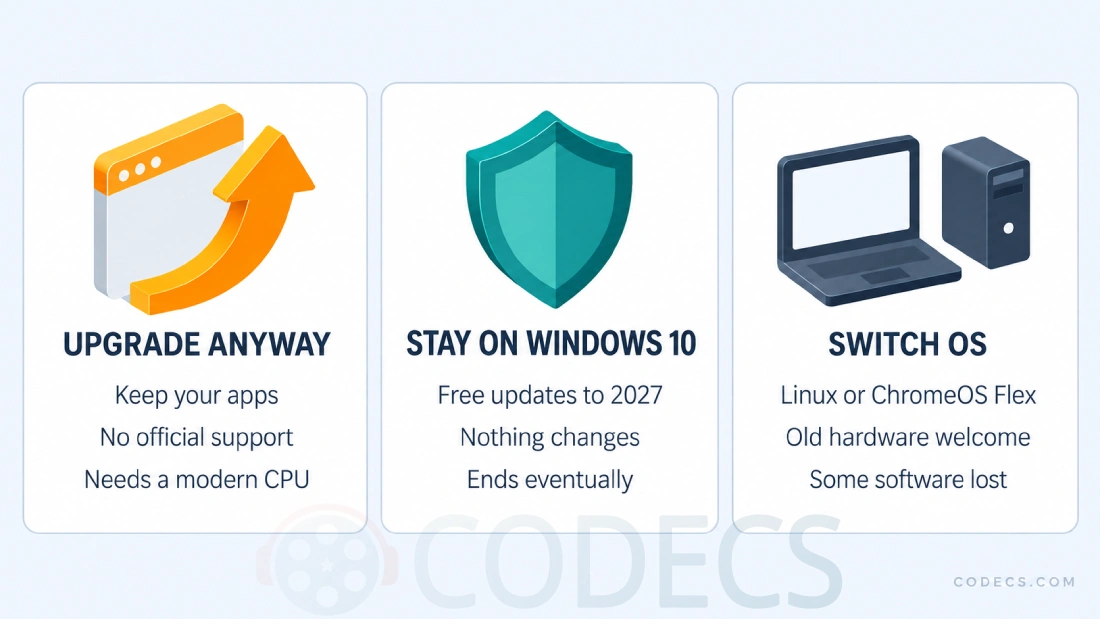
Staying on Windows 10 with ESU enrolled is the least disruptive answer, and it is free until October 2027. Nothing about your machine changes.
Linux is the answer that keeps an old PC genuinely useful for years rather than months. Mint and Ubuntu both run well on hardware Windows 11 will not touch, and the guide to Linux distros for beginners is the place to start if you have never tried it.
ChromeOS Flex suits anyone who lives in a browser, and you can run it from a USB stick first to see how it feels. Check your model against Google's certified list before committing, though - once a model is decertified, updates keep arriving but Google stops testing them against that hardware, which is a strange thing to accept when updates are the reason you left Windows 10.
Quick questions
Is Windows 10 really still getting security updates?
Yes, until 12 October 2027, if you enrol in the free Extended Security Updates programme. Anything telling you the deadline is 2025 or 2026 was written before Microsoft extended it.
Will an unsupported Windows 11 PC stop getting updates?
Microsoft says you are not entitled to them, which is not the same as saying you will not get them. In practice monthly and feature updates have continued to arrive on bypassed installations.
How do I know whether my processor is the problem?
If the PC is roughly 2009 or newer on Intel, or 2011 or newer on AMD, the processor instructions are there. Older than that and no tool will help, however many tutorials suggest otherwise.
Does the desktop watermark ever go away?
Not reliably. Registry tweaks that hide it tend to come back after a feature update, so treat it as permanent and decide whether you can live with it.
Can I go back to Windows 10 if I hate it?
Within ten days of an in-place upgrade, yes, through Settings. After that, only from the backup you made first - which is the real reason to make one.
Is Linux actually easier than it used to be?
For browsing, documents and media, yes, and Mint in particular is close to a Windows layout. Specialist Windows software and some games remain the sticking point.


Latest comments
AllXMediaRecode gives only the option to Copy (No convert) in Audio Mode drop down. I am trying to convert/recode the EAc3 ...
Guide: How to Convert EAC3 Audio to AC3 or AAC With XMedia Recode 1 commentTo view major football league live
Guide: Free Popular IPTV Playlist: Where to Get Fresh, Legal M3U Links in 2026 19 commentsThe link isn't working. [link]
Guide: Free M3U Playlist for TiviMate: Legal Lists That Load Cleanly 1 comment