Looking for creative ways to entertain your guests at your New Year's Eve party?
These free prank websites and browser-based tools deliver instant laughs without requiring any downloads or installations. Simply open them in any browser and watch the fun unfold.
Fake Windows Update Screen Pranks
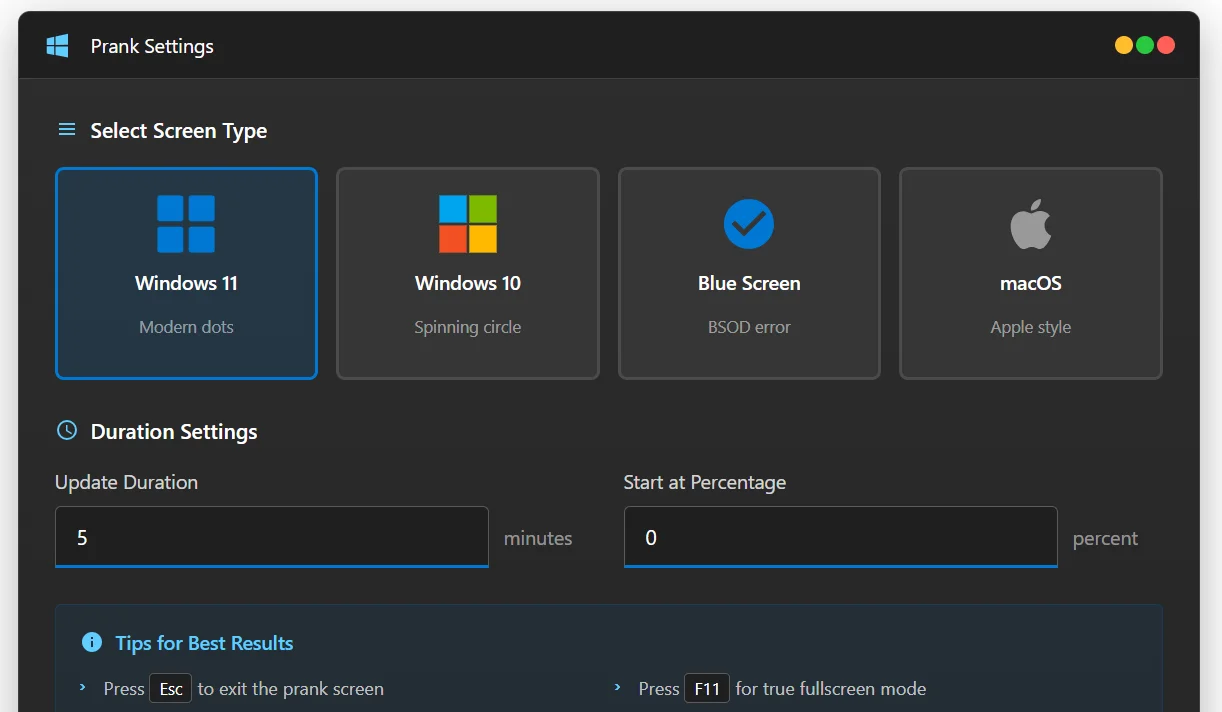
Our free Fake Windows Update Screen Generator creates convincing Windows update simulations that fool everyone watching.
Choose from Windows 11, Windows 10, Blue Screen of Death (BSOD), or macOS styles.
Set a custom duration and starting percentage, then go fullscreen to make your friend think their computer is stuck updating at the worst possible moment.
For external alternatives, WhiteScreen.online also offers fake update screens for Windows XP, Ubuntu, and Chrome OS - perfect for targeting specific operating systems your guests might recognize.
To display these pranks on your TV or second monitor during the party, connect your device via HDMI and use a media player like VLC Media Player or MPC-BE to stream party content on the main screen while the prank runs on another display.
Blue Screen of Death Prank
Nothing causes more panic than a system crash. 
The Fake Windows Update tool includes an authentic Blue Screen of Death mode complete with the sad face emoticon, QR code, and error details.
Select "Blue Screen" from the control panel and watch the confusion unfold.
New Year's Countdown Display
For your midnight countdown, use a fullscreen clock or timer on your TV.
For more professional countdown displays, combine a web-based timer with video editing tools like CapCut or VSDC Free Video Editor to create custom countdown videos.
Recording Your Party Pranks
Capture prank reactions with these free tools:
- ScreenToGif - Create instant shareable GIFs of screen pranks.
- Snagit - Professional screen capture with quick editing.
- Camtasia Studio - Full video recording with advanced effects.
Playing Party Videos and Music
Keep the entertainment going between pranks with reliable media players:
- VLC Media Player - Plays any video or audio format without additional codecs.
- MPC-BE - Lightweight player with excellent 4K support.
- GridPlayer - Display multiple videos simultaneously for a video wall effect.
- KMPlayer - Feature-rich alternative with built-in codec support.
Creating Your Own Prank Videos
Take your pranks to the next level by creating custom fake update or error videos:
- VideoPad Video Editor - Beginner-friendly editor with text overlays.
- DaVinci Resolve - Professional-grade effects and color grading.
- Kdenlive - Free open-source editor for advanced users.
Quick Tips for Maximum Effect
- Go fullscreen - Press F11 in your browser to hide the URL bar and make pranks more convincing.
- Disable notifications - Enable Do Not Disturb mode so pop-ups don't break the illusion.
- Practice timing - Queue up pranks before guests arrive for seamless execution.
- Capture reactions - Have someone ready to record responses with their phone or use ScreenToGif.


Latest news comments
AllThe Vega OS shift is the biggest Firestick story of 2026. Anyone buying now needs to know: 4K Max = sideloading works, plain 4K = ...
News: The New Fire TV Stick 4K Can't Run Kodi - Here's Which Fire Stick Still Can 2 commentsBrave just enabled it by default for stable users yesterday (1.97). Not specified is chromeOS will be passively gaining decode capability too, and ...
News: JPEG XL Is Back in Chrome: What It Means and How to Open JXL Files 1 commentI didn't know it was EU, AND france. That doesn't sound like a good idea. Related to coding or privacy.
News: Meet Qwant: The Private, EU-Built Alternative to Google 1 comment