Jellyfin skipped version 11 and went straight to 12.0, and it is the biggest change the free media server has had in years.
The release landed on 8 September 2026, and it is a real major version rather than a point update.
It is faster with big libraries, it looks different the moment you open it, and a few old things stop working.
Back up your data folder before you touch anything.
There is no way back from this one. Jellyfin 12.0 changes the database, and you cannot return to 10.11 afterwards without restoring a full backup. Stop the server, copy the data and config directories somewhere safe, and only then upgrade.
Why It Jumped From 10.11 to 12.0
Jellyfin has carried a 10.x version number since it split from Emby in 2018, so every release for seven years looked like a minor update no matter how much had changed underneath.
The team's own reasoning is that 10.11.0 rewrote the library database and was a major release by any reasonable measure - the number just never said so.
Dropping the leading 10 fixes that, and since 11 had effectively just been used as 10.11, the next number up was 12. From here, a change in the first digit actually means something.
What Is Actually New
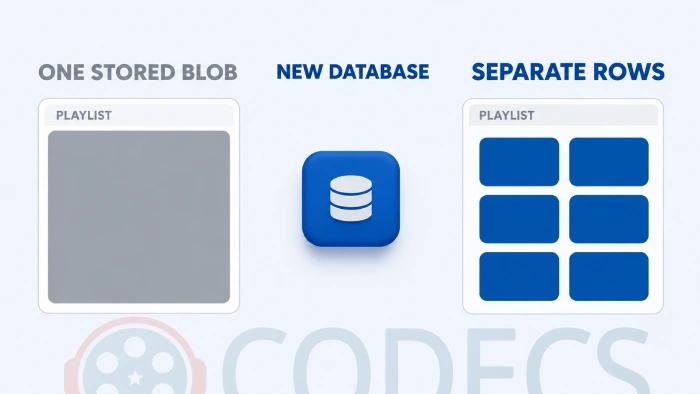
The database change is the one you will feel. Playlists and collections used to be stored as one long serialised list, and now every item is its own row, so opening, paging through and editing a large collection is much quicker.
Episodes finally get alternate versions, the way films always have. Two cuts of the same episode can sit under one entry, and each keeps its own resume position.
Books and comics stop being an afterthought. The server now reads metadata from OPF and ComicInfo files, generates posters, pulls chapters out of audiobooks, adds an OpenLibrary provider and ships a redesigned reading interface.
The Modern web layout is now the default, and the layout you have been using is renamed Legacy. If you prefer the old one, it is still there.
Search, similar items and recommendations are now plugin territory. An add-on can extend or replace any of them, and each library can pick where its suggestions come from, with ListenBrainz support bundled in.
Transcoding and Playback
Jellyfin moves up to FFmpeg 8.1, with faster CUDA transposing and faster OpenCL scaling. The optimised tone mapping on Mali graphics is the one that matters most on ARM boxes and NAS units.
HLG tone mapping now uses the BT.2446 Method B curve, and a long-standing audio and video desync in HLS transcodes has been fixed.
Clients get Dolby Vision in MKV on webOS 25 and newer, AV1 stream copy in fMP4 on TV clients, and direct play of anamorphic video on Tizen.
Transcoding is what brings a weak server to its knees, and the cheapest fix has always been a client that can direct play the file instead. Our roundup of the best players for HEVC files covers which ones manage it without help.
The Security Fixes Are the Real Reason to Update
Several of the fixes in 12.0 are security ones, and they matter most if your server is reachable from the internet.
A crafted subtitle file path could inject arguments into FFmpeg, tracked as advisory GHSA-wwwm-px48-fpvq. Other fixes stop crafted requests reaching files outside Jellyfin's own directories, close cross-site scripting holes in the web client, and block the setup wizard being re-run on a misconfigured install.
Plugin packages with unsafe names are now rejected, and parental controls are enforced more strictly.
What Breaks When You Upgrade
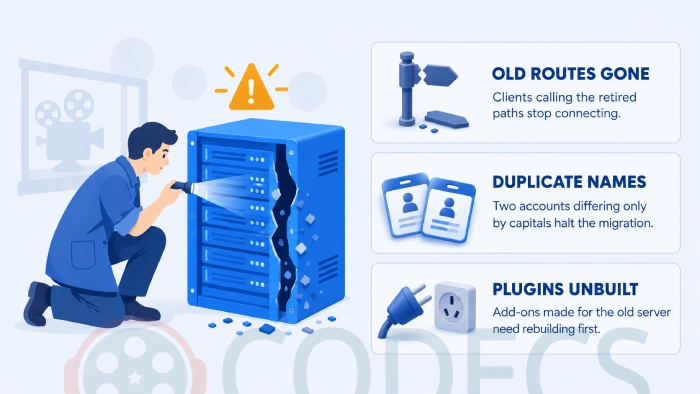
Most of these cost you five minutes if you know about them in advance, and an evening if you do not.
| What changed | What it means | What to do |
|---|---|---|
| The /emby/ and /mediabrowser/ route prefixes are gone | Very old third-party clients that still call them stop connecting | Update the client, or replace it |
| Legacy authorization is off by default | The migration disables it on existing installs too | Move clients to current authentication |
| Usernames are no longer case-locked | Two accounts differing only by capital letters stop the migration | Rename one of them before upgrading |
| Global subtitle settings are removed | Subtitles are configured per library now | Re-check the settings on each library |
| The server targets .NET 10 | Plugins built for 10.11 will not load | Wait for the author to ship a rebuild |
| File extensions are treated differently | .ogg is audio only, .aifc is audio, .aiff is no longer an image | Rescan and check any affected library |
| Symlinks resolve at playback only | They are no longer followed during a scan | Point libraries at real paths where you can |
| Image endpoints stop upscaling | Artwork is never served larger than the source file | Replace low-resolution posters if they look soft |
| Debian Bullseye and Ubuntu Focal builds are dropped | There is no 12.0 package for either | Move the server to a newer release first |
If one of your clients is a casualty, Kodi with the official Jellyfin add-on is the usual replacement on a TV box or a media PC.
How to Upgrade Without Losing Your Library
- Stop the Jellyfin server before you do anything else.
- Copy the entire data and config directories somewhere safe - this is the only way back.
- Remove any plugins you installed from a repository, and add them again later once their authors ship 12.0 builds.
- Check for two accounts whose usernames differ only by capitalisation, and rename one.
- Upgrade. Direct upgrades work from 10.10.7 and any 10.11 release, while anything older should go to 10.10.7 first.
- Let the migration finish without interrupting the server, then hard-refresh your browser.
- Point the plugin repository at https://repo.jellyfin.org/files/plugin/manifest.json.
- Run a full library scan, then run the Optimize database scheduled task.
That first scan takes noticeably longer than usual, and some films may show up as newly added because the upgrade corrects item types as it goes. Alternative versions only reappear once the scan has finished, so let it run.
Should You Upgrade Today?
If your server is reachable from outside your home network, yes. Take the current Jellyfin Server build and set aside an afternoon, because the security fixes alone justify it.
If you lean on third-party plugins, wait until their authors post 12.0 builds. A server that starts without your plugins is a worse day than an older version number.
If you are running Debian Bullseye or Ubuntu Focal, the upgrade is really an operating system job first, because there is no 12.0 package for either.
Quick questions
Is Jellyfin 12.0 free?
Yes. Jellyfin is free and open source with no paid tier, no account and no feature locked behind a subscription, and 12.0 changes none of that.
Can I go back to 10.11 if I do not like it?
Not without restoring a backup. The database changes in 12.0 cannot be rolled back, which is why the backup step comes before everything else.
Why is there no Jellyfin 11?
The team dropped the leading 10 from the version number so the first digit means something again. Since 10.11 had just shipped, the next free number was 12.
Will my apps and clients still work?
Most will. Only clients still calling the retired /emby/ and /mediabrowser/ paths, or relying on legacy authorization, stop connecting.
Do my plugins carry over?
Third-party plugins built for 10.11 will not load, because the server now targets .NET 10 and every plugin needs rebuilding. Remove them before you upgrade and add them back when updates appear.
A file will not play after the upgrade - is it the server?
Test the same file locally first with VLC Media Player. If VLC plays it cleanly the file is fine and the problem is the client or the transcode, not your library.
Back up first, upgrade second, and give the scan the time it asks for.
Download Jellyfin Server and see how it handles your library, or tell us how the upgrade went if you have already made the jump.


Latest news comments
AllThe Vega OS shift is the biggest Firestick story of 2026. Anyone buying now needs to know: 4K Max = sideloading works, plain 4K = ...
News: The New Fire TV Stick 4K Can't Run Kodi - Here's Which Fire Stick Still Can 2 commentsBrave just enabled it by default for stable users yesterday (1.97). Not specified is chromeOS will be passively gaining decode capability too, and ...
News: JPEG XL Is Back in Chrome: What It Means and How to Open JXL Files 1 commentI didn't know it was EU, AND france. That doesn't sound like a good idea. Related to coding or privacy.
News: Meet Qwant: The Private, EU-Built Alternative to Google 1 comment