Meta, the leading social media platform, has introduced a new feature called HDR video to Reels, designed to improve the visual quality of videos.
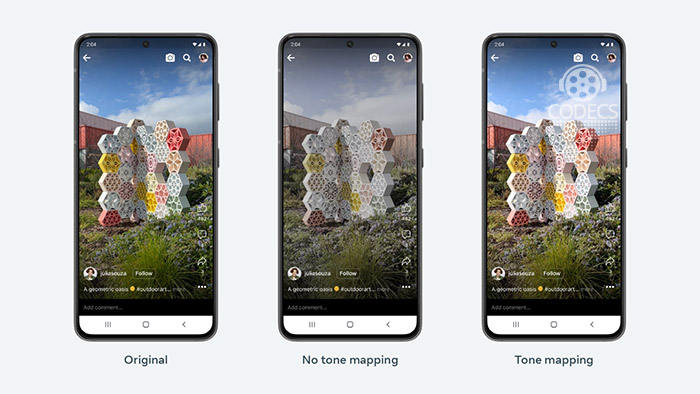
HDR Videos offers users enhanced visuals, including improved color depth, contrast, and realism.
With the implementation of HDR videos, Meta aims to provide users with a more immersive and visually appealing viewing experience. By leveraging advanced algorithms and processing techniques, the company seeks to enhance the overall quality of videos.
During the creation process, they transcode uploaded videos into various resolutions and bitrates for optimal playback across different devices and network conditions.
However, handling HDR videos adds complexity due to their requirement of 10 bits per color component per pixel and utilization of newer codecs like HEVC, VP9, or AV1. These characteristics increase decode complexity, necessitating higher-performance devices for smooth decoding and playback.
Delivering HDR content to all devices, including those lacking sufficient support, can result in degraded performance. The higher required bitrates lead to wasted bandwidth, causing increased buffering, more frequent in-play stalls, and reduced battery life. Hence, careful consideration is required when delivering HDR content to ensure an optimal viewing experience for users.
Content creators, such as filmmakers, vloggers, and social media influencers, can benefit from HDR videos by presenting their creative vision with greater accuracy. This technology enables the display of videos with a full range of colors and subtle visual details.
HDR videos ensures compatibility across various devices, including smartphones, tablets, and desktops, for a seamless viewing experience regardless of the device being used.
Meta prioritizes user privacy and data protection, ensuring the implementation of robust measures to safeguard personal data.




Latest news comments
AllThe Vega OS shift is the biggest Firestick story of 2026. Anyone buying now needs to know: 4K Max = sideloading works, plain 4K = ...
News: The New Fire TV Stick 4K Can't Run Kodi - Here's Which Fire Stick Still Can 2 commentsBrave just enabled it by default for stable users yesterday (1.97). Not specified is chromeOS will be passively gaining decode capability too, and ...
News: JPEG XL Is Back in Chrome: What It Means and How to Open JXL Files 1 commentI didn't know it was EU, AND france. That doesn't sound like a good idea. Related to coding or privacy.
News: Meet Qwant: The Private, EU-Built Alternative to Google 1 comment