If you still run Windows 10, Windows Update may now offer you Windows 11 26H2 directly - the newest version, with no stop at 24H2 or 25H2 on the way.
The short answer: if your PC meets Windows 11's requirements and you were going to upgrade anyway, this is the cleanest time to do it.
It's free, it keeps your files and apps, and if you're not ready there's no rush - enrolled Windows 10 PCs get security fixes until October 12, 2027.
What Changed
If you check for updates on Windows 10 now, you''re "offered to install Windows 11 26H2 right away", and TechSpot reported the same this week.
Until recently, a Windows 10 PC was offered an older Windows 11 version first. Microsoft's release health page now says 26H2 "is now available for all eligible devices".
One honest caveat: Microsoft's own pages don't announce the Windows 10 offer by name. It''s showing up on PCs, but it may not reach every Windows 10 machine on the same day.
What You Actually Get With 26H2
Don't expect a makeover. 26H2 is built on the same base as 24H2 and 25H2, and Windows Latest calls it "the faster update that barely changes anything". For a Windows 10 user, though, that means the most polished Windows 11 so far.
- Better on low-memory PCs. Microsoft says Windows 11 is now up to 20% more responsive, with a faster Start menu and Search.
- A tidier right-click menu. You can now choose what appears in File Explorer''s context menu.
- The longest support. 26H2 Home and Pro get security updates until October 2028.
- Known bugs already fixed. The Dolby Digital audio crash and the black screen after sign-in were both fixed in October.
Before You Click Download
- Check your PC is supported. Windows 11 still needs TPM 2.0, Secure Boot and a supported processor - if Windows Update offers 26H2, your PC passed the check.
- Back up anything you can''t lose. The upgrade keeps your files, but a copy on a USB drive or in the cloud costs nothing.
- Free up some space. A full upgrade from Windows 10 needs room on your C: drive, so clear a few gigabytes if it's nearly full.
- Leave time. Coming from Windows 10, this is a full upgrade, not a quick restart - plan for up to an hour.
- Using a USB headset or sound card? Microsoft lists an open bug where some older USB audio devices show Code 10 and play no sound - it affects Windows 10 too, so staying put won't avoid it.
How to Get It
Go to Settings > Update & Security > Windows Update and press Check for updates. If you see the Windows 11 upgrade, select Download and install.
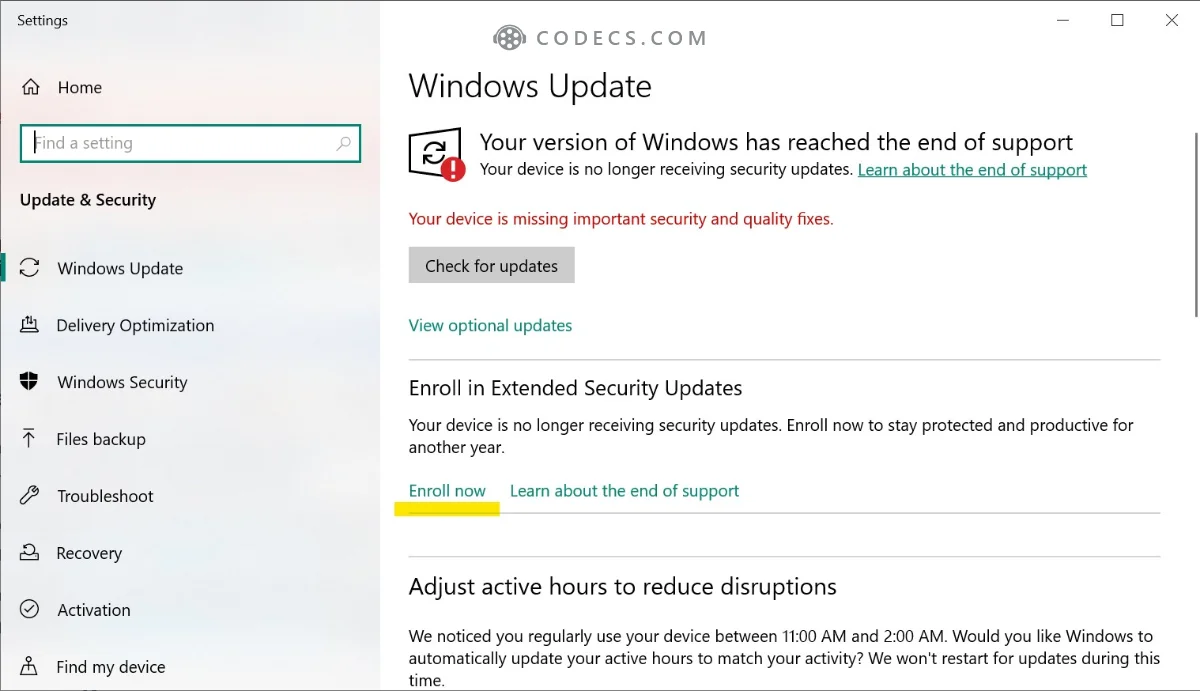
Not showing up? Use the free Windows 11 Installation Assistant instead. Our 26H2 download guide also covers the ISO and a USB stick.
Changed your mind?
For 10 days after the upgrade, you can return to Windows 10 from Settings > System > Recovery > Go back - on Windows 11, Recovery sits under System, not under Update & Security as it did on Windows 10. After that, Windows deletes the old files and going back means a clean install.
Who Should Wait
If Windows says your PC isn't supported, the offer won't appear at all. You can still upgrade with our Rufus guide for unsupported PCs, but read the risks first.
And if you simply like Windows 10, staying is fine for now. Our article on whether it's still safe to wait shows how to check you''re enrolled in free security updates.
Quick questions
Is the upgrade from Windows 10 to 26H2 free?
Yes. A Windows 10 PC that meets the requirements upgrades for free, and your Windows 10 licence activates Windows 11.
Will I lose my files and apps?
No. Upgrading through Windows Update or the Installation Assistant keeps your files, apps and most settings. Only a clean install from USB wipes the drive.
Do I have to install 24H2 or 25H2 first?
No. Windows 10 PCs can now go straight to 26H2, which saves a second upgrade later.
Can I go back to Windows 10?
Yes, within 10 days, from Settings > System > Recovery > Go back - Recovery moves out of Update & Security once you are on Windows 11. After that you would need a clean install.
How long does Windows 10 still get updates?
Until October 12, 2027, if your PC is enrolled in Extended Security Updates. Without enrolment, it has had no security fixes since October 2025.
The bottom line
Windows 10 PCs can now skip straight to 26H2, the newest and longest-supported Windows 11. If your PC qualifies, back up, leave an hour and take it - or stay on Windows 10 with ESU and upgrade before October 2027.
', CURDATE(), CURDATE(), CURTIME(), 0, 1, '' FROM guides g WHERE g.file LIKE 'windows-11-s-bing-wallpaper-app-now-opens-bing-when-you-click-your-desktop%' AND NOT EXISTS (SELECT 1 FROM guides x WHERE x.file = 'windows-10-pcs-can-now-jump-straight-to-windows-11-26h2-should-you-take-it.php') LIMIT 1; SELECT id, type, name, file, show_date, modify_date, LENGTH(content) AS content_len FROM guides WHERE file = 'windows-10-pcs-can-now-jump-straight-to-windows-11-26h2-should-you-take-it.php';


Latest news comments
What readers are saying All[link] Epg is not working on this one.
Team replied News: Free USA IPTV Playlist: The American TV That Is Really Free 1 commentInteresting development with the Fire TV Stick 4K — losing Kodi sideloading is a big deal for a lot of users. For those ...
News: The New Fire TV Stick 4K Can't Run Kodi - Here's Which Fire Stick Still Can 3 commentsBrave just enabled it by default for stable users yesterday (1.97). Not specified is chromeOS will be passively gaining decode capability too, and ...
Team replied News: JPEG XL Is Back in Chrome: What It Means and How to Open JXL Files 1 comment