Tiny11 developer NTDEV has shown Windows 11 26H2 starting up on just 128MB of RAM, which is 32 times less than Microsoft's official minimum.
It's an experiment, not a download, and you can't install it on your old laptop yet.
What you can use today is Tiny11 Builder, the same developer's free tool that makes a slimmer Windows 11 installer from Microsoft's own ISO.
Here is what was actually shown, what it means for low-RAM PCs, and the realistic way to lighten Windows 11 right now.
What NTDEV Actually Showed
On 31 October, NTDEV posted that Windows 11 26H2 had booted on 128MB of RAM, calling it "a possible world record". The screenshots show build 26300 reporting about 127MB of memory.
That's all that has been published so far. NTDEV hasn't said what hardware or virtual machine was used, how long it took to start, or how much the system could do once it got there.
Context matters here. NTDEV previously got Windows 7 onto 128MB of RAM on a very slow emulated PC, and that took about 28 minutes to reach the desktop. Starting up and being usable are two very different things.
Meet Pico11 - Windows 11 Small Enough for a CD
The 128MB stunt builds on Pico11, a stripped-down Windows 11 that NTDEV showed in late October. Its installer is about 667MB, so the whole thing fits on an old 700MB CD.
- What still works. It reaches the normal Windows 11 desktop, and File Explorer, Settings, Calculator, Notepad and Paint all open.
- Memory use. In a test machine with 4GB of RAM, it sat at roughly 880 to 900MB when idle, on the developer's own measurement.
- What's gone. Windows Update and the servicing tools are removed, so it can't get security fixes.
- Task Manager. The modern one is swapped for an older, lighter version.
There is no official Pico11 download.
NTDEV calls it a proof of concept and hasn't released it. Any site offering a "Pico11 ISO" is handing you a stranger's copy of Windows, so skip it.
One tester who tried to rebuild Pico11 with NTDEV's public tools only got down to about 2.9GB, so the extra tricks aren't public yet. NTDEV has said Pico11 features will come to Tiny11 Builder later, with no date given.
Can Your Old PC Run Windows 11 on Very Little RAM?
Not like this, and not today. Microsoft's minimum for Windows 11 is 4GB of RAM, and a normal install with a browser open uses most of that.
A rough guide for real-world use:
- 8GB or more. A standard Windows 11 install runs fine - removing extras makes it feel tidier, not faster.
- 4GB. This is where a slimmed-down build helps most - fewer background apps leaves more memory for your browser.
- Under 4GB. Even slimmed down, Windows 11 will struggle once you open real apps, and adding RAM, if your PC allows it, beats any software trick.
The processor matters too. Since 24H2, Windows 11 needs a CPU with the POPCNT and SSE4.2 instructions, so PCs from before roughly 2009 to 2011 can't run it however little RAM it uses.
The Slim Windows 11 You Can Actually Use Today
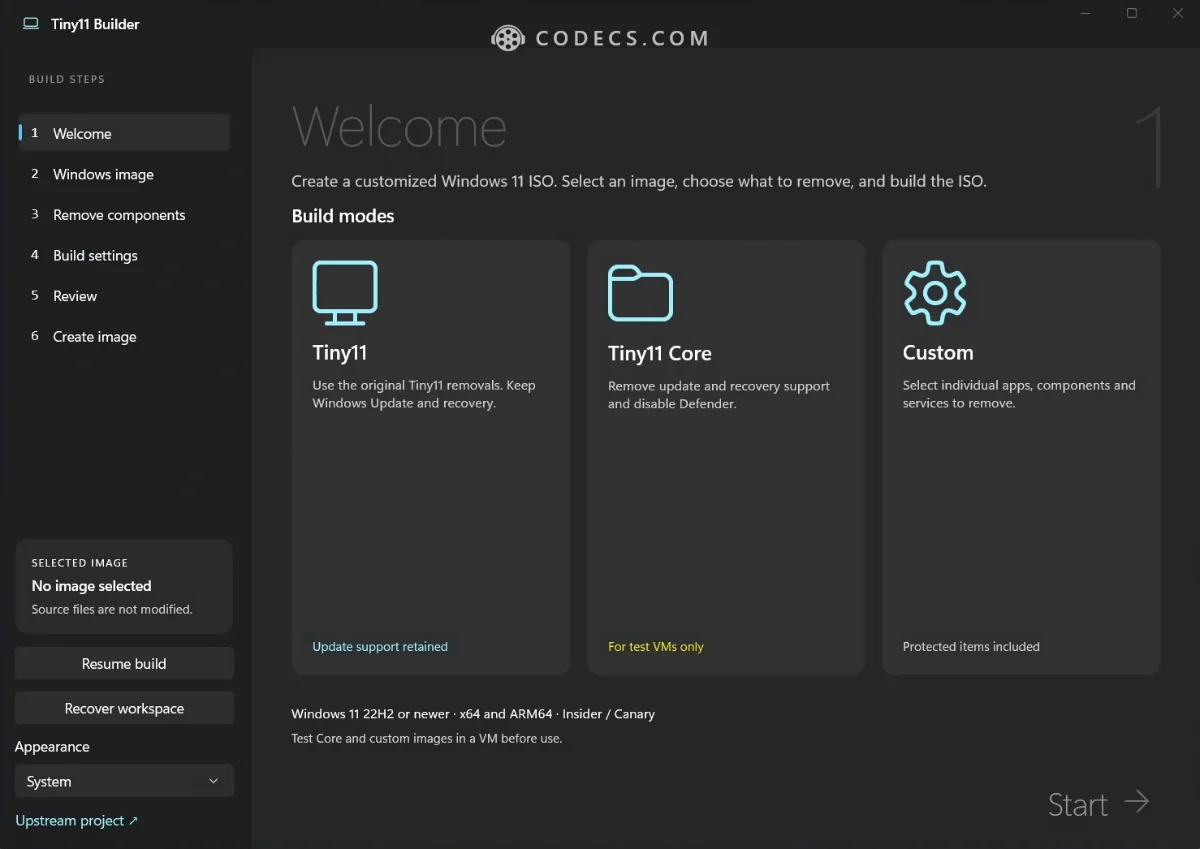
Tiny11 Builder 0.2.0 came out on 30 October. It takes Microsoft's official Windows 11 ISO, removes bundled apps like Copilot, OneDrive, Teams and Clipchamp, and builds a smaller installer you can trust.
- Download Tiny11 Builder and extract the whole ZIP - x64 for a normal PC, ARM64 for Windows on Arm.
- Run it as administrator and let it download the official Windows 11 ISO, or point it at one you have.
- Choose Tiny11 mode, not Core. Tiny11 keeps Windows Update and Defender, so your PC stays protected.
- Write the ISO to a USB stick with Rufus, then boot from it and install.
Our full Tiny11 Builder walkthrough explains each mode and what gets removed.
Don't want to reinstall? FlyOOBE can strip many of the same extras from a PC that's already set up.
Quick questions
Can I download Pico11?
No. NTDEV hasn't released it, and it's described as a proof of concept. Tiny11 Builder is the public tool from the same developer.
Does Windows 11 really run on 128MB of RAM?
It started up on 128MB in NTDEV's test, but no details on speed or usability have been shared. For everyday use, Microsoft's 4GB minimum still stands.
What is the least RAM Windows 11 needs?
Officially 4GB. A slimmed-down Tiny11 build makes 4GB PCs more comfortable, but 8GB is the sweet spot for a browser full of tabs.
Is Tiny11 Builder safe to use?
It's open source and builds from Microsoft's own ISO, so you know what went in. Stick to Tiny11 mode on any PC you use every day.
Will Pico11 come to Tiny11 Builder?
NTDEV has said some Pico11 features are planned for Tiny11 Builder, but there is no date yet.
The bottom line
Windows 11 on 128MB is a great party trick, but it isn't something you can install. If your PC is short on memory, build a Tiny11 installer today and keep an eye out for Pico11 features arriving later.


Latest news comments
All[link] Epg is not working on this one.
Team replied News: Free USA IPTV Playlist: The American TV That Is Really Free 1 commentInteresting development with the Fire TV Stick 4K — losing Kodi sideloading is a big deal for a lot of users. For those ...
News: The New Fire TV Stick 4K Can't Run Kodi - Here's Which Fire Stick Still Can 3 commentsBrave just enabled it by default for stable users yesterday (1.97). Not specified is chromeOS will be passively gaining decode capability too, and ...
Team replied News: JPEG XL Is Back in Chrome: What It Means and How to Open JXL Files 1 comment