Windows 11 is adding an "Opt out of backup" button to its full-screen OneDrive prompt, which means you can finally refuse it once instead of postponing it forever.

The old version of that screen gave you two ways out, and neither of them was a real no.
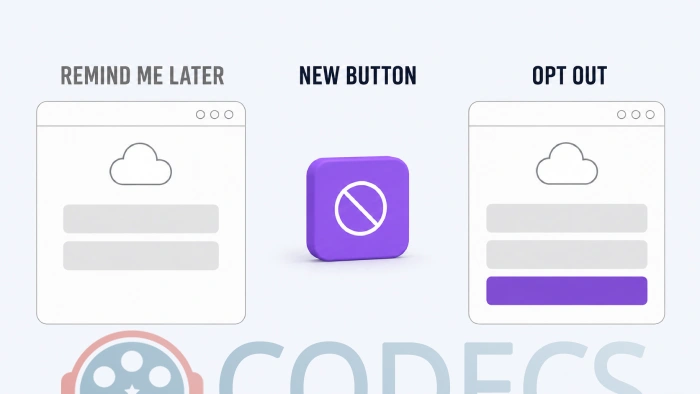
You could pick Continue, which switched backup on, or "Remind me in 3 days", which brought the same screen back later.
The new one, now turning up on stable Windows 11 25H2 machines, adds a third button that simply says "Opt out of backup".
What Was Actually Wrong With the Old Prompt
Both buttons led back to OneDrive, one immediately and one three days later. On a freshly installed PC the wording was gentler and the trap was the same: Continue on one side, "Skip for now" on the other. Neither of them was a way to tell Windows you did not want the feature at all.
Windows Latest, which spotted the change on 30 August 2026, found the new screen on two PCs that had no OneDrive sync client installed at all. That is what made the old behaviour so grating - you did not need OneDrive on the machine for the machine to keep asking about it.
What the New Screen Changes
The sales pitch has not moved. Microsoft still recommends backing your PC up and still lists the same three reasons: cloud storage, not losing your files and photos, and syncing settings between devices.
What is new is that saying no is now a button rather than a hunt through Settings or a registry edit somebody posted on a forum.
Worth knowing. Microsoft has not announced any of this, and nobody has lived with the new button long enough to prove it really means never. It is also a staged rollout, so it may reach your PC weeks after it reaches somebody else's.
What to Do Once You Have Said No
Opting out stops the nagging, it does not back anything up. If the cloud was never the plan, an external drive and an imaging tool such as Clonezilla do the same job locally with no subscription attached.
For the leftovers, Microsoft PC Manager is Microsoft's own free cleanup tool and reclaims the space that half-finished syncing tends to strand. If you would rather strip the preinstalled apps out entirely, Win11Debloat is a small PowerShell script that does it in one pass.
This is also not the only thing Microsoft has quietly put on people's PCs this year. In August it shipped a OneDrive Photos app to Windows 11 and 10 machines nobody had asked, called the wide rollout a mistake and pulled it back, not long after the 3.3 GB Copilot app that installed itself on Windows 10.
Quick questions
Is the Opt out of backup button on my PC yet?
Maybe not. It is rolling out gradually to stable Windows 11 25H2 machines, so the screen you get today may still be the old one with only Continue and "Remind me in 3 days".
Does opting out delete what is already in OneDrive?
No. The button governs whether Windows keeps backing things up, not what is already stored, so anything already in your OneDrive stays there until you remove it from OneDrive itself.
Can I turn backup on again later?
Yes. Windows Backup stays in Settings whether you opt out of the prompt or not, so this is a decision about the pop-up rather than a permanent lockout.
Does this remove OneDrive from Windows 11?
No. Refusing the backup prompt and removing the OneDrive app are two separate things, and the prompt can appear even on a PC where the sync client was never installed.
What is the difference between Windows Backup and OneDrive?
Windows Backup is the built-in feature that copies your Desktop, Documents and Pictures folders plus some settings into OneDrive. OneDrive itself is the storage and the sync app underneath it.
Say no once, then back up on your own terms.
Download Clonezilla if you would rather keep your own images on your own drive, or tell us whether the opt-out button has reached your PC yet.


Latest news comments
AllThe Vega OS shift is the biggest Firestick story of 2026. Anyone buying now needs to know: 4K Max = sideloading works, plain 4K = ...
News: The New Fire TV Stick 4K Can't Run Kodi - Here's Which Fire Stick Still Can 2 commentsBrave just enabled it by default for stable users yesterday (1.97). Not specified is chromeOS will be passively gaining decode capability too, and ...
News: JPEG XL Is Back in Chrome: What It Means and How to Open JXL Files 1 commentI didn't know it was EU, AND france. That doesn't sound like a good idea. Related to coding or privacy.
News: Meet Qwant: The Private, EU-Built Alternative to Google 1 comment