Nikon gives away four different pieces of Windows software, and most people install the wrong one first.
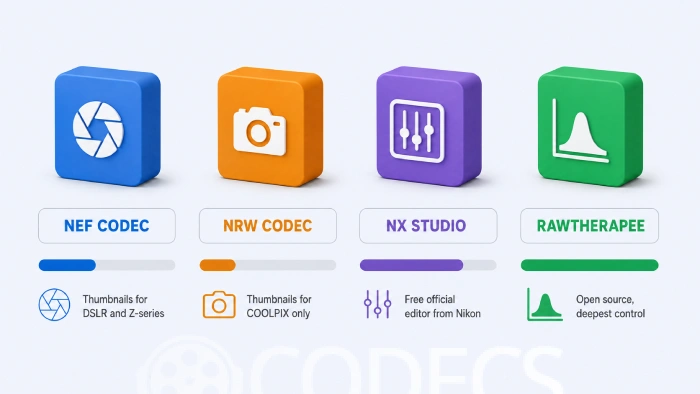
Which one you need comes down to a single question: do you want to see your RAW files, or edit them?
Seeing them is a codec's job, editing them is an app's job, and the two are not interchangeable.
Here is the short version, then the detail.
Start Here: Which One Do You Actually Need
| What you want | Install this | Why this one |
|---|---|---|
| Thumbnails for DSLR or Z-series RAW | NEF Codec | Nikon's own codec for .NEF, and it still works on older Windows builds |
| Thumbnails for COOLPIX RAW | NRW Codec | COOLPIX shoots .NRW, which the NEF Codec does not cover |
| Thumbnails on Windows 10 or 11, all brands | Raw Image Extension | One install covers Nikon plus Canon, Sony, Fujifilm and more |
| To actually edit your Nikon RAW files | Nikon NX Studio | Free, official, and it reads .NEF and .NRW with no codec installed |
| Deeper control than NX Studio gives you | RawTherapee | Open source and non-destructive, at the cost of a steeper learning curve |
| To fix dates, GPS or copyright in bulk | ExifToolGUI | Batch metadata edits across a whole folder in one pass |
What a Codec Does, and What It Does Not
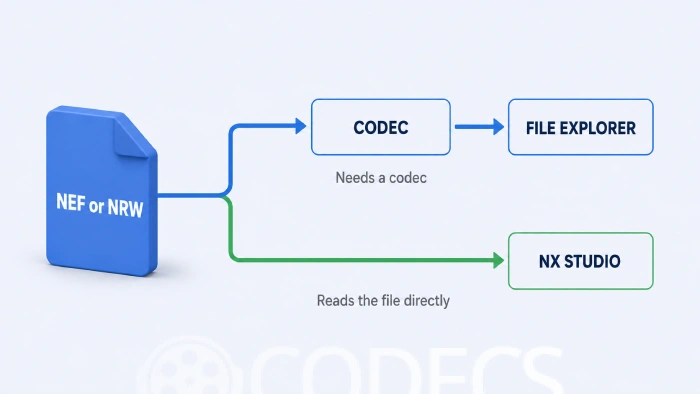
A RAW codec is a small piece of plumbing that teaches Windows how to draw a picture from your camera file. Install it and File Explorer stops showing grey rectangles and starts showing your photos.
That is the whole job. It does not crop, it does not resize, and it does not adjust anything.
Editors work the other way round. NX Studio, RawTherapee and Adobe's software all read your RAW files directly, so none of them needs a codec installed to open a .NEF.
NEF Codec: Thumbnails for DSLR and Z-Series Files
NEF Codec is Nikon's free plugin for the Windows Imaging Component, and .NEF is what almost every Nikon DSLR and mirrorless body writes to the card.
Install it and your files get proper thumbnails in File Explorer, plus previews in Windows Live Photo Gallery and Windows Photo Viewer. EXIF details become readable straight from the shell, no app needed.
It covers a wide span of bodies, from the early D1 professionals through the D850 and D780, the DX cameras, and the Z-series mirrorless range.
NRW Codec: The COOLPIX One
If your camera is a COOLPIX, your RAW files end in .NRW instead, and the NEF Codec will do nothing for them.
NRW Codec is the matching plugin, and it covers the RAW-capable COOLPIX line including the P1000, B700, P7800, P7100, P6000 and P340. It is a separate install, so owners of both a DSLR and a COOLPIX want both.
One caveat worth knowing before you install: Nikon only ever tested this one up to Windows 10, and it hooks into the older Photo Gallery and Photo Viewer rather than the modern Photos app.
The easier route on Windows 10 and 11.
Microsoft's Raw Image Extension handles .NEF and .NRW alongside more than a hundred other RAW formats, and it is the one the modern Microsoft Photos app actually listens to. One install, every brand, nothing to configure.
Nikon's own codecs are still the right pick on older Windows builds, or if you specifically want Nikon's decoding rather than Microsoft's.
Nikon NX Studio: The Free Editor Most People Are Looking For
Nikon NX Studio is Nikon's own editing and cataloguing app, free for Windows and macOS, and it is where the real work happens.
It reads .NEF and .NRW on its own. You do not need either codec installed for NX Studio to open your files, which is the single most common misunderstanding about Nikon's software lineup.
Inside, you get exposure, white balance, colour and sharpness controls, plus your camera's Picture Control settings carried straight through from capture. Lens correction is automatic - it identifies the lens from the file and applies the right profile.
For organising, there are keywords, ratings and albums, so you can group a shoot by job, location or subject without moving files around on disk.
RawTherapee: When You Want More Than NX Studio Gives You
RawTherapee is a free, open-source RAW developer that goes considerably deeper than Nikon's app, and it reads Nikon files alongside JPEG, TIFF, PNG and BMP.
Editing is non-destructive, so your original file is never touched - adjustments live in a sidecar and are only baked in when you export.
- Batch processing, so one set of adjustments can be queued across a whole shoot.
- Tone mapping, graduated filters and a long list of sharpening and noise reduction methods.
- Lensfun-based lens correction, both automatic and manual.
- A portable build, if you would rather not install anything.
The trade-off is honest: it ships without a help file and assumes you already know your way around RAW editing. If you are new to this, start with NX Studio and come back later.
ExifToolGUI: Metadata, Hundreds of Files at a Time
ExifToolGUI is a Windows front end for ExifTool, the command-line utility that reads and writes metadata in just about any file format including .NEF and .NRW.
It exists so you do not have to memorise terminal syntax. Fields sit in organised panels, and a change can be applied to an entire folder in one pass.
This is what you reach for when a camera clock was set wrong for a whole trip, or when a few hundred files need the same copyright line. For a one-off check on a single image, the online EXIF viewer is quicker than installing anything.
Still Seeing Grey Icons After Installing?
This is the usual complaint, and it is almost always one of three things.
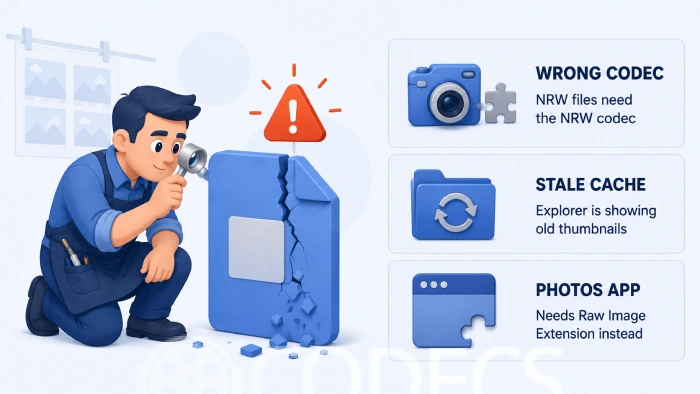
- Check the extension first. Right-click one file, open Properties, and read what comes after the dot - a .NRW file will stay grey forever with only the NEF Codec installed.
- Clear the thumbnail cache. Windows caches thumbnails aggressively, so run Disk Cleanup, tick Thumbnails, and let Explorer rebuild them.
- Check which app you are looking in. The modern Photos app does not use Nikon's codec at all, so if that is where you are looking, install Raw Image Extension instead.
Worth ruling out one more thing while you are in there. If Explorer is set to "Always show icons, never thumbnails" in Folder Options, no codec on earth will change what you see.
Shooting More Than One Brand?
Nikon's codecs only speak Nikon. If there is a second body in your bag, you have two ways to go.
The tidy option is Raw Image Extension, which covers everything in one install on Windows 10 and 11. The alternative is a codec per brand:
- Canon RAW Codec for .CR2 files.
- Sony RAW Codec for .ARW files.
- Pentax RAW Codec for .PEF files.
- Microsoft Camera Codec Pack if you are still on Windows 7 or 8.1 and want them bundled.
A third route is to stop juggling formats altogether. Adobe DNG Converter turns everything into DNG, which most software opens without help, and it is a sensible archiving move regardless.
If you want the background on why every manufacturer invented its own RAW format in the first place, our guide to understanding RAW image formats covers it.
Who Should Look Elsewhere
Mac owners. The NEF and NRW codecs are Windows-only plumbing, and macOS already reads Nikon RAW in Finder and Preview without any of it. Download NX Studio and skip the rest of this page.
Anyone who just wants to browse fast. If the goal is flicking through a card full of shots rather than editing them, a viewer beats a codec - FastStone Image Viewer and XnView both read Nikon RAW natively.
Anyone who needs one file converted, once. Installing anything is overkill - convert RAW to JPEG or PNG online and move on.
Anyone with a JPEG-only camera. Check your shooting menu, and if there is no RAW option in it, none of this applies to you at all.
Quick questions
Do I need both NEF Codec and NRW Codec?
Only if you own cameras that shoot both formats. DSLR and Z-series bodies write .NEF, RAW-capable COOLPIX compacts write .NRW, and each codec handles one of them.
Is Nikon NX Studio really free?
Yes, completely. Nikon gives it away for Windows and macOS with no paid tier, no trial period and no watermark.
Do I need a codec installed to use NX Studio?
No. NX Studio reads .NEF and .NRW files directly, and the codecs only exist to give Windows itself the ability to draw thumbnails.
Can Photoshop open NEF files without the Nikon codec?
Yes. Photoshop opens Nikon RAW through Adobe Camera Raw, which ships with it and ignores the Windows codec entirely.
Do these work on Windows 11?
NEF Codec and NX Studio do. Nikon only ever tested NRW Codec up to Windows 10, so COOLPIX owners on Windows 11 are better served by Microsoft's Raw Image Extension.
Why are my thumbnails still grey after installing?
Usually a stale thumbnail cache, the wrong codec for that file's extension, or you are looking in the modern Photos app, which uses Raw Image Extension instead. Work through the three checks above.
More free photo and RAW tools live in the Graphics section.


Latest comments
AllXMediaRecode gives only the option to Copy (No convert) in Audio Mode drop down. I am trying to convert/recode the EAc3 ...
Guide: How to Convert EAC3 Audio to AC3 or AAC With XMedia Recode 1 commentTo view major football league live
Guide: Free Popular IPTV Playlist: Where to Get Fresh, Legal M3U Links in 2026 19 commentsThe link isn't working. [link]
Guide: Free M3U Playlist for TiviMate: Legal Lists That Load Cleanly 1 comment