YouTube Music streams at 128kbps unless you tell it otherwise, and the setting that doubles that is four taps deep in a menu called Data saving. Two minutes, and it is the last time you will think about it.
The difference is not subtle on good headphones, and it is barely there on phone speakers.
Whether you can make the change at all depends on one thing, so it is worth checking before you go looking.
The High setting needs Premium. On the free tier the option is there but you cannot select it - YouTube Music caps free listening at Normal, which is 128kbps.
Everything below works if you have YouTube Music on Premium or on a YouTube Premium plan. If you do not, the download and mobile-data settings are still worth setting, and the rest of the page explains what you are and are not missing.
What the four settings actually are
Same four options in every place the app asks, with the same numbers behind them.
| Setting | Bitrate | Who can pick it |
|---|---|---|
| Low | 48kbps | Everyone |
| Normal | 128kbps - the default | Everyone |
| High | 256kbps | Premium only |
| Always High | 256kbps, held even on a weak connection | Premium only, not in every country |
256kbps is the ceiling. There is no lossless or hi-res option on YouTube Music, whatever you are paying - more on that below.
Change it for Wi-Fi
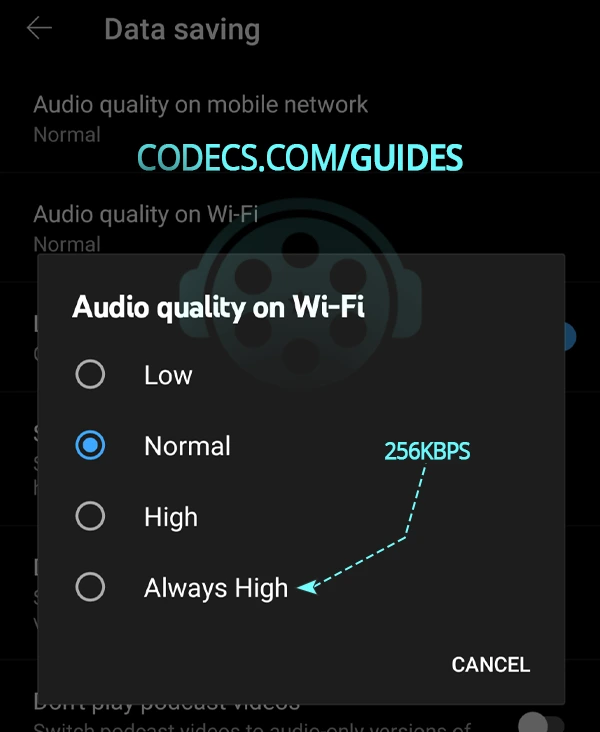
- Open your profile. Tap your picture in the top right of the YouTube Music app.
- Go to Settings, then Data saving. On an iPhone it is under Playback and restrictions instead. Either way it is not called audio or sound, which is why nobody finds it.
- Tap Audio quality on Wi-Fi. Pick High, or Always High if your network is steady.
It takes effect immediately - no restart, no re-login. Skip to a track you know well and listen to something with a lot going on in it.
On an iPhone the menu has a different name.
Android puts these settings under Data saving; on iOS the same options live under Playback and restrictions. The entries themselves, Audio quality on Wi-Fi and Audio quality on mobile network, are worded identically on both.
Change it for mobile data
Same menu, different entry, and here the answer depends on your data plan rather than your ears.
- Go back to Settings, then Data saving - or Playback and restrictions on an iPhone.
- Tap Audio quality on mobile network.
- Pick High on an unlimited plan, Normal otherwise. At 256kbps an hour of music is roughly 115 MB; at 128kbps it is about half that.
There is a Stream via Wi-Fi only switch in the same menu if you would rather the app simply never touched your data.
Set the download quality before you download anything
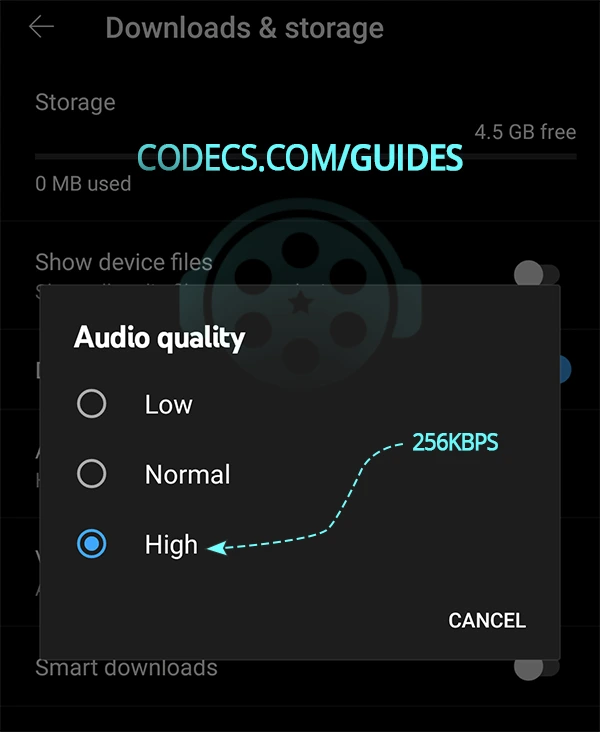
- Open Settings, then Downloads and storage.
- Tap Audio quality and choose Low, Normal or High.
This one does not apply retroactively. Anything already on your phone keeps the quality it was downloaded at. If you have built an offline library at Normal and then switch to High, you have to remove and re-download those tracks to get the benefit - the setting only governs what happens next.
What 256kbps actually gets you
YouTube Music does not use MP3. It streams AAC and Opus, both of which are meaningfully more efficient than MP3 at the same bitrate.
That efficiency is the reason the default is not as bad as the number suggests. 128kbps AAC is not 128kbps MP3 - it holds up considerably better, and on a phone speaker or cheap earbuds most people would not pick it out in a fair test.
Where 256kbps earns its keep is on equipment that can show it: open-back headphones, a decent DAC, a quiet room. Dense passages hold together, cymbals stop sounding like static, and bass keeps its shape instead of smearing.
It is a real improvement and a modest one. Anyone telling you it transforms your library is selling something.
There is no lossless option, and that may matter to you
256kbps AAC is the best YouTube Music offers. It is compressed audio, and no setting, plan or trick gets you past it.
If lossless is what you are after, it is the one thing YouTube Music does not compete on - Apple Music, Amazon Music and Tidal all include lossless tiers, and Spotify has added one. That is a reason to switch service, not a reason to keep hunting through menus.
For most listening, on most equipment, in most rooms, 256kbps AAC is not the thing holding your music back.
Squeezing more out of it on a Windows PC
If you listen at a desk, the room and the headphones are doing more to your sound than the bitrate is. Two Windows tools help with that - both are Windows-only, and neither has a macOS equivalent worth recommending.
FxSound, formerly DFX Audio Enhancer, processes everything your PC plays, browser audio included. It cannot put back detail the encoder discarded - nothing can - but it shapes what is there, and on flat-sounding laptop output that is a genuine improvement.
Equalizer APO with Peace is the precise version of the same idea. If your headphones have a known frequency response, you can correct for it directly, which does more for perceived quality than any bitrate change will.
Quick questions
Can I get 256kbps without Premium?
No. High is a Premium feature and the free tier is capped at Normal, which is 128kbps.
The download and mobile-data settings are still worth checking on free, but the streaming ceiling does not move.
Does YouTube Music have lossless or hi-res audio?
No. 256kbps AAC is the maximum on every plan. Apple Music, Amazon Music, Tidal and Spotify all offer lossless; YouTube Music does not.
Is 128kbps on YouTube Music as bad as a 128kbps MP3?
No, and this is where a lot of advice goes wrong. YouTube Music uses AAC and Opus, which hold together far better than MP3 at the same bitrate.
It is still the lower setting and High is better, but the default is not the disaster the number implies.
Why do my downloaded songs still sound the same after changing the setting?
Because downloads keep whatever quality they were saved at. Remove them and download again after changing the setting.
How much data does High use?
Roughly 115 MB an hour at 256kbps, against about half that at 128kbps. An hour a day at High is somewhere near 3.5 GB a month.
Will I actually hear the difference?
On open-back headphones or a decent hi-fi, yes - most noticeably in busy passages and in the bass.
On phone speakers, Bluetooth earbuds or in a car, probably not. Bluetooth re-encodes the audio anyway, which flattens much of the gain before it reaches you.
The bottom line
On Premium, set Wi-Fi and downloads to High and leave mobile on Normal unless your data is unlimited. That is the whole job, and it takes about two minutes.
On free, the streaming ceiling does not move - but 128kbps AAC is better than the number makes it sound, and your headphones matter more than the setting does.



Latest comments
AllXMediaRecode gives only the option to Copy (No convert) in Audio Mode drop down. I am trying to convert/recode the EAc3 ...
Guide: How to Convert EAC3 Audio to AC3 or AAC With XMedia Recode 1 commentTo view major football league live
Guide: Free Popular IPTV Playlist: Where to Get Fresh, Legal M3U Links in 2026 20 commentsThe link isn't working. [link]
Guide: Free M3U Playlist for TiviMate: Legal Lists That Load Cleanly 1 comment