Windows 11 is getting an internet speed test built right into Quick Settings, so you can check your connection in seconds without opening a browser.

Microsoft started testing it with Windows Insiders on 23 October, in a new Experimental build.
It's most useful when your IPTV channels or streams keep buffering - because the first thing to rule out is your connection, not your app.
What the New Speed Test Does
It measures three things: download speed, upload speed and ping.
The results appear in a small window above the taskbar, in well under a minute in early tests.
- From Quick Settings. A new Speed test button sits with your Wi-Fi and volume controls.
- From the Wi-Fi menu. Open the Wi-Fi or mobile data list and start it there.
- From the network icon. Right-click the network icon on the taskbar and choose "Test internet speed".
It's powered by Speedtest, the same service many speed-test websites use. The difference is that nothing opens in your browser any more.
You can't get the new version yet.
It's only in the Experimental Insider channel for now, and even Insiders may need to switch it on. Microsoft hasn't said when it reaches everyone.
How to Test Your Speed Today
Windows 11 already has an older version. Right-click the network icon on the taskbar and choose the speed test option, and Windows opens a test in your browser instead.
- Test on the device that buffers. Your PC can be fast while the TV box in another room isn't, so run the test as close to it as you can.
- Test when it buffers. Evening speeds are often lower than morning ones, when everyone nearby is streaming too.
- Look at download speed first. That's the number that decides whether a stream plays smoothly.
How Fast Is Fast Enough?
Netflix recommends these steady speeds, and they're a good rule of thumb for any live TV or IPTV stream:
| Picture quality | Download speed |
|---|---|
| HD (720p) | 3 Mbps or more |
| Full HD (1080p) | 5 Mbps or more |
| 4K Ultra HD | 15 Mbps or more |
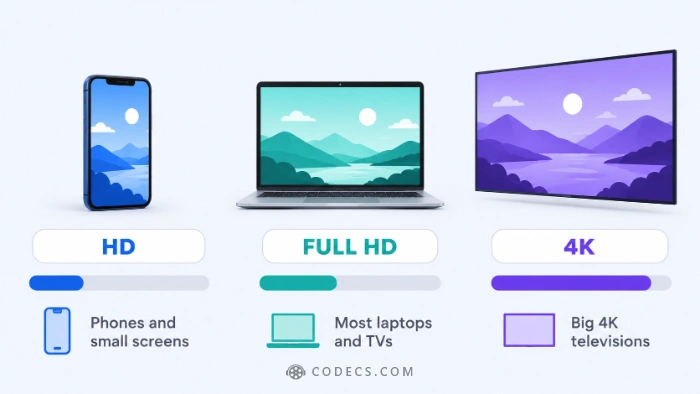
Add more if other people in your home are streaming or gaming at the same time. A very high ping can also cause slow starts and stalls on live channels.
Fast Internet but Still Buffering?
If your speed is well above those numbers, the problem is somewhere else. These are the usual suspects, in order.
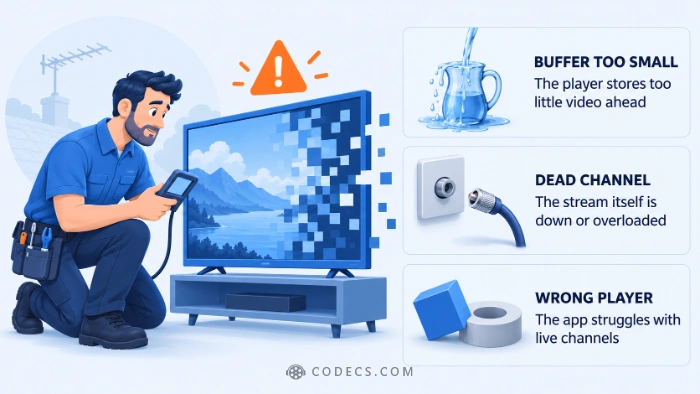
- The player's buffer is too small. In VLC media player, raising one setting usually stops the stutter - our guide shows the one setting that stops VLC buffering.
- The channel itself is dead or overloaded. IPTV Checker tests every channel in your playlist and tells you which ones still work.
- The app isn't up to the job. On Android TV and Fire TV, a dedicated player such as TiviMate handles live channels more smoothly.
Not sure which player to use? Our list of the best free IPTV players covers every device.
Quick questions
How do I run a speed test in Windows 11?
Right-click the network icon on the taskbar and choose the speed test option. Today it opens a test in your browser, and the new built-in version shows the result right above the taskbar.
When will the built-in speed test reach my PC?
Microsoft hasn't said. It's in the Experimental Insider channel now, and features there usually take months to reach everyone.
What internet speed do I need for IPTV?
About 5 Mbps of steady download speed for Full HD and 15 Mbps for 4K, based on Netflix's recommendations. Add more if several people stream at once.
Why does IPTV buffer when my internet is fast?
Usually it's the player's buffer setting, an overloaded channel or a weak Wi-Fi signal near the TV. Test the speed on the device that buffers, then check the player and the channel.
Does the speed test use Bing?
The old version opens a test on Bing in your browser. The new one runs inside Windows and shows the result without opening a browser.
A one-minute speed test tells you whether buffering is your connection's fault or your player's - and Windows 11 is about to make that test even quicker.
If your speed is fine, fix the buffering in VLC media player, or tell us what speed your streams need.


Latest news comments
AllInteresting development with the Fire TV Stick 4K — losing Kodi sideloading is a big deal for a lot of users. For those ...
News: The New Fire TV Stick 4K Can't Run Kodi - Here's Which Fire Stick Still Can 3 commentsBrave just enabled it by default for stable users yesterday (1.97). Not specified is chromeOS will be passively gaining decode capability too, and ...
Team replied News: JPEG XL Is Back in Chrome: What It Means and How to Open JXL Files 1 commentI didn't know it was EU, AND france. That doesn't sound like a good idea. Related to coding or privacy.
News: Meet Qwant: The Private, EU-Built Alternative to Google 1 comment