Download River Past QuickTime DirectShow Filter 1.0.17
Direct Download Links - free, safe and fast mirrors
5.8K
all time
349KB
file size
updated
Jul 14, 2019
EU Main LINK
River Past QuickTime DirectShow Filter 1.0.17
Windows
quicktime_wmp_filter.exe
How did it go with River Past QuickTime DirectShow Filter?
Rate it in one click - your rating helps other readers pick the right tool.
What is River Past QuickTime DirectShow Filter?
By installing River Past QuickTime DirectShow Filter for WMP to your computer, you will easily play QuickTime and MPEG4 files using Windows Media Player.
River Past QuickTime DirectShow Filter screenshots
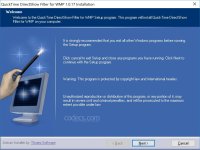
See the River Past QuickTime DirectShow Filter interface full size before you install it.
View full sizeHow to Download River Past QuickTime DirectShow Filter
- 1 Click the DOWNLOAD button for your preferred link (US/EU Main or Mirror). When prompted by your browser, choose "Save" and select a destination folder.
- 2 We recommend using the mirror links (EU MIRROR / US MIRROR) first - they tend to be faster and more reliable than external sources.
- 3 Having trouble downloading River Past QuickTime DirectShow Filter? If the download doesn't start, click the link again or try a different browser (Firefox/Chrome). Some security software may block downloads due to false positives.


