Error 0xc00d5212 means Windows found the video but has no decoder for what is inside it, and the free fix takes about two minutes.
Your file is almost certainly fine.
Windows is missing the decoder for one of the streams inside it, and most of the time that stream is HEVC video from a phone or camera.
Here is how to confirm which piece is missing, and the free download that fixes each one.
The fast fix. If the video came from a phone, a drone or an action camera, install the free HEVC Video Extensions from Device Manufacturer, then close and reopen the player. On Windows 10, take version 2.4.109.0 from the same page.
What 0xc00d5212 Actually Means
The full message reads: Can't play. This item was encoded in a format that's not supported. 0xc00d5212. Some versions open with the words Missing codec instead.
It comes from Media Foundation, the part of Windows that the Media Player app, Movies & TV and the Photos app all use to play video. Its internal name is MF_E_TOPO_CODEC_NOT_FOUND, which translates as no suitable decoder was found for this content.
That is good news, because it rules out a broken file. Windows opened the container, read what was inside, and then had nothing to decode one of the tracks with.
Not every player is affected. VLC and PotPlayer carry their own decoders and never use the Windows ones, so a file that throws this error in Media Player often plays straight away in them.
Step 1: Find Out What the File Contains
Installing codecs at random is how people end up with three packs fighting each other. Spend thirty seconds finding out which track Windows cannot read first.
Drop the file into our Codec Finder. It runs in your browser, uploads nothing, and lists the video and audio formats inside the file.
If you would rather use a desktop tool, MediaInfo shows the same details, including the exact audio format.
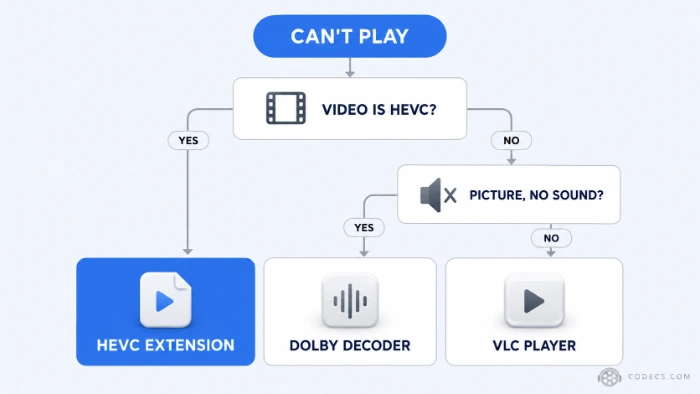
Step 2: Install the Decoder That Matches
Match what the Codec Finder reported against this table. Every option here is free.
| The file contains | Install this | Good to know |
|---|---|---|
| HEVC or H.265 video | HEVC Video Extensions | The usual culprit. Phones, drones and action cameras record 4K this way |
| AV1 video | AV1 Video Extension | Often already on Windows 11, but easy to lose after a reset |
| VP9 video, usually in a WebM file | VP9 Video Extension | Common on video downloaded from the web |
| MPEG-2 video, from DVDs or TV recordings | MPEG-2 Video Extension | Typical on VOB, TS and older camcorder files |
| AC-3 or EAC3 audio (Dolby Digital) | Dolby Digital Plus Decoder | Clean Windows 11 24H2 installs no longer include AC-3 |
| DTS audio, or anything rarer | VLC Media Player | Windows has no free DTS decoder of its own |
Want several of these in one go? Media Foundation Codecs gathers the Windows video extensions in one place.
How to Install the HEVC Fix
Because HEVC causes most of these errors, here is that one step by step.
- Open the download list. Go to the HEVC Video Extensions page and start the download.
- Pick the right build. Take the newest version on Windows 11, or 2.4.109.0 on Windows 10, because newer builds fail quietly there.
- Double-click the file. It is an AppxBundle, so Windows App Installer opens and does the rest.
- Close and reopen the player. Media Player and Photos only notice a new decoder when they start.
- Play the video again. A restart is rarely needed, but try one if the error stays.
Picture Plays but There Is No Sound
This is the same missing-decoder problem, just on the audio track. Media Player may show 0xc00d5212 or simply play the picture in silence.
Microsoft stopped including the AC-3 (Dolby Digital) codec with Windows 11 version 24H2. PCs upgraded from an earlier build usually keep it, while a clean install or a reset loses it.
The Dolby Digital Plus Decoder puts it back, and our guide to fixing silent AC3 video covers the other routes.
Still Seeing 0xc00d5212?
A few things catch people out after installing the right decoder.
- Wrong build on Windows 10. The newest HEVC builds will not run there - remove it and install 2.4.109.0 instead.
- The player was already open. Close it completely, including from the system tray, then try again.
- The file itself is damaged. Drop it into the online HEVC player, and if it will not play there either, the file is the problem.
- Some laptops have HEVC switched off in firmware. Recent Dell and HP models are affected, and our news piece on the change explains the workarounds.
For anything else, the Codec Troubleshooter walks through the remaining causes, and our HEVC troubleshooting guide goes deeper on H.265 files.
The Lookalike Errors: 0xc00d36c4 and 0xc10100be
Two other codes look similar but point somewhere else, so it is worth checking which one you actually have.
- 0xc00d36c4. Windows did not recognise the file type at all, usually because of a wrong file extension, an unusual container or a download that never finished.
- 0xc10100be. The message reads This file isn't playable, and it is more often a damaged or incomplete file than a missing codec.
For both, try the file in VLC first. If VLC plays it, a codec was missing after all; if VLC fails too, the file needs repairing or downloading again.
Or Skip Windows Codecs Entirely
If you only need to watch the file and do not care about Photos or Media Player, VLC Media Player plays HEVC, AV1, Dolby and DTS with nothing else installed.
The trade-off is that Windows itself stays unable to open those files, so thumbnails stay blank and the Photos app still refuses them. Our list of the best HEVC players compares the other options.
Quick questions
What does error 0xc00d5212 mean?
Windows opened the video but has no decoder for one of its tracks. It is a missing codec, not a broken file, and it is usually HEVC video.
Is the HEVC extension really free?
Yes. The Device Manufacturer edition is the same Microsoft decoder that the Store lists for a small fee, published free for PC makers to bundle.
Why do my iPhone videos show 0xc00d5212?
iPhones record in HEVC by default to save space. Install the HEVC extension once and every video from the phone opens normally.
Will a codec pack fix it?
A pack like K-Lite fixes DirectShow players, but Media Player and Photos use Media Foundation, so the matching Windows extension is the more reliable fix.
I installed the extension and nothing changed. Why?
Usually the player was still open, or a Windows 11 build went onto Windows 10. Close the app fully, check the build, and try again.
Can I fix it without installing anything?
You can watch the clip in the online HEVC player in your browser, but Windows itself will keep showing the error until a decoder is installed.
The bottom line
Find out which track Windows cannot read, install the free decoder for it, and reopen the player. For most people that is the HEVC extension.
- Get HEVC Video ExtensionsFree, fixes most 0xc00d5212 errors
- Check your file in the Codec FinderSee which decoder is missing
Did a different fix work for you? Tell us in the comments so the next reader finds it faster.


Latest comments
AllI am using [link] Playlist. What address can I use to populate the epg for this Playlist.
Team replied Guide: Free EPG URLs for IPTV: TV Guide Links That Still Work 1 commentSi mund te shikoj te gjitha kanalet e DigitAlb dhe Tring me url pa pagese ne Iptv Player?
Team replied Guide: Free Popular IPTV Playlist: Where to Get Fresh, Legal M3U Links in 2026 20 commentsالبروتوكول (http:// أو [link] بعنوان الـ IP أو الدومين، ورقم المنفذ (مثل :8080 أو :80).• مثال لشكل الرابط: [link]
Team replied Guide: Xtream Codes Explained: How They Work and Differ From M3U 1 comment