Windows 11 now ships with Sysmon, Microsoft's free activity logger, and turning it on takes two commands and about two minutes.
Sysmon used to be a separate download from Microsoft's Sysinternals toolkit, but since the March 2026 update it is part of Windows 11 itself.
It works like a flight recorder for your PC, quietly noting which programs start, what they connect to and which files they create.
It is switched off by default, so here is how to turn it on, where to read what it records, and how to switch it off again.
What Sysmon actually does - and what it does not
Sysmon writes a detailed diary of activity into the Windows event log. It sees things Task Manager forgets the moment they happen, such as a program that ran for two seconds during an install and then vanished.
It does not block, quarantine or remove anything, and it is not antivirus. Think of it as a security camera rather than a guard - it records, and you or another tool decide what to do about it.
For a home user, it answers three practical questions:
- What did that installer actually run and drop on my PC?
- Which program keeps connecting to the internet in the background?
- After a scare - a strange pop-up, a suspicious download - what happened, and when?
Before you start
- Windows 11 with the March 2026 update or later. To check, press Windows + R, type winver and press Enter - Windows 11 builds are 22000 or higher, and anything lower is Windows 10, which does not have it.
- An administrator account on the PC.
- No older standalone Sysmon installed - the built-in one refuses to run alongside it. Step 2 below checks this for you.
How to turn on the built-in Sysmon
- Open PowerShell as administrator. Right-click the Start button, choose Terminal (Admin) and click Yes - on Windows 11 it opens in PowerShell, which is what these commands need.
- Check for an old copy. Type the first command below and press Enter - if it prints nothing, you are clear; if it lists a Sysmon service, uninstall that old version first.
- Add the Sysmon feature. Run the second command below and wait for it to finish.
- Start Sysmon. Run the third command, which installs the Sysmon service and driver with Microsoft's default settings.
- That is it. No restart is needed, and Sysmon starts logging straight away.
Check for an existing standalone Sysmon:
Get-Service sysmon*Add the built-in Sysmon feature:
Enable-WindowsOptionalFeature -Online -FeatureName SysmonInstall and start Sysmon:
sysmon -iCommand not recognized?
If you see 'Get-Service' is not recognized as an internal or external command, you are in the old Command Prompt, not PowerShell. Type powershell, press Enter, and run the command again.
Prefer clicking?
Open Settings, go to System, then Optional features, then More Windows features, tick Sysmon and click OK. You still need to run sysmon -i in an admin Terminal afterwards - the tick box only adds the feature, it does not start it.
If you copy commands from Microsoft's own setup page, watch the dash before the i. Some versions of that page show a long dash instead of a normal hyphen, and Terminal will not accept it.
Where to read what Sysmon recorded
Press Start, type Event Viewer and open it. In the left panel, open Applications and Services Logs, then Microsoft, then Windows, then Sysmon, and click Operational.
Every row is one event, and the Event ID column tells you what kind. These are the ones worth knowing:
| Event ID | What it means | Look here when |
|---|---|---|
| 1 | A program started, with its full command line | You want to know what an installer really ran |
| 3 | A program made a network connection | Something keeps going online in the background |
| 11 | A file was created | You are hunting for files a program left behind |
| 13 | A registry setting was changed | An app keeps resetting your browser or startup settings |
| 22 | A program looked up a web address | You want to see which sites a program contacts |
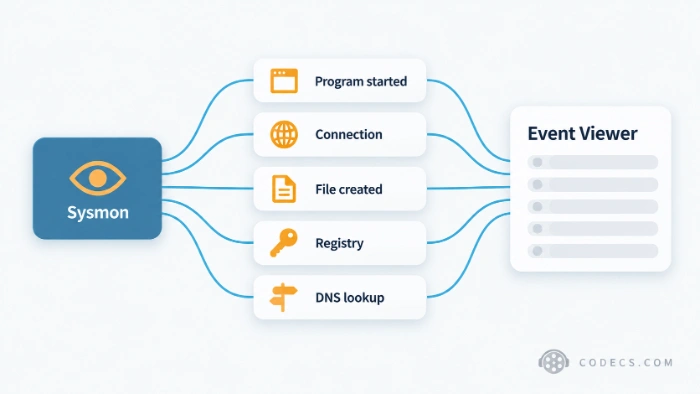
Not every event type is switched on in the default setup, so some of these rows may never appear until you add a configuration file. Click any event and the General tab below shows the details in plain text.
Make it log more - or less
What Sysmon records is controlled by a small settings file in XML format. You do not have to write one yourself: Microsoft points to free community files, and SwiftOnSecurity's sysmon-config is the popular starting point because it already filters out most everyday noise.
Save the file somewhere simple, such as a new folder called Sysmon on your C: drive, then apply it from an admin Terminal. The change takes effect at once, with no restart.
sysmon -c C:\Sysmon\sysmonconfig.xmlGo easy on the settings.
A configuration that logs everything can write thousands of events an hour and make the log hard to read. Start with a filtered community file and add rules only when you need them.
How to turn Sysmon off again
To stop logging, run the first command below in an admin Terminal. To remove the feature completely, run the second one as well and restart when Windows asks.
sysmon -uDisable-WindowsOptionalFeature -Online -FeatureName SysmonWho should look elsewhere
If you just want to see what is running right now, Task Manager already does that, with no setup. Sysmon is for what happened when you were not watching.
If you want to see the actual traffic leaving your PC rather than a list of connections, Wireshark shows every packet. And if Sysmon turns up adware or a browser hijacker, AdwCleaner removes it in a few clicks.
If things look genuinely bad, the cleanest fix is often to restore a system image from before the problem started. More free tools sit in our Security Tools section.
Still on Windows 10? The built-in version is Windows 11 only, but the standalone Sysmon from Sysinternals works the same way.
Quick questions
Is the built-in Sysmon free?
Yes. It is an optional feature included with Windows 11, with nothing to buy and nothing extra to download.
Will Sysmon slow down my PC?
With the default settings or a filtered community configuration, most people will not notice it. A configuration that logs everything can use more disk space and some processor time, which is why a filtered file is the safer start.
Does it work on Windows 11 Home?
Microsoft does not say which editions include it. The quickest way to find out is to run Get-WindowsOptionalFeature -Online -FeatureName Sysmon in an admin Terminal - if it reports the feature, your edition has it.
Is it the same as the Sysinternals Sysmon?
It is the same tool, now delivered and updated through Windows Update. The two cannot run side by side, so remove the standalone version before enabling the built-in one.
Does Sysmon send my activity to Microsoft?
Sysmon writes to the event log on your own PC. Microsoft's documentation describes no upload, and businesses that want the data elsewhere have to set up forwarding themselves.
Can Sysmon remove a virus?
No. It only records activity. Use it to find out what happened, then use your antivirus or a cleanup tool to deal with it.
The bottom line
Two commands give your PC a detailed activity diary that costs nothing and blocks nothing - worth switching on before you need it. Tell us what it caught on yours.


Latest comments
AllInteresting development with the Fire TV Stick 4K — losing Kodi sideloading is a big deal for a lot of users. For those ...
News: The New Fire TV Stick 4K Can't Run Kodi - Here's Which Fire Stick Still Can 3 commentsThanks genius, it worked for me. v2.4.149.0 on windows 10
Guide: How to Download HEVC Video Extension for Free 181 commentsXMediaRecode gives only the option to Copy (No convert) in Audio Mode drop down. I am trying to convert/recode the EAc3 ...
Team replied Guide: How to Convert EAC3 Audio to AC3 or AAC With XMedia Recode 1 comment