AI slop is the flood of low-quality machine-made content filling the web, and Merriam-Webster made "slop" its word of the year for 2025. On a site about video and audio files, the part that matters is what it does to the files themselves.
Merriam-Webster defines slop as digital content of low quality produced in quantity by artificial intelligence, and named it the 2025 word of the year.
The term covers text, images, video and audio, and it describes volume as much as quality - the problem is not one bad clip but ten thousand of them.
This page is about the media side: how to recognise it, why it looks broken in ways a codec cannot fix, and what to check before you blame your player.
What AI slop looks like in a media file
Text slop is easy to spot because you read it. Video and audio slop is harder, because the file usually plays perfectly - the container is valid, the codec is standard, and nothing errors.
- Detail that dissolves under motion. A still frame looks sharp, then anything that moves smears into texture that is not quite anything - hair, crowds, foliage and text on signs go first.
- Faces and hands that drift. Features shift slightly between frames because each one was generated rather than filmed, which reads as an unsettling wobble rather than an obvious error.
- Audio with no room in it. Generated speech and music often carry no reverb, no breath and no noise floor, so a voice sounds pasted onto silence.
- Bitrate spent on nothing. An upscaled or generated clip can be a huge file whose extra bits describe invented texture rather than real detail.
The last one is the reason this belongs on a codecs site. AI-generated and AI-upscaled video is unusually expensive to compress, because encoders are built to preserve real detail and cannot tell the invented kind from the genuine kind.
Why bad AI video is not a codec problem
Readers regularly arrive convinced a file is broken when the source was simply poor. A codec cannot restore information that was never captured, and no player setting sharpens a frame that was generated soft.
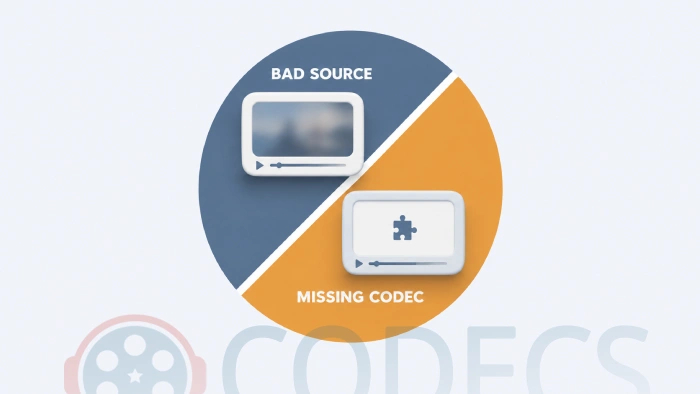
The two problems look different once you know the tell. A missing decoder gives you a black screen, an error code or sound with no picture - the file does not play. Slop plays fine and simply looks wrong, and the same wrongness follows the file into every player you try.
If you are not sure which you are looking at, Why Videos Don't Play: Understanding Decoders and Renderers covers the failure side, and if a file genuinely will not open, the K-Lite Codec Pack supplies the decoders Windows leaves out.
How to check a file before you trust it
You cannot prove a clip is AI-made from its file properties alone, but three checks together are usually enough to tell you what you are holding.
- Read the metadata. MediaInfo shows the encoder, container, bitrate and resolution - generation and upscaling tools often leave their name in the writing library field, and a 4K file at a low bitrate has been blown up rather than shot.
- Look for a Content Credentials or AI label. Major platforms including YouTube, TikTok and Meta now require disclosure for realistic synthetic media and display a label on it, and some files carry provenance metadata that travels with them.
- Watch one moving second at full size. Slop survives thumbnails and collapses at full resolution, which is exactly backwards from a genuine low-bitrate encode, where the whole frame degrades evenly.
Not sure what is inside a file at all? The Codec Finder reads a media file in your browser and reports its codecs without installing anything.
Why it matters beyond the annoyance
Three consequences are worth knowing about, and none of them are hypothetical any more.
- Search and download results get worse. Sites generated in bulk outrank hand-written ones on long-tail queries, which is how people end up on pages offering a "codec" that is really an installer bundle.
- Models trained on slop degrade. Researchers describe a feedback loop in which systems trained on their own output lose accuracy and variety over successive generations.
- Real work gets doubted. The reflex to call anything imperfect "AI" now falls on genuine photographs, recordings and writing, which is its own kind of damage.
There is a hopeful counterweight: the same machine-learning research that produces slop is also being used inside encoders, where it does measurable good. That side is covered in Is AI Enabling Next-Generation Codecs?
What you can actually do
Not much about the flood, quite a lot about your own files. Keep originals rather than re-uploaded copies, because every pass through a platform re-encodes and every re-encode makes a weak source weaker.
When you generate or upscale something yourself, encode it once at a sensible bitrate and keep the master. And when you publish, leave the AI disclosure on - the label costs you nothing and the alternative is being labelled automatically, less kindly, by the platform.
Quick questions
What does "AI slop" actually mean?
Low-quality digital content produced in bulk by artificial intelligence. Merriam-Webster added the sense to its dictionary and made "slop" the word of the year for 2025, beating "performative" and "tariff".
Can I tell for certain that a video was made by AI?
Not with certainty from the file alone. Metadata, a platform's AI label and the way detail behaves under motion together give a strong answer, but detection tools are unreliable and produce false accusations in both directions.
Why do AI-generated videos make such large files?
Encoders preserve detail, and generated frames are full of invented detail that behaves like noise. The encoder cannot tell it is meaningless, so it spends bits on it - which is why a slop clip can be larger than a real one that looks better.
Will a better codec or player fix a blurry AI video?
No. A decoder reproduces what is in the file, so if the detail was never there, nothing adds it back. Sharpening filters and AI upscalers only invent more of the same.
Does AI upscaling count as slop?
Only when it is passed off as the real resolution. Upscaling a genuine source for your own viewing is fine; labelling an upscaled 1080p file as 4K, on a page selling it as remastered, is the slop version.
Slop is a source problem, not a playback problem - which is the one piece of good news, because it means your setup was never at fault.
If a file genuinely will not play rather than merely looking poor, download the K-Lite Codec Pack and rule the codec side out, or tell us the worst slop you have run into if you have a good example.


Latest reviews
AllFree M3U Playlist for TiviMate: Legal Lists That Load Cleanl...
5/5The link isn't working. https://www.free-codecs.com/guides/free-epg-urls-for-iptv.htm
The New Fire TV Stick 4K Can't Run Kodi - Here's Which Fire ...
5/5The Vega OS shift is the biggest Firestick story of 2026. Anyone buying now needs to know: 4K Max = sideloading ...
JPEG XL Is Back in Chrome: What It Means and How to Open JXL...
5/5Brave just enabled it by default for stable users yesterday (1.97). Not specified is chromeOS will be passively gaining decode ...