PhotoCraft, FilmCraft and LightCraft, the free AI-built copies of Photoshop, Premiere Pro and Lightroom, have now been tested for a week, and the verdict is clear: they look familiar, but they are not ready for real work yet.
The apps come from the ArtCraft team, who used AI coding agents to write them in the Rust programming language.
As reported by PetaPixel, software engineer Brandon Thomas set out to offer familiar editing tools without an Adobe subscription.
Here is what early testers liked, what broke, and which free tools to use while the apps mature.
What Can You Download?
- PhotoCraft: a Photoshop-style image editor with layers, masks and support for Photoshop's PSD files, labelled early alpha, which means an early test version.
- FilmCraft: a Premiere-style video editor with a multitrack timeline, effects and audio tools.
- LightCraft: a photo library and RAW editor modelled on Lightroom's cloud-style app, rather than Lightroom Classic.
The wider lineup adds VectorCraft, PdfCraft, EffectCraft and DesignCraft for illustration, PDFs, motion graphics and page layout, and a spreadsheet called GridCraft is on the way.
Builds are available for Windows, macOS and Linux, and Phoronix counted several new releases in the first week alone.
What Early Testers Say
Most hands-on reports come from long threads on Hacker News and the Phoronix forums. The short version: the apps look polished and familiar, but many basic tools do not behave like their Adobe originals yet.
What impressed testers:
- Speed. FilmCraft, the Premiere-style editor, opens remarkably fast, because these are native programs rather than web pages in a wrapper.
- A familiar layout. Menus and panels sit roughly where Photoshop users expect them, and one tester found most of the buttons they tried did something useful.
- No account needed. PhotoCraft installs and launches with no sign-up, no licence screen and no pop-ups.
- Usable on Linux. One Linux user tried the portable PhotoCraft build and found it rough but able to do a lot of work for something so new.
What frustrated them:
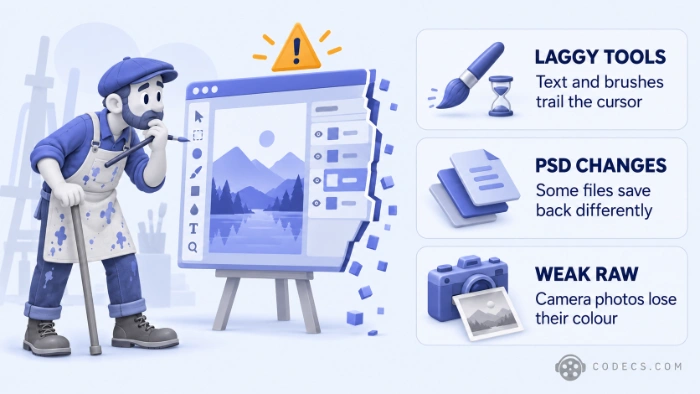
- Laggy, unreliable tools. A designer who opened simple layout projects in PhotoCraft reported lag, a text cursor that missed its target and keyboard shortcuts that did nothing.
- Missing basics. Testers could not paste an image from the clipboard, the clone stamp showed no live preview, and one artist uninstalled it because a drawing tablet and stylus did not work.
- Files that would not open. One Fedora user found FilmCraft launched fine but would not open any of their clips, and early builds could not export HEVC or AV1, two space-saving video formats used by modern phones and streaming sites.
- PSD files change on save. The project says nearly all of its test files look the same after a re-save, but the saved file is rewritten rather than copied, and testers found a few that changed.
- Weak RAW photos. RAW files are the unprocessed photos a camera saves, and a photographer found LightCraft's colours far behind Lightroom's, while PhotoCraft could not process them at all.
Fixes are arriving fast, so some complaints may already be out of date. PhotoCraft 0.5.0, released on 8 October, added a New from Clipboard command and better recovery after a crash.
The mood was split rather than hostile. Several testers called the apps impressive for a project only weeks old, while others said almost nothing worked on the tasks they tried.
The Developer Says It Is Not Ready Either
A developer behind the project, posting on Hacker News as echelon, agreed the apps are super early alpha and said they were shared publicly sooner than planned.
The same developer says the code uses permissive open-source licences (MIT or Apache), the apps collect no usage data, and the goal is to match every Adobe feature. Commenters noted earlier posts promised that within a month, and several plan to check back.
AI-Built Does Not Mean Adobe's Code
The apps are described as clean-room rebuilds: new code written to copy how Adobe's software behaves, not code taken from it. The project's instructions to its AI agents, quoted in the discussion, forbid opening Adobe's program files and limit them to public documents and watching the real apps run.
That is why commenters rejected a Hacker News headline saying the suite was decompiled, meaning rebuilt from Adobe's own program code. Others argue that AI trained on huge amounts of existing code blurs the line, but no court has ruled on it, so it is no reason to download or avoid the apps.
Should You Switch Yet?
Not for anything with a deadline. Test the Craft apps on a copy of a small project, and keep a proven free tool for real work in the meantime.
| If you use | Free tool to rely on today | Craft app to test on the side |
|---|---|---|
| Photoshop | GIMP | PhotoCraft |
| Premiere Pro | Kdenlive | FilmCraft |
| Lightroom | darktable | LightCraft |
Keep your originals safe.
Open duplicates of your PSDs, RAW photos and video projects, never the only original, until these apps leave alpha. A familiar menu is not proof that a tool behaves the way Adobe's does.
Quick questions
Are PhotoCraft and FilmCraft really free?
Yes. The Crafting apps are free and open source. ArtCraft separately sells paid AI image and video generation, which the desktop apps do not need.
Can PhotoCraft replace Photoshop yet?
Not yet. Its own status note calls it early alpha and lists missing tools, typography, professional workflows and plug-in support among the gaps.
Does PhotoCraft open PSD files?
Yes, it opens and saves layered PSD and PSB files. Re-saved files are rewritten rather than copied, so compare the result with your original before sharing it.
Can FilmCraft export HEVC or AV1?
Not in the early builds. It exports H.264 MP4, ProRes and DNxHR, and testers found the export options limited.
Do the apps work offline?
Yes. They run on your own computer and process your files locally, with no cloud upload in between.
Is it safe to install them?
The code is public on GitHub and the apps run locally. The real risk is an early build crashing or saving a file wrongly, so keep backups of anything that matters.
The bottom line
Impressive for their age, not yet a replacement. Worth a test on a small project, and if you have tried them already, tell us how they did.


Latest news comments
All[link] Epg is not working on this one.
Team replied News: Free USA IPTV Playlist: The American TV That Is Really Free 1 commentInteresting development with the Fire TV Stick 4K — losing Kodi sideloading is a big deal for a lot of users. For those ...
News: The New Fire TV Stick 4K Can't Run Kodi - Here's Which Fire Stick Still Can 3 commentsBrave just enabled it by default for stable users yesterday (1.97). Not specified is chromeOS will be passively gaining decode capability too, and ...
Team replied News: JPEG XL Is Back in Chrome: What It Means and How to Open JXL Files 1 comment