Your MP3 files are probably wasting space. VBR encoding fixes that - but it comes with trade-offs you should know about.
You ripped a CD at 320 kbps CBR. Every second of that file - even the silent gaps between tracks - uses the same amount of data.
That quiet intro? 320 kbps. The two-second pause? Still 320 kbps. That's like paying rush-hour rates for an empty highway.
VBR (Variable Bit Rate) encoding solves this by adjusting the bitrate on the fly.
Complex passages get more data. Simple ones get less. The result is a file that sounds the same - or better - at a fraction of the size.
How VBR Actually Works
MP3 files are encoded in small chunks called frames. With CBR (Constant Bit Rate), every frame gets the same number of bits - typically 128, 192, or 320 kbps.
VBR lets the encoder make smarter decisions frame by frame. A dense orchestral passage might need 320 kbps to sound right. A spoken pause might only need 32 kbps.
The LAME MP3 Encoder - widely considered the best MP3 encoder available - handles this automatically through its VBR presets (V0 through V9).
Most users should start with V2, which averages around 190 kbps and sounds transparent to the vast majority of listeners.
VBR Advantages
Why VBR Wins for Most Use Cases
Smaller files, same quality.
A VBR file at V2 (~190 kbps average) typically sounds as good as a 256 kbps CBR file - at 25-30% less storage.
Better high-frequency detail.
VBR allocates extra bits to complex passages where CBR would introduce audible artifacts - particularly in cymbals, strings, and sibilance.
Perfect for music libraries.
If you're ripping CDs or converting audio collections, VBR gives you the best quality-to-size ratio. See our CD Ripping Guide for step-by-step instructions.
Great for spoken word.
Podcasts and audiobooks have lots of silence and pauses - VBR drops the bitrate dramatically during these sections, saving significant space.
VBR Disadvantages
VBR is not perfect for every situation. Here's where it falls short:
Streaming compatibility.
Live audio streaming typically requires a predictable, constant data rate. VBR's fluctuating bitrate can cause buffering. If you're setting up a stream, CBR is safer.
Unpredictable file sizes.
You can't know the exact file size before encoding. For storage planning or bandwidth budgets, CBR gives you predictable numbers.
Legacy device issues.
Some older MP3 players and car stereos misreport track length or skip with VBR files. This was a bigger problem a decade ago, but cheap hardware still occasionally trips over it.
DJ and broadcast use.
Professional DJs and radio stations typically prefer CBR 320 kbps for maximum compatibility and zero risk of playback glitches during live sets.
VBR vs CBR vs ABR - Quick Comparison
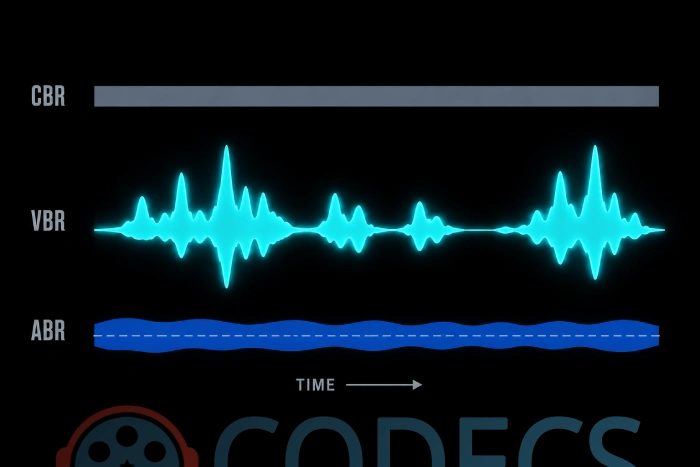
CBR (Constant Bit Rate) - Same bitrate throughout. Predictable file size. Best for streaming and maximum compatibility.
VBR (Variable Bit Rate) - Bitrate adapts to audio complexity. Best quality-to-size ratio. Ideal for music libraries and offline listening.
ABR (Average Bit Rate) - Targets an average bitrate while allowing some variation. A middle ground, but generally outperformed by VBR in quality tests.
Best VBR Settings for 2026
If you're using the LAME Encoder (and you should be), here are the recommended VBR presets:
- V0 (~245 kbps) - Archival quality. Virtually indistinguishable from the original source.
- V2 (~190 kbps) - The sweet spot. Transparent quality for the vast majority of listeners and equipment.
- V4 (~165 kbps) - Good quality with noticeably smaller files. Fine for casual listening.
- V6 (~115 kbps) - Best for podcasts and spoken word content where quality demands are lower.
For detailed encoding instructions and command-line examples, check our WAV to MP3 Best Quality Settings Guide.
Prefer a graphical interface? LameXP wraps LAME in an easy drag-and-drop interface with batch processing and preset management - no command line needed.


Audio Quality: ABR>VBR>CBR
but for some reason they are trying to hide this information until now.