A .HIF file is a HEIF photo, written by a Canon or a Sony camera, and there is nothing exotic inside it - Windows simply cannot read it until you add two free pieces.
The short version: HIF is a file extension, not a separate format.
Rename it, and nothing improves, because the missing piece is a decoder rather than three letters.
Here is what is actually in the file, and how to open it on each platform.
What Is Actually Inside a HIF File
HEIF is the container standard published by MPEG in 2015. It holds one or more images, plus thumbnails, metadata and edits, and it leaves the choice of compression open.
In practice, everything you will meet uses HEVC to compress the picture itself. That is true of an iPhone HEIC and it is true of a camera HIF.
So a HIF is a HEIF container with an HEVC-coded photograph inside it. The file even says so: Canon files declare the compatible brands mif1 and heix, and heix is simply the tag for HEVC-coded stills.
Where the name came from. Camera makers picked a three-letter extension because DCF, the file-naming standard cameras follow, has never been comfortable with four. HIF is HEIF with a letter trimmed off, nothing more.
HIF, HEIF and HEIC in One Table
These are not three competing formats. Two of them are extensions on the same kind of file, and the third is the standard both are built on.
| Name | What it actually is | Where you meet it |
|---|---|---|
| HEIF | The container standard itself, published by MPEG in 2015 | The thing the other two are made of |
| HIF | A HEIF file with HEVC inside, written as 10-bit | Canon and Sony cameras |
| HEIC | A HEIF file with HEVC inside, usually written as 8-bit | iPhones, and now plenty of Android phones |
| JPEG | The 1992 format, 8-bit and sRGB only | Everywhere, and it opens on everything |
The real difference between a HIF and a HEIC is the camera that made it. Canon and Sony both write 10-bit 4:2:2 files under the HDR PQ standard, which is why HIF files hold visibly more tone in skies and shadows than a phone snap does.
Canon's own claim is worth knowing: an HDR PQ HEIF holds 10-bit data at roughly the same file size as the 8-bit JPEG it replaces.
How to Open a HIF File on Windows
Windows ships with no HEIF support at all, which is why the file shows a blank icon rather than an error.
Two Microsoft add-ons fix it, and you need both.
- Install HEIF Image Extensions, which teaches Windows the container.
- Install the HEVC extension, which decodes the picture inside it - our guide covers how to get the HEVC extension free rather than paying for the Store listing.
- Restart File Explorer from Task Manager, because thumbnails will not rebuild until you do.
After that, HIF files show real thumbnails in File Explorer and open in the Photos app like any other picture. Anything else built on Windows Imaging Component picks up the same support at the same time.
Renaming does not work. Changing the extension to .heif or .heic is the first thing everybody tries, and it changes nothing, because Windows was never confused about the name. It has no decoder, and only the two add-ons above supply one.
On a Mac There Is Nothing to Install
macOS has read HEIF since High Sierra, and Preview opens a HIF straight from the Finder with no add-ons at all.
Quick Look works too, so the space bar previews them the same way it previews a JPEG.
Four Ways to Open One
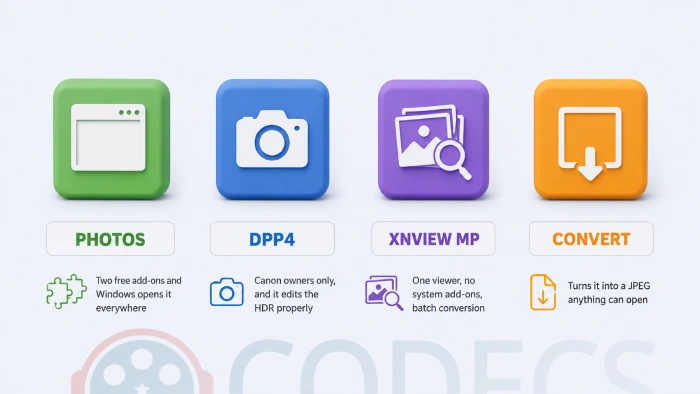
The two extensions are the tidiest answer on Windows, because they fix the whole system at once rather than one application.
Canon Digital Photo Professional is the right choice if you shot the file on a Canon and want to edit it rather than look at it, since it is the only free option that handles the HDR PQ tone curve as Canon intended. It is free to Canon owners and the download asks for a camera serial number.
XnView MP is the answer if you would rather not touch the Microsoft Store. It reads HIF directly, in both 4:2:0 and 4:2:2, and converts folders of them in a batch.
Converting HIF to JPEG
Convert when you are sending files to someone else, uploading somewhere that rejects HEIF, or handing images to a client whose software you cannot control.
XnView MP does batches, DPP4 exports one at a time with Canon's own colour handling, and HEIF to JPEG in the browser handles a one-off with nothing to install.
Keep the originals either way. A JPEG is 8-bit, so the conversion throws away the extra tonal information permanently.
Who Should Look Elsewhere
Here is the tell, and you can check it before installing anything: open Photoshop and try to drag a .HIF onto it.
It will refuse. Adobe does not read Canon HIF files, and no Windows extension changes that, because Photoshop does not use the system imaging pipeline for this.
If your whole workflow runs through Photoshop, the practical answer is to shoot RAW plus JPEG instead of HEIF, or to convert every HIF on import and accept the loss.
Quick questions
Is HIF the same as HEIC?
Effectively yes. Both are HEIF containers with an HEVC-coded picture inside. The extension tells you which kind of device wrote it, not what is in it.
Which cameras write HIF files?
Canon bodies including the EOS-1D X Mark III, R5, R6 and R3, and Sony bodies including the a7 IV, a1 and a7S III. Both makers use the same .HIF extension.
Can I just rename a .HIF to .HEIC?
No. The extension was never the problem. Without a HEIF and HEVC decoder installed, the renamed file fails in exactly the same way.
Do I have to pay for the HEVC extension?
The main Microsoft Store listing charges a small fee, but there is a free route to the same decoder. Our guide on getting the HEVC extension free walks through it.
Why does my HIF look flat compared to the camera screen?
The file is HDR PQ, and an ordinary SDR monitor cannot show that range. Nothing is wrong with the photograph - it looks correct on an HDR display, or through software that maps it for you.
Should I shoot HIF instead of JPEG?
Shoot it if you have an HDR display or you finish your pictures on a computer. If you hand files straight to other people, JPEG saves everyone the compatibility conversation.
One free add-on, one free decoder, and the blank icons turn back into photographs.
Download HEIF Image Extensions and see whether your camera folder finally opens, or tell us which camera your HIF files came from if you got there another way.


Latest comments
AllXMediaRecode gives only the option to Copy (No convert) in Audio Mode drop down. I am trying to convert/recode the EAc3 ...
Guide: How to Convert EAC3 Audio to AC3 or AAC With XMedia Recode 1 commentTo view major football league live
Guide: Free Popular IPTV Playlist: Where to Get Fresh, Legal M3U Links in 2026 19 commentsThe link isn't working. [link]
Guide: Free M3U Playlist for TiviMate: Legal Lists That Load Cleanly 1 comment