Microsoft is splitting Photos into three apps on Windows 11, and the new build will not install on Windows 10.
If you are on Windows 10, nothing breaks.
You keep the Photos app you already have, and it works exactly as before.
Here is what changes on Windows 11, and what we found inside the new package.
What Is Changing on Windows 11
Microsoft announced the new Photos experience on 15 October. It reached Windows Insiders first, started spreading to all Windows 11 PCs on 26 October, and should be everywhere by mid-December.
- Photo Viewer is the old Photos app, renamed. It opens when you double-click a picture and keeps the editing tools, object removal included.
- Photos is a new gallery built on OneDrive Photos. It shows pictures from your PC, OneDrive and iCloud in one place, and takes the old app's spot in Start.
- Gallery in File Explorer stays as it is.
That is three ways to look at the same pictures, which you may found more confusing than helpful.
Why the New Build Skips Windows 10
Microsoft has said nothing about Windows 10. The answer is in the packages themselves, so we compared the last two Photos builds.
| Build | Name in Windows | Installs on | Size |
|---|---|---|---|
| 2026.11090 (September) | Photos | Windows 10 21H2 and Windows 11 | 1.09 GB |
| 2608.1401 (24 October) | Photo Viewer | Windows 11 only | 873 MB |
The new build also drops the AutoPlay entries that offered to import photos when you plug in a phone or a camera card. On Windows 11, that prompt will no longer come from this app.
We tried it on a Windows 10 PC to be sure. The installer stops straight away:
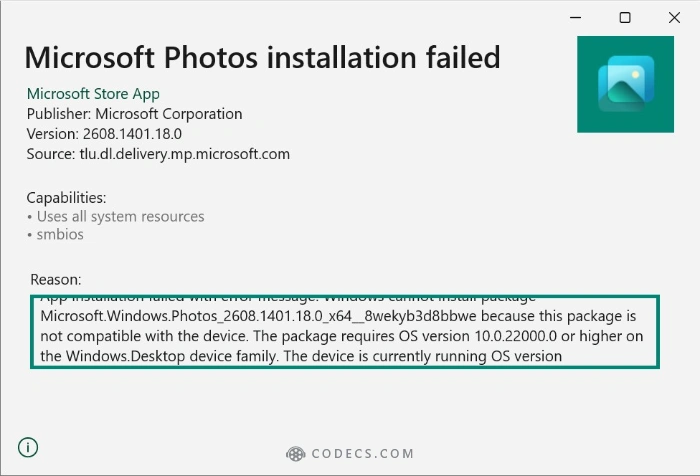
Windows cannot install package Microsoft.Windows.Photos_2608.1401.18.0 because this package is not compatible with the device. The package requires OS version 10.0.22000.0 or higher.
In plain English: 10.0.22000 is the first release of Windows 11, and Windows 10 22H2 reports itself as 10.0.19045. The package is too new for the PC, and nothing on your PC is broken.
What Windows 10 Users Should Do
Nothing. Windows 10 stays on build 2026.11090, which still opens, edits and imports your photos.
If Photos is missing or broken, our Microsoft Photos page lists the Windows 10 build separately. iPhone photos still need HEIF Image Extensions plus the free HEVC Video Extensions from Device Manufacturer, on any version of Windows.
Just expect 2026.11090 to be the last Photos build Windows 10 gets. Microsoft ended Windows 10 support in October 2025, so new features will land on Windows 11 only.
If you want a viewer that keeps improving on Windows 10, ImageGlass is free, opens instantly and reads HEIC and AVIF without any Windows extension.
Quick questions
Will Photos stop working on Windows 10?
No. The version you have keeps working. It simply will not be replaced by the new Photo Viewer.
Where did Photos go on Windows 11?
It is now called Photo Viewer and opens when you double-click an image. The Photos icon in Start opens the new gallery app instead.
Why do I get error 0x80073CFD when I install Photos on Windows 10?
You are installing the new 2608 build, which needs Windows 11. Install build 2026.11090 instead, the Windows 10 download on our Microsoft Photos page, and it goes in without the error.
Does the new Photos gallery need a Microsoft account?
No. Microsoft says pictures stored on your PC show up without signing in. OneDrive and iCloud photos need their own sign-in.
The bottom line
Windows 11 gets a renamed Photo Viewer and a new gallery. Windows 10 keeps the Photos it has, and that is fine.


Latest news comments
AllInteresting development with the Fire TV Stick 4K — losing Kodi sideloading is a big deal for a lot of users. For those ...
News: The New Fire TV Stick 4K Can't Run Kodi - Here's Which Fire Stick Still Can 3 commentsBrave just enabled it by default for stable users yesterday (1.97). Not specified is chromeOS will be passively gaining decode capability too, and ...
Team replied News: JPEG XL Is Back in Chrome: What It Means and How to Open JXL Files 1 commentI didn't know it was EU, AND france. That doesn't sound like a good idea. Related to coding or privacy.
News: Meet Qwant: The Private, EU-Built Alternative to Google 1 comment