Windows 11 24H2 Home and Pro just got their final update - and it fixes the Dolby Digital crash that broke movie sound last month.

The update is called KB5127648, and it arrived on 13 October.
Install it, then move to a newer Windows 11 version - it is free, small and takes one restart.
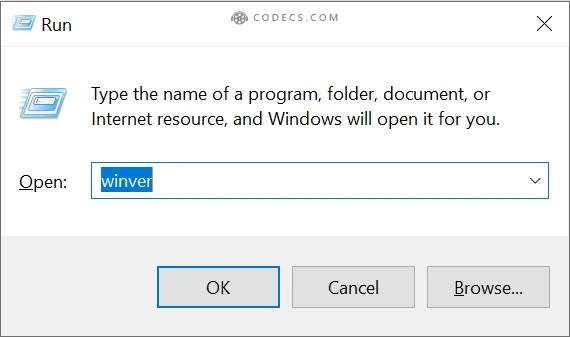
Not sure which version you have? Press Win + R, type winver and press Enter. If the build number starts with 26100, you are on 24H2 and this is your last update.
The Good News: Dolby Digital Works Again
September's preview update, KB5124010, made some apps crash the moment they tried to play AC-3 (Dolby Digital) sound - the AC-3 crash we covered in September. Older media players and games were hit hardest.
Microsoft's release notes for KB5127648 now list it plainly: "This update fixes an issue that affects AC-3 audio playback in some applications." The fix lands on 24H2, 25H2 and 26H2 alike.
The same update also steadies Bluetooth audio. It fixes a crash while streaming to Bluetooth headphones, improves some headset microphones and makes LE Audio earbuds more reliable.
Still using a USB sound card or DAC? One older bug is only partly fixed. Some USB Audio Class 1.0 devices can still show "This device cannot start (Code 10)" or stay silent. Microsoft says switching the device to 2-channel (stereo) mode in Sound settings brings audio back for some people.
What Happens to 24H2 Now
From here, Windows 11 24H2 Home and Pro get no more security fixes, bug fixes or support. Your PC keeps working exactly as before - it just stops getting protection from new threats.
There is no paid extension for home users, unlike Windows 10. Work and school PCs on Enterprise or Education editions are on a different clock and stay supported until October 2027.
Microsoft is already moving home PCs off 24H2 automatically. Windows Update will offer 25H2 and ask you to pick a restart time.
25H2 or 26H2: Which One Should You Pick?
Both are the same Windows underneath. Moving to either one is a tiny download and one restart, and your files and apps stay where they are. The only real difference is how long the support lasts.
- 25H2 - security updates until October 2027. This is what Windows Update gives you by default.
- 26H2 - security updates until October 2028. That is one extra year for the same one restart.
Our pick is 26H2, simply for the extra year. If you want the full download options, including the ISO, our 26H2 download guide has them.
How to Move Off 24H2 in One Restart
- Press Win + I and open Windows Update.
- Turn on Get the latest updates as soon as they're available. This puts you in line for 26H2 instead of 25H2.
- Click Check for updates and install everything waiting, including KB5127648.
- When the new version shows up, click Download and install, then Restart now.
- Run winver again. A build starting with 26300 means 26H2, and 26200 means 25H2. Either one means you are covered.
If 26H2 has not reached your PC yet, take 25H2 now rather than waiting. You can move to 26H2 later in the same quick way.
If the Upgrade Never Shows Up
First, catch up. Install every pending update, restart and check again. A PC that is months behind has to catch up before the new version is offered.
Look for a safeguard hold. Microsoft sometimes holds back the upgrade on PCs with a known driver or app conflict. Windows Update then only says something vague like "nothing requires your attention". Microsoft's safeguard hold page explains how to check.
Use the official tool. The free Windows 11 Installation Assistant installs the newest version over your current one and keeps your files and apps. Leave it alone if there is an active safeguard hold, though, because it can install straight into the problem the hold is there to avoid.
Installed Windows 11 on an unsupported PC? Windows Update will not offer the new version, and the Installation Assistant refuses to run. You can still download the 26H2 switch-on package, KB5121794, from the Microsoft Update Catalog and double-click it to install. If that fails, our Rufus guide for unsupported PCs covers the full reinstall route.
Dolby Sound Still Crashing?
Check that KB5127648 is installed under Settings > Windows Update > Update history. If it is there and an old player still crashes on Dolby tracks, the app is probably leaning on a Windows part it should not need.
The quickest way around it is VLC Media Player. It brings its own Dolby Digital decoder, so it never relies on the Windows one, and it is free.
Quick questions
Is KB5127648 safe to install?
Yes. It is Microsoft's regular October security update, and Microsoft lists no new problems caused by it. On 24H2 it is also the last protection you will get, so install it.
Does KB5127648 fix the Dolby Digital (AC-3) crash?
Yes. Microsoft's release notes say it fixes AC-3 audio playback in apps that crashed after the September preview update, KB5124010.
Will my PC stop working now that 24H2 support has ended?
No. It runs normally. It just stops getting security fixes, so it becomes easier to attack over time.
Will upgrading to 25H2 or 26H2 delete my files?
No. It is a small switch-on package, not a reinstall. Your files, apps and settings stay put, and it usually takes one restart.
Can I stay on 24H2 by pausing updates?
For up to 35 days at a time, but it is a bad trade. Every paused day is a day without security fixes, and 24H2 will never get another one.
24H2 bows out with a useful fix - install KB5127648, then take the free one-restart upgrade so the updates keep coming.
Keep VLC Media Player around for any player that still trips on Dolby sound, and tell us which version your PC landed on.


Latest news comments
All[link] Epg is not working on this one.
Team replied News: Free USA IPTV Playlist: The American TV That Is Really Free 1 commentInteresting development with the Fire TV Stick 4K — losing Kodi sideloading is a big deal for a lot of users. For those ...
News: The New Fire TV Stick 4K Can't Run Kodi - Here's Which Fire Stick Still Can 3 commentsBrave just enabled it by default for stable users yesterday (1.97). Not specified is chromeOS will be passively gaining decode capability too, and ...
Team replied News: JPEG XL Is Back in Chrome: What It Means and How to Open JXL Files 1 comment