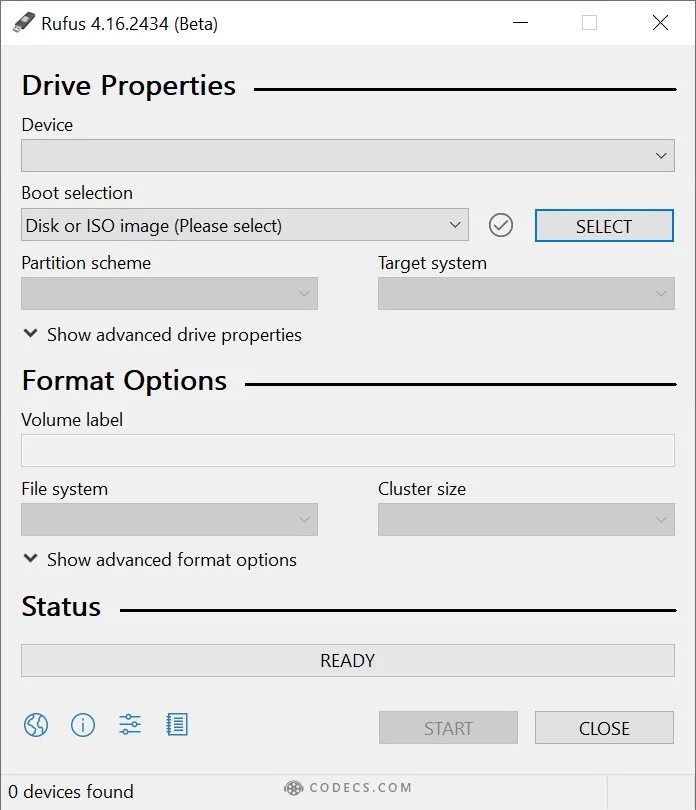
Rufus 4.16 Beta came out on 30 October. It works around a firmware bug that its developer says affects millions of PCs, and it can now bring back Windows 11's classic right-click menu during install.

The short answer: if your Windows USB drives already work, Rufus 4.15 is still the safe, stable pick. Try the 4.16 beta if you use Rufus's boot-time media check, want the old right-click menu on a fresh install, or just like having the newest security fixes.
The AMI Bug, in Plain English
AMI makes the firmware - the low-level software that starts your PC before Windows - for a huge number of motherboards and laptops. Some of that firmware includes a buggy NTFS driver that can read the wrong data from files stored in scattered pieces on a drive.
That broke Rufus's optional boot-time check, called runtime UEFI media validation. It checks that every file on your USB stick is intact before you install, but on affected PCs it could flag perfectly good drives as damaged.
Rufus developer Pete Batard did not hold back in the release notes, saying the fix covers "the millions of PCs that AMI screwed up". Rufus now works around the bug itself, so you don't need a firmware update or any setting changes.
Your files were never at risk
The bug affected the check, not your data. Your NTFS drives are not corrupted, and USB sticks made with older Rufus versions still install Windows normally.
What Else Is New in Rufus 4.16
- Classic right-click menu. The Quality of Life option can now restore Windows 10-style full right-click menus, so tools like 7-Zip show up straight away instead of hiding under "Show more options".
- Real USB speeds. Fast drives are finally reported at their proper class: USB 3.2 (20 Gbps), USB4 (40 Gbps) and the newest 80 Gbps drives.
- Security fixes. Several reported vulnerabilities are patched.
- Bug fixes. "Write as ESP" again creates a 1GB partition instead of using the whole drive, time zones no longer duplicate on non-English setups, and dots are allowed in local usernames again.
- Under the hood. GRUB is updated to version 2.16, Microsoft's new Secure Boot (DBX) addresses are used, and the "Do you want to format this drive?" pop-up is handled without Group Policy tricks.
Like recent versions, Rufus 4.16 can still skip the TPM check and the forced Microsoft account. Our Rufus guide for unsupported PCs walks through every option.
Should You Install the Beta?
Betas are for testing, and the final 4.16 should follow once testing is done. Here is a quick way to decide:
- Stay on 4.15 if your USB drives boot and install fine. Nothing in 4.16 changes how a normal Windows install works.
- Try 4.16 Beta if the media check reports errors on a drive you trust, you want the classic right-click menu baked in, or you make install drives often.
The beta is 64-bit only, and both versions are portable - just download and run. If you would rather keep several ISOs on one stick, Ventoy is a good free alternative.
How to Get the Classic Right-Click Menu With Rufus
- Download Rufus 4.16 Beta and plug in a USB stick of 8GB or more.
- Pick your Windows 11 ISO and click START.
- Tick the Quality of Life option in the Windows User Experience box that appears, then click OK.
- Install Windows from the USB as normal. Full right-click menus are on from the first login.
Already running Windows 11? You don't need to reinstall. Here is how to get the new right-click menu and find 7-Zip again.
Quick questions
Is Rufus 4.16 out?
Only as a beta, released on 30 October 2026. Rufus 4.15 is still the stable version.
Is my PC affected by the AMI bug?
Possibly, if it uses AMI firmware, which many desktops and laptops do. It only matters if you use Rufus's runtime UEFI media validation, and 4.16 fixes it either way.
Do I need to remake my Windows USB?
No. Drives made with older Rufus versions still install Windows normally.
Does Rufus 4.16 work on 32-bit or ARM Windows?
The beta is 64-bit only. Rufus 4.15 has separate 32-bit and ARM64 versions.
The bottom line
Rufus 4.16 Beta fixes a firmware bug that made its media check cry wolf on millions of PCs, and it can now install Windows 11 with the classic right-click menu. Stay on 4.15 if all is well, or try the beta if you want the new extras.


Latest news comments
All[link] Epg is not working on this one.
Team replied News: Free USA IPTV Playlist: The American TV That Is Really Free 1 commentInteresting development with the Fire TV Stick 4K — losing Kodi sideloading is a big deal for a lot of users. For those ...
News: The New Fire TV Stick 4K Can't Run Kodi - Here's Which Fire Stick Still Can 3 commentsBrave just enabled it by default for stable users yesterday (1.97). Not specified is chromeOS will be passively gaining decode capability too, and ...
Team replied News: JPEG XL Is Back in Chrome: What It Means and How to Open JXL Files 1 comment