Your free playlist plays fine, but every channel in the TV guide says No information - here are the free EPG links that fill it in, and the two-minute fix that makes your app use them.
An EPG is the grid that tells you what is on now and what is on next, and it is the first thing missing from a free playlist.
That is not your app failing - the playlist and the guide are two separate files, and most free lists only come with the first one.
Below are free guide links that were working on 6 October 2026, sorted by country and by streaming service, with the steps for TiviMate and Kodi.
Using the Free-TV playlist? Its guide is already built in, so there is nothing to add.
For any other playlist, copy the file for your country from the list below and add it as an EPG source in your app. For Pluto TV, Samsung TV Plus, Plex and Roku channels, use the second list instead.
Expect a few channels to stay blank. That is normal, and the last section shows how to fix most of them.
What an EPG Link Actually Is
An EPG link points to one file in a format called XMLTV, usually ending in .xml or .xml.gz. It holds programme titles and start times for a list of channels, a few days ahead, and no video at all.
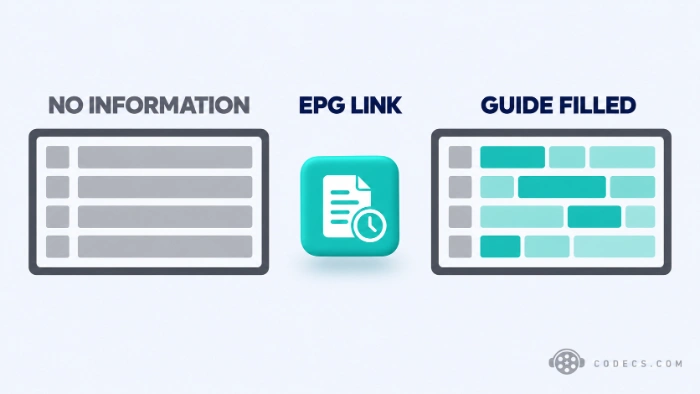
Your app downloads that file and pairs each channel in your playlist with a channel in the guide, mostly by a short code called the tvg-id. When the codes match, the grid fills in. When they do not, you get No information.
The .gz version is the same file, compressed. Use it whenever it is offered - it downloads several times faster on a TV stick.
Why Your Free Playlist Came Without a Guide
If you took a country or language list from our free IPTV playlist guide, it has no guide link inside it at all. The iptv-org project only adds one to its big combined lists.
And that built-in link does not help much either. When we opened it on 6 October 2026, it held listings for exactly two channels out of thousands.
Seen an iptv-org.github.io/epg address in another tutorial?
Those ready-made guides stopped being published in 2023, and every address in that form now returns a 404 error. Plenty of older pages still list them, which is why so many people end up with a guide that never loads.
Free EPG Links by Country
These come from epgshare01, a community project that rebuilds each country's guide every day. It is the same source the Free-TV playlist uses, and each file covers about four days ahead.
Copy the one for your country and add it to your app - the steps are further down.
- United States:
https://epgshare01.online/epgshare01/epg_ripper_US2.xml.gz - United Kingdom:
https://epgshare01.online/epgshare01/epg_ripper_UK1.xml.gz - Canada:
https://epgshare01.online/epgshare01/epg_ripper_CA2.xml.gz - Australia:
https://epgshare01.online/epgshare01/epg_ripper_AU1.xml.gz - India:
https://epgshare01.online/epgshare01/epg_ripper_IN1.xml.gz - Germany:
https://epgshare01.online/epgshare01/epg_ripper_DE1.xml.gz - France:
https://epgshare01.online/epgshare01/epg_ripper_FR1.xml.gz - Spain:
https://epgshare01.online/epgshare01/epg_ripper_ES1.xml.gz - Italy:
https://epgshare01.online/epgshare01/epg_ripper_IT1.xml.gz - South Africa:
https://epgshare01.online/epgshare01/epg_ripper_ZA1.xml.gz - Nigeria:
https://epgshare01.online/epgshare01/epg_ripper_NG1.xml.gz - United Arab Emirates and Arabic channels:
https://epgshare01.online/epgshare01/epg_ripper_AE1.xml.gz
More countries use the same address with a different ending. Copy this, then replace the last part with the file name from the table:
https://epgshare01.online/epgshare01/epg_ripper_IE1.xml.gz| Country or channel group | File name |
|---|---|
| Ireland | epg_ripper_IE1.xml.gz |
| New Zealand | epg_ripper_NZ1.xml.gz |
| Netherlands | epg_ripper_NL1.xml.gz |
| Portugal | epg_ripper_PT1.xml.gz |
| Poland | epg_ripper_PL1.xml.gz |
| Romania | epg_ripper_RO1.xml.gz |
| Turkey | epg_ripper_TR1.xml.gz |
| Brazil | epg_ripper_BR1.xml.gz |
| Mexico | epg_ripper_MX1.xml.gz |
| Kenya | epg_ripper_KE1.xml.gz |
| Al Jazeera channels | epg_ripper_ALJAZEERA1.xml.gz |
| US sports channels | epg_ripper_US_SPORTS1.xml.gz |
| US local stations - large, see the note below | epg_ripper_US_LOCALS1.xml.gz |
The US local stations file is big.
It runs to tens of megabytes, which a cheap TV stick can take minutes to load. Add it only if your playlist really has local channels, and keep the main US file for everything else.
Country not listed? Open-EPG and epg.pw publish free guides for other countries too, using the same XMLTV format.
Free EPG for Pluto TV, Samsung TV Plus, Plex and Roku
Free streaming services publish their own schedules, and i.mjh.nz turns them into guide files and keeps them up to date. Use these when your playlist is built from those services' channels.
- Pluto TV (United States):
https://i.mjh.nz/PlutoTV/us.xml.gz - Samsung TV Plus (United States):
https://i.mjh.nz/SamsungTVPlus/us.xml.gz - Plex (United States):
https://i.mjh.nz/Plex/us.xml.gz - The Roku Channel:
https://i.mjh.nz/Roku/all.xml.gz
Outside the US, swap us for your country code. Pluto TV also covers gb, ca, de, fr, es, it, mx and br; Samsung TV Plus covers gb, ca, de, fr, es, it, in and kr; Plex covers gb, ca, au, nz, es, fr and mx.
Would you rather have these channels with the guide already working and no setup at all? The official Pluto TV app has its own guide built in.
The Guide Links We Left Out
- The all-countries file. epgshare01 offers one file with every source in it, and at close to 200 MB compressed a TV stick either takes ages to load it or gives up - pick your country instead.
- Old iptv-org guide addresses. Anything starting iptv-org.github.io/epg/guides/ is dead, as explained above.
- Guides sold with cheap IPTV codes. A guide that only comes bundled with a low-price subscription is usually a sign that the channels are not licensed either.
- Links behind shorteners or download pages. A real guide address ends in .xml or .xml.gz and opens straight away - if it bounces you through adverts first, close the tab.
How to Spot a Dead EPG Link
Guides decay just like playlists do. A source stops updating, and your grid quietly runs out of programmes a few days later.
- Check the date. In the source's folder listing, a healthy file shows today's or yesterday's date - anything older than a week has stopped updating.
- Check the size. A country guide normally runs from a few hundred kilobytes to a few megabytes, so a file of a few hundred bytes is an empty shell.
- Check tonight in your app. If the grid shows yesterday's programmes but nothing for this evening, the source has stopped - swap it for another.
A real example: on 6 October 2026, epgshare01's Pakistan file was 310 bytes, and its Saudi Arabia file had not changed since August 2024. Both still sit in the listing looking perfectly normal, which is exactly why this page leaves them out.
How to Add an EPG Link to Your App
Every app below wants the same thing: the address you copied, pasted in as an EPG or XMLTV source.
In TiviMate, guides work in the free version, so you do not need premium for this.
- Open Settings, then EPG. This is where TiviMate keeps every guide source it uses.
- Choose Add source. Paste the EPG address and confirm it.
- Choose Update EPG. Give it a minute - the grid fills in as the file downloads.
In Kodi, the guide goes into the same add-on that plays your playlist, PVR IPTV Simple Client.
- Open the add-on settings. Go to Add-ons, then My add-ons, then PVR clients, select PVR IPTV Simple Client and choose Configure.
- Open the EPG tab. Set Location to Remote path.
- Paste the address into XMLTV URL. Choose OK, then restart Kodi so it loads the guide.
IPTV Smarters is built around provider logins, and with a plain M3U link its guide often stays empty whatever you add. VLC never shows a guide for an M3U playlist - it plays the channels and that is all.
If the guide matters to you, our free IPTV player comparison shows which apps handle one properly on each device.
The fix that works in any app that reads it:
Load your playlist into the free M3U Playlist Builder, paste your EPG address into the EPG guide URL box when you export, and save. The builder writes the guide into the top of the playlist, so apps that check for it load it on their own.
Why Some Channels Still Say No Information
No free guide covers every channel in a free playlist, and that is the honest answer for most blanks. Small web-only channels simply have no published schedule anywhere.
The rest are usually a name mismatch. iptv-org lists tag their channels with codes ending in things like @SD, while a guide file may call the same channel something like QUEST.HD.uk, so the app cannot pair them.
- Pair it by hand. Open the playlist in the Playlist Builder, edit the channel and type the guide's code into the Guide ID field.
- Or pair it in TiviMate. TiviMate lets you pick the guide channel by hand from that channel's options.
- Times an hour or two out? That is a time zone gap, not a dead guide - look for EPG time shift in your app's EPG settings.
Before you blame the guide for a channel that will not play at all, run the list through the M3U Checker. A dead stream has no picture and no guide, and no EPG link will change that.
Quick questions
Should I use the .xml or the .xml.gz link?
Use the .xml.gz link whenever one is offered. TiviMate and Kodi open it directly, and it downloads several times faster on a TV stick.
Can I add more than one EPG?
Yes. Add each one as its own source - your country file plus the Pluto TV file, for example - and the app combines them. Keep it to two or three, because every extra file adds loading time.
How often does a free EPG update?
The sources on this page rebuild their files every day. Set your app to refresh the guide at least once a day, or the grid will run out after a few days.
Why does the guide show the right shows at the wrong times?
The guide is in a different time zone from your app. Look for EPG time shift in your app's EPG settings and move it by the number of hours you are off.
Why does VLC show no TV guide?
VLC reads the channel list from an M3U playlist but has no programme guide view for it. Use TiviMate on a TV or Kodi on a PC if you want the grid.
Is it legal to use a free EPG?
An EPG is a timetable - programme names and start times - with no video in it. What matters legally is the channels you watch, so pair these guides with free-to-air and legal free streaming channels.
One link for your country, added once, and the grid fills itself in every day.
If channels stay blank, check the date on the guide before anything else - a stale source is the cause far more often than your app. Found a working guide we missed? Tell us in the comments.


Latest comments
AllHola cuando descargo un video con mpc-hc lo descarga en formato webm en vez de mp4 o mp3
Team replied Guide: How to Stream Videos with MPC-HC 1 commentInteresting development with the Fire TV Stick 4K — losing Kodi sideloading is a big deal for a lot of users. For those ...
News: The New Fire TV Stick 4K Can't Run Kodi - Here's Which Fire Stick Still Can 3 commentsThanks genius, it worked for me. v2.4.149.0 on windows 10
Guide: How to Download HEVC Video Extension for Free 181 comments