Windows will not show you what is inside an iPhone, and iTunes was never going to help. 3uTools opens the folders directly - photos, video, voice memos and downloads, over a USB cable, for free.
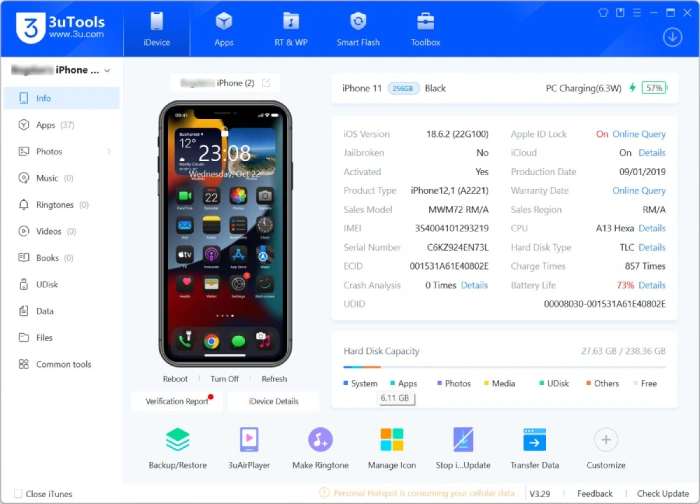
Plug an iPhone into a Windows PC and File Explorer shows you one folder of camera photos, if you are lucky.
Everything else on the device is invisible.
3uTools replaces that with a proper file browser, and this guide walks through connecting the device, finding the folder you actually want, and getting the files onto your computer in a state Windows can open.
On a normal iPhone you get the user area: your media, your downloads, your documents. That covers what almost everybody is looking for.
The iOS system folders stay locked unless the device is jailbroken. Any guide promising you system-level access on a stock iPhone is wrong, and the table further down sets out exactly where the line falls.
What you need
- A Windows 10 or 11 PC.
- 3uTools installed - it is free, with no account and no Apple ID sign-in at any point.
- An iPhone, iPad or iPod Touch and the USB cable that came with it.
- Your device passcode, which you will be asked for once.
Step 1: Connect your iPhone
- Launch 3uTools on your PC, then connect the iPhone with the USB cable.
- Tap Trust This Computer on the phone when the prompt appears.
- Enter your passcode to confirm it.
- Wait a few seconds for 3uTools to read the device and show its summary.
Nothing showing up?
3uTools has a built-in iTunes driver reinstaller in its menu, and that clears most USB recognition failures without leaving the program. Failing that, try a different cable and a port directly on the machine rather than a hub.
Step 2: Open the file browser
- Click the Files tab along the top.
- Choose File System (User) in the left sidebar.
- Browse the folder tree that appears.
If the device is jailbroken, File System (Root) sits in the same sidebar and opens the system folders as well. On a stock iPhone that option will simply refuse you, which is expected rather than a fault.
Step 3: Where your files actually live
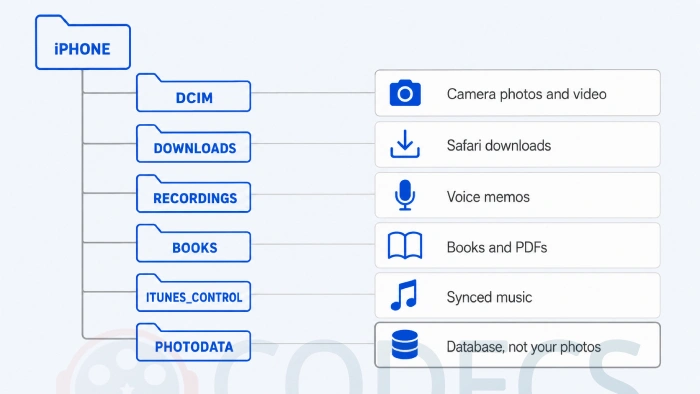
The folder names are not obvious, so here is what is behind each one.
| Folder | What is in it | Worth knowing |
|---|---|---|
| DCIM | Camera photos and video | Split into numbered subfolders, roughly by date |
| Downloads | Safari downloads | Often holds files the Files app never surfaces |
| Recordings | Voice memos | Plain M4A files you can copy straight off |
| Books | Books and PDFs | Includes anything you saved to Apple Books |
| iTunes_Control/Music | Music synced from iTunes | Filenames are scrambled, so tags are your only guide |
| PhotoData | The photo library database and thumbnail caches | Not your photos, and not a recovery route |
That last row is worth dwelling on, because plenty of guides get it wrong. PhotoData is the index and the cache, so anything you find there is a low-resolution thumbnail rather than the original.
Deleted something by accident? Check Recently Deleted in the Photos app on the phone first, where iOS keeps deleted items for 30 days. That is the only reliable route, and it does not need a PC at all.
Step 4: Move files in and out
Everything here works on the current folder, and 3uTools never syncs or overwrites in the background - you move what you select and nothing else.
- Copy to your PC. Tick the files you want, click Export, choose a destination folder and confirm.
- Copy to the iPhone. Open the folder you want them in, click Import, pick the files from your PC and confirm.
- Delete. Select the files, click Delete and confirm - this is immediate and there is no undo.
- Make a folder. Right-click in the file pane and choose New Folder, then name it.
Getting iPhone media to open once it is on your PC
This is where most people hit the real wall. The files copy across perfectly and then Windows refuses to open half of them.
That is not a 3uTools problem. Modern iPhones save photos as HEIC and video as HEVC to keep file sizes down, and a stock Windows install ships with neither decoder.
- Photos show as blank icons. They are HEIC - HEIF Image Extensions adds support to Photos and File Explorer thumbnails in about two minutes.
- Video plays with no picture, or not at all. That is HEVC, and the HEVC Video Extension fixes it - our guide on getting the HEVC extension free covers the version Microsoft charges for.
- You would rather not install anything. VLC Media Player plays HEVC on its own, and FFmpeg converts a whole folder in one command.
- Voice memos in the wrong format. The online audio converter turns M4A into MP3 in the browser, with nothing to install.
Not sure which of those you are looking at? The online codec finder identifies a file in seconds, and our guide on checking what codec a video uses covers the desktop way.
Jailbreak or not: what changes
| What you want | Stock iPhone | Jailbroken |
|---|---|---|
| Photos, video, music, downloads | Full access | Full access |
| App data and documents | Limited to apps that allow it | Full access |
| iOS system folders | No access | Full access |
| Risk to the device | None, it is read and copy only | Real, if you edit the wrong thing |
The short version: if you came here for photos, video, music or downloads, you do not need a jailbreak and you should not go looking for one.
If something goes wrong
- "Access Denied" on a folder. It is a system folder and your device is not jailbroken, which is normal - the user folders above will have what you want.
- Files are not showing. Click the refresh icon, or unplug and reconnect the phone so 3uTools re-reads the device.
- Transfers are slow. Use a USB 3.0 port on the machine itself, skip the hub, and close anything heavy running in the background.
- The connection keeps dropping. Swap the cable for an original one, reinstall the iTunes drivers from the 3uTools menu, and turn off USB power saving in Windows.
Staying safe
- Back the device up before you change anything on it.
- Copy files out rather than moving them, so the original stays where it was.
- Leave anything you do not recognise alone, and never touch the /System/ directory on a jailbroken device.
- Get 3uTools from its official download page and keep it updated - modified builds circulate and they are not worth the risk.
3uTools, or something lighter?
3uTools does everything at once, which is a strength if you want the whole toolkit and overkill if you have one specific job.
- Just want the photos. CopyTrans Studio mounts the camera roll as a drive in File Explorer, with no interface to learn.
- Just want documents and folders. CopyTrans Filey does that and nothing else.
- Music, from a USB stick. SharePod is portable and handles playlists, and iDump covers pulling songs off an old iPod.
- Media with conversion built in. SynciOS converts video on the way to the phone, and iPhone PC Suite adds SMS and calendar access.
- Moving to Android. Samsung Smart Switch handles the migration rather than the browsing.
Against iTunes there is no contest: iTunes has no file browser at all, and it still runs a sync model that can remove content already on your device. The rest of the Other Tools section covers what sits around these.
Quick questions
Do I need to jailbreak my iPhone for this?
No. Photos, video, music, voice memos and downloads are all reachable on a completely stock device - only the iOS system folders need a jailbreak.
Is it safe for my phone?
Browsing and copying files out is safe and changes nothing on the device. The risk only starts if you delete or edit things you do not recognise.
Does it work over Wi-Fi?
No. File system access needs a USB cable, and an original Apple cable is noticeably more reliable than a cheap one.
Will this void my warranty?
Reading and copying files does not affect your warranty. Jailbreaking is a different matter and can.
Does it work with an iPad?
Yes, and with iPod Touch. The steps are identical on all three.
Why will Windows not open the photos I copied across?
They are HEIC files, which Windows does not read by default. HEIF Image Extensions fixes it in a couple of minutes.
3uTools gives you the file-level access iTunes never offered, free and without an Apple ID. Connect over USB, open File System (User), and copy out what you need - then add the HEIC and HEVC extensions so Windows can actually open it.
Download 3uTools and see how it handles your device, or tell us how you got on if you have already used it.


Latest comments
AllInteresting development with the Fire TV Stick 4K — losing Kodi sideloading is a big deal for a lot of users. For those ...
News: The New Fire TV Stick 4K Can't Run Kodi - Here's Which Fire Stick Still Can 3 commentsThanks genius, it worked for me. v2.4.149.0 on windows 10
Guide: How to Download HEVC Video Extension for Free 181 commentsXMediaRecode gives only the option to Copy (No convert) in Audio Mode drop down. I am trying to convert/recode the EAc3 ...
Team replied Guide: How to Convert EAC3 Audio to AC3 or AAC With XMedia Recode 1 comment