A 4K clip that will not open on someone else's laptop and a phone that is permanently out of storage are the same problem, and HEVC is the answer to one of them.
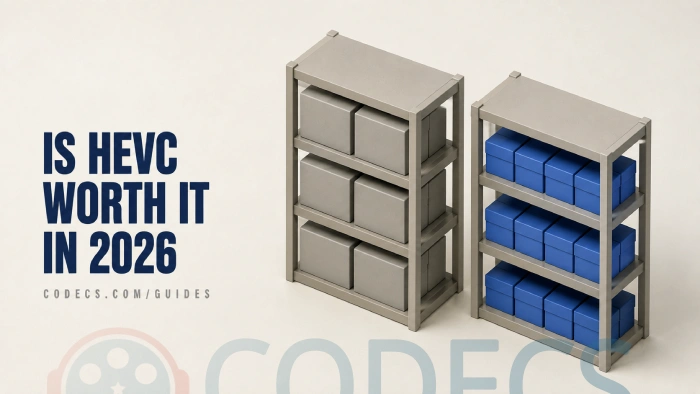
HEVC, also called H.265, gets you roughly the same picture in about half the space.
It also introduces a compatibility problem that H.264 does not have.
Whether that trade is worth making comes down to one thing, and it is not the codec.
The Short Answer
Yes, if your hardware can decode it and you are keeping the files. No, if you are sending them to other people or your machine is more than about eight years old.
That is the whole decision. Everything below is how to work out which of those you are.
Where the Saving Actually Is
The storage difference is real and it grows with resolution. At 1080p you will notice it; at 4K it changes how much fits on a drive.
Ten minutes of typical phone 4K at 50 Mbps comes to about 3.7 GB. The same ten minutes in HEVC lands near 1.9 GB, and that gap compounds fast across a few hundred clips.
This is why Netflix and Apple TV+ deliver 4K in HEVC. It is also why iPhones have recorded in it by default since the iPhone 7, and most Android flagships since around 2018.
One correction worth making: YouTube is often listed alongside them and does not belong there. It delivers VP9 and AV1, not HEVC, so an HEVC upload gets re-encoded on arrival like everything else.
The Bar Your Hardware Has to Clear
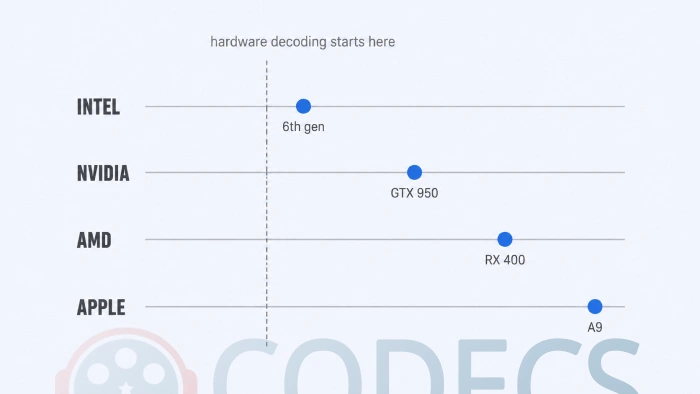
This is the factor that decides everything, and it is about decoding rather than the codec itself. With hardware decoding your graphics chip plays HEVC without noticing; without it your processor does all the work.
The line falls at roughly Intel 6th-generation, NVIDIA GTX 950, AMD RX 400, Apple A9 and Qualcomm Snapdragon 820. Below those generations, 4K HEVC stutters, drops frames and drains a laptop battery fast.
There is a second line above the first. Intel's 6th generation handles 8-bit HEVC but not 10-bit, and 10-bit is what HDR needs, so HDR footage wants 7th-generation or newer.
If you are not sure where your machine sits, our guide on whether your PC can play H.265 walks through checking it, and the Codec Finder tells you what a given file actually contains.
Getting HEVC Playing on Windows Without Paying
Windows does not include an HEVC decoder. That is a licensing decision rather than a technical one: HEVC is covered by patent pools, and shipping the decoder with the operating system would mean paying for every copy.
Microsoft lists the extension twice in its Store. One version carries a charge, and one, published for PC makers to bundle, is free. They are the same decoder.
Take the free one. The HEVC Video Extensions from Device Manufacturer package does exactly what the paid listing does, at no cost, and our guide on getting the HEVC extension free covers every click.
One trap to know about. Windows 10 needs version 2.4.109.0 rather than the current build, because the newer packages will not install on it and fail without saying why.
If you would rather not touch the Windows codec at all, VLC and the K-Lite Codec Pack both bring their own HEVC decoding and never use the Windows one.
That also explains a common complaint. Installing the extension changes nothing in VLC, because VLC was never asking Windows in the first place, and our HEVC player comparison covers which players work which way.
When to Stay on H.264
Three situations, and they cover most people most of the time.
- Sending files to other people. H.264 opens everywhere with no installation and no "I can't play this" reply - the x264 encoder is still the reference for it.
- Live streaming or video calls. HEVC encoding costs noticeably more CPU, and most platforms want H.264 in anyway.
- Editing. Plenty of editors scrub HEVC sluggishly and export slowly, and the fix is to transcode before you start cutting rather than to fight the timeline.
HandBrake handles that conversion in either direction, using your GPU where it can, which makes it a preset rather than a project.
The Two-Track Approach That Actually Works
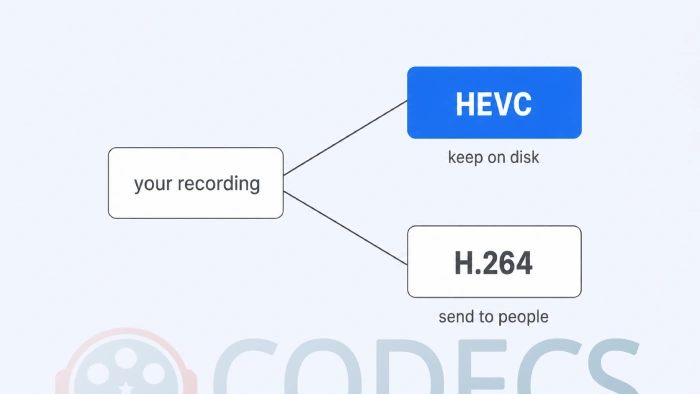
Almost nobody picks one codec for everything. The practical pattern is to record and archive in HEVC, where the storage saving lands, and convert to H.264 at the point of sharing.
That keeps the archive small and the outbound copy universal, and it costs one preset click per file you actually send. It is also what stops the compatibility problem ever reaching anyone else.
Where AV1 Fits In
AV1 compresses better than HEVC rather than merely matching it, and Netflix reports AV1 sessions using about a third less bandwidth than H.264 and HEVC alike. It was also designed to avoid HEVC's licensing situation.
The catch is encoding rather than playback. AV1 decoding is widespread on recent hardware, but making AV1 files is confined to newer GPUs, and doing it in software is slow enough to rule it out for casual use.
AV2 arrived in 2026 with another step on top and will not reach ordinary hardware for years. If you want the full three-way comparison, whether H.264 is making way yet is the page for it.
Quick Decision Table
| Your situation | Use | Why |
|---|---|---|
| Phone storage always full | HEVC | Roughly half the size, and the phone already records it |
| Archiving a 4K library | HEVC | The saving compounds across hundreds of files |
| Sending files to other people | H.264 | Nothing refuses it and nobody has to install anything |
| Live streaming or video calls | H.264 | Lower encoding cost, and platforms prefer it as input |
| Uploading to YouTube or social | H.264 | It gets re-encoded on arrival either way |
| Machine older than Intel 6th generation | H.264 | No hardware HEVC decoding, so 4K stutters |
| HDR footage on Intel 6th generation | H.264 | 8-bit HEVC only, and HDR needs 10-bit |
| Recent hardware, files you are keeping | HEVC | Best quality per gigabyte with mature tooling |
Quick questions
Do I have to pay for HEVC on Windows?
No. Microsoft lists the extension twice, and the "from Device Manufacturer" edition is the same decoder published free. The paid listing offers nothing extra.
Does HEVC lose quality compared to H.264?
Not at the same visual quality, which is the point of it. HEVC reaches a similar-looking result at roughly half the bitrate, so you save space rather than trade picture.
Why does my HEVC video stutter?
Almost always because your hardware has no HEVC decoder and the processor is doing the work. Check your chip generation before blaming the file, and if it is below the line, convert to H.264 for local playback.
Can I upload HEVC to YouTube?
You can, but there is little point. YouTube re-encodes everything on arrival and delivers VP9 or AV1, never HEVC, so uploading H.264 costs you nothing in quality.
Should I convert my old H.264 library to HEVC?
Usually not. Re-encoding is lossy, it takes a long time, and you end up with files that play on fewer devices than the ones you started with. Record new material in HEVC instead.
Is it worth waiting for AV1 instead?
Only if you are buying hardware now and keeping it a long time. AV1 compresses better, but encoding it is slow without a recent GPU, while HEVC is mature and supported everywhere that matters today.
If a file still refuses after all that, the HEVC troubleshooting guide picks up where this one stops.
HEVC is worth it for the files you are keeping and not for the files you are sending, which is why most people who use it well end up using both.
Get the free HEVC Video Extensions if Windows is refusing to open your clips, or tell us what your hardware made of it once you have tried.


Latest reviews
AllJPEG XL Is Back in Chrome: What It Means and How to Open JXL...
5/5Brave just enabled it by default for stable users yesterday (1.97). Not specified is chromeOS will be passively gaining decode ...
The New Fire TV Stick 4K Can't Run Kodi - Here's Which Fire ...
5/5Really interesting news - I had no idea Amazon was switching the new Fire TV Stick 4K over to ...
Free Popular IPTV Playlist: Where to Get Fresh, Legal M3U Li...
5/5Hi! Thanks for creating this list, and I have a small question: why do the channels I used to ...