Media Foundation is the machinery Windows uses to play video and audio - and Microsoft ships it deliberately incomplete. That is why your files will not open, and it is free to fix.
Most people meet the words "Media Foundation" in an error message.
A video will not open, a forum post mentions it, and it is not obvious whether it is something you have, something you need, or something you broke.
It is a part of Windows, it is already installed, and the reason your file will not play is almost always that Microsoft left out one specific piece of it.
Media Foundation is the pipeline Windows apps use to turn a video file into a picture on your screen. The framework is built in; several of the decoders it needs are not.
Microsoft removed them to avoid paying licence fees, and hands them back as free Store extensions - which is what Media Foundation Codecs bundles into one installer.
What Media Foundation actually does
A video file is a container holding compressed streams. Something has to open the container, work out what is inside, decode it and push the result to your screen and speakers.
Media Foundation is the part of Windows that does that, introduced with Windows Vista and still the standard route today. Apps hand it a file and it handles the rest, which is why the Photos app has no codec settings - it is not doing the decoding.
It also handles the parts you never see: syncing audio to video, using your graphics card instead of your processor where it can, and honouring protected-content rules on streaming services. If you want the developer-level detail, Microsoft's Media Foundation documentation is the reference.
The vocabulary underneath all this - containers, codecs, what is actually inside an MP4 - is covered in our guide to codecs and file formats.
Media Foundation or DirectShow? This is the bit that confuses everyone
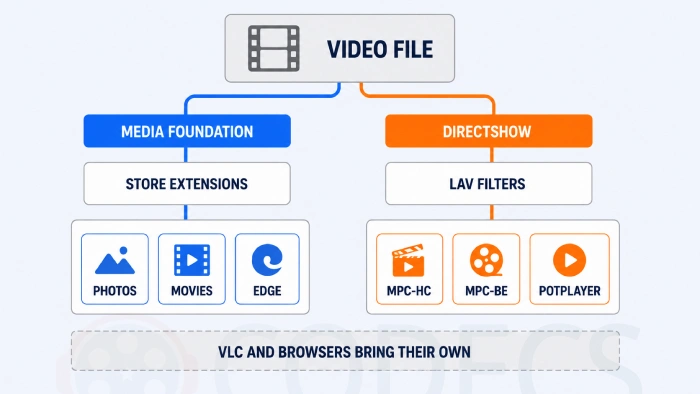
Media Foundation is often described as having replaced DirectShow, the older framework. It did not.
Both are still in Windows, both still work, and different programs use different ones. That single fact explains a symptom that otherwise makes no sense: you install a codec pack, one player starts working, and another carries on failing.
| Program | What it uses | So it needs |
|---|---|---|
| Photos, Movies & TV, Edge, most Store apps | Media Foundation | The Microsoft Store extensions |
| Windows Media Player | Media Foundation | The Microsoft Store extensions |
| MPC-HC, MPC-BE, PotPlayer | DirectShow | LAV Filters, or a codec pack |
| VLC, mpv, Chrome, Firefox | Neither - their own decoders | Nothing at all |
So installing LAV Filters fixes MPC-HC and does nothing for the Photos app. Installing the Store extensions fixes the Photos app and does nothing for MPC-HC.
And VLC Media Player plays the file either way, because it ignores both pipelines and carries its own decoders. That is why "just use VLC" is such common advice, and why it does not actually solve the underlying problem.
Why yours is missing pieces
Windows once shipped with a fuller set of decoders. Several were taken out, and the reason is money rather than engineering.
Codecs like HEVC carry patent licence fees per device. Removing them from the base install cuts what Microsoft pays on every Windows machine sold, and pushes the cost onto whoever actually needs the format.
Two situations make it worse than the default:
- Windows N and KN editions. Sold in Europe and Korea for competition-law reasons, these ship with the media stack stripped out entirely - so nothing plays until you restore it.
- A clean install or a new PC. Manufacturer images sometimes include the extensions and sometimes do not, which is why the same file plays on one machine and not another.
The tell is the wording of the error. "This item was encoded in a format that's not supported", or error code 0xc00d5212 in Movies & TV, both mean the framework is fine and one decoder is absent.
Getting the missing pieces back
The extensions are all free from Microsoft, and installing them registers the decoders system-wide - every Media Foundation app gains support at once, with nothing to configure.
Media Foundation Codecs collects all of them into one installer so you are not hunting the Store one at a time.
- HEVC Video Extension - iPhone recordings and most 4K video, and the one people need most often.
- AV1 Video Extension - YouTube and Netflix streams, and AVIF images as a bonus.
- VP9 Video Extension - WebM files and older YouTube downloads.
- HEIF Image Extensions - the HEIC photos an iPhone produces.
Microsoft charges for one version of the HEVC extension and gives away another, which our guide on getting the HEVC extension free walks through.
Prefer to cover both pipelines in one go? The K-Lite Codec Pack installs the DirectShow side as well, and the rest of the codec packs section covers the alternatives.
If it still will not play
- Restart properly. Windows fast startup can leave the old codec registration in place, so use Restart rather than shutting down and switching back on.
- Check which program is failing. If the Photos app fails but MPC-HC works, you need the Store extensions - the other way round, you need LAV Filters.
- Find out what the file actually is. The online codec finder identifies it in the browser with nothing installed.
- Work through it systematically. Our Codec Troubleshooter narrows down the cause by symptom.
Still stuck on which player to run, rather than which codec to install? The media players section has the field, and Windows Media Player is worth a try purely as a diagnostic.
Quick questions
Do I need to install Media Foundation?
No, it is already part of Windows. What you may need are the free Microsoft extensions that add the individual decoders it is missing.
What does error 0xc00d5212 mean?
Movies & TV cannot find a decoder for that file, almost always HEVC. Installing the extensions clears it.
Why does VLC play the file when nothing else will?
VLC ignores both Windows pipelines and carries its own decoders. It proves the file is fine, but it does not fix anything else on the machine.
Is Media Foundation the same as DirectShow?
No. Both are in Windows and different programs use different ones, which is why a codec pack can fix one player and not another.
Why does Windows not just include these codecs?
Patent licence fees. Formats like HEVC cost Microsoft money per device, so they are shipped separately for whoever actually needs them.
I have Windows N - what is different?
N and KN editions ship without the media stack entirely, so you need the Media Foundation components restored before any extension will work.
Media Foundation is not missing from your PC and it is not broken - it is deliberately incomplete, because the decoders cost Microsoft money. The extensions that fill the gap are free, and one installer covers the lot.
Further reading: this Media Foundation architecture presentation by Alex Trylysenko covers the pipeline in more technical depth.
Download Media Foundation Codecs and see whether your files open, or tell us how you got on if you have already tried it.


Latest reviews
AllFree M3U Playlist for TiviMate: Legal Lists That Load Cleanl...
5/5The link isn't working. https://www.free-codecs.com/guides/free-epg-urls-for-iptv.htm
The New Fire TV Stick 4K Can't Run Kodi - Here's Which Fire ...
5/5The Vega OS shift is the biggest Firestick story of 2026. Anyone buying now needs to know: 4K Max = sideloading ...
JPEG XL Is Back in Chrome: What It Means and How to Open JXL...
5/5Brave just enabled it by default for stable users yesterday (1.97). Not specified is chromeOS will be passively gaining decode ...