A portable Windows drive is a real installation you carry in your pocket, and one free tool builds it in an afternoon.
Plug it into almost any PC, boot from it, and your desktop, your programs and your files are all there.
Nothing on the host computer is touched, and nothing of yours is left behind when you unplug.
The tool is Rufus, and the setting that makes it work is called Windows To Go.
What You Need Before You Start
- An external SSD. 128GB is the floor, 256GB or more if you plan to install much beyond Windows itself.
- A Windows 10 or Windows 11 ISO file, downloaded from Microsoft's own page.
- Rufus, which is free, portable and needs no installing.
- A USB 3.0 port or better on the machine you want to boot, and preferably on the machine building the drive too.
- About an hour, most of which is waiting.
Back up the drive first. Rufus erases the entire external SSD, partitions and all, and there is no undo once it starts.
Why a USB Stick Will Disappoint You
Rufus's own documentation is blunt about this: building a Windows To Go drive writes an enormous number of small, scattered files rather than one big stream.
That means random write speed decides how the finished drive feels, not the headline sequential number on the box. A cheap flash drive can advertise 150 MB/s and still take a minute to open the Start menu.
An external SSD in a decent USB 3.2 enclosure is the difference between a usable Windows and a science experiment. Spend the money there rather than on capacity.
Building the Drive With Rufus
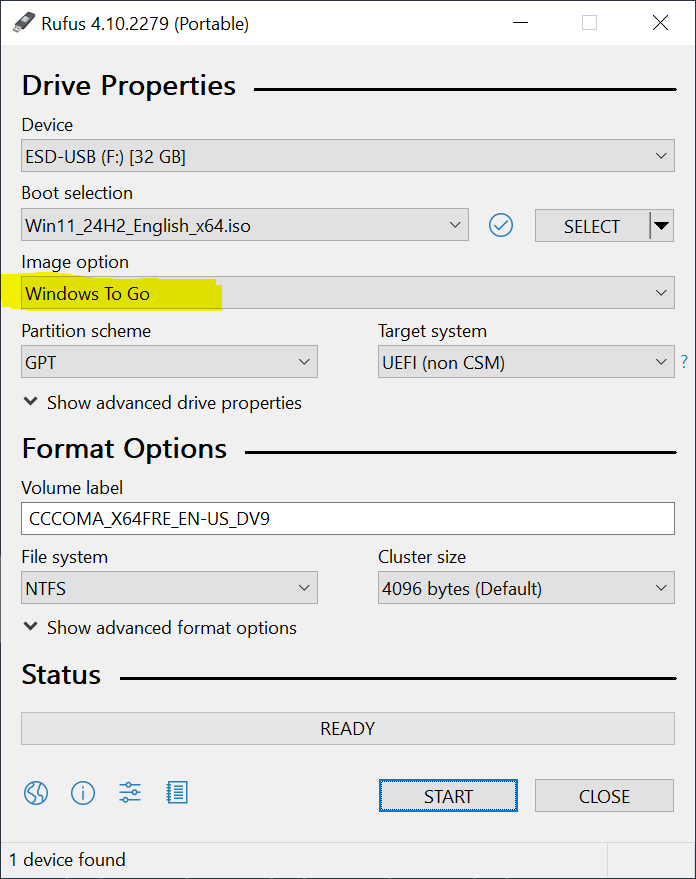
- Plug in the SSD and open Rufus. It runs straight from the download with no installer.
- If your SSD is not in the Device list, click Show advanced drive properties and tick List USB Hard Drives. Rufus hides external hard drives and SSDs by default so nobody wipes their backup disk by accident.
- Click SELECT and choose your Windows ISO file.
- Change Image option from Standard Windows installation to Windows To Go. This one dropdown is the entire difference between an install disc and a portable Windows.
- Leave Partition scheme on GPT and Target system on UEFI. Those are correct for every PC made in roughly the last twelve years.
- Click START, then pick which Windows edition to install when Rufus asks.
- Decide on Prevent Windows To Go from accessing the internal disks. Tick it if you will plug into machines that are not yours, leave it clear if you want to reach your own PC's files while booted from the drive.
- Confirm the erase warning and wait. Expect twenty to forty minutes on a good SSD, and considerably longer on anything slower.
What the First Boot Actually Looks Like
There is no installer to sit through. Windows To Go copies a finished installation onto the drive, so the first boot goes straight to the setup questions - region, keyboard, network, account - and there is no screen asking where to install Windows.
Restart with the drive plugged in and open the boot menu, usually F12, F11, F9 or Esc depending on the maker. Pick the external drive rather than the internal one.
The first boot on each new computer is slow, because Windows detects and installs drivers for hardware it has never seen. That is normal and it only happens once per machine.
After that, the same drive boots on that computer in roughly the time an internal drive would take.
Settings Worth Changing Once You Are In
Hibernation is already switched off. Windows disables it by default in a portable workspace precisely so the drive can move between machines without waking up confused.
If you ever want it back, the setting lives in Computer Configuration > Administrative Templates > Windows Components > Portable Operating System in the Group Policy Editor. Note that gpedit.msc is not included in Windows Home.
Leave the page file alone. Older guides tell you to disable virtual memory on a portable install, which gains you nothing and causes out-of-memory errors and crashes in anything demanding.
Check Settings, then Privacy and security, then Device encryption. If Windows switched it on during setup, turn it off before you move the drive, because automatic encryption ties the key to the machine you set it up on.
If you want the drive encrypted anyway, turn on BitLocker manually and choose a password rather than letting it use a chip inside one particular computer. Then keep the recovery key somewhere that is not the drive.
The Licence Question, Answered Honestly
Microsoft retired its own Windows To Go feature in 2020, partly because a roaming install could not reliably take feature updates. There is no consumer licence designed for what you are about to do.
In practice a digital licence is tied to the computer it was first activated on, so your portable Windows will usually report itself as not activated once you plug it into a different machine.
A retail key can move between machines, one at a time. An OEM key that came preinstalled on a laptop cannot.
Unactivated Windows 11 keeps running indefinitely. You get a watermark in the corner, the Personalisation settings are locked, and security updates keep arriving as normal - which is enough for a rescue drive or a work-away-from-home drive, if not for a daily machine.
If you want to sort the licence out properly, we have a separate guide on five legal ways to get Windows 11 that covers which keys actually still work.
When Rufus Will Not Play Along
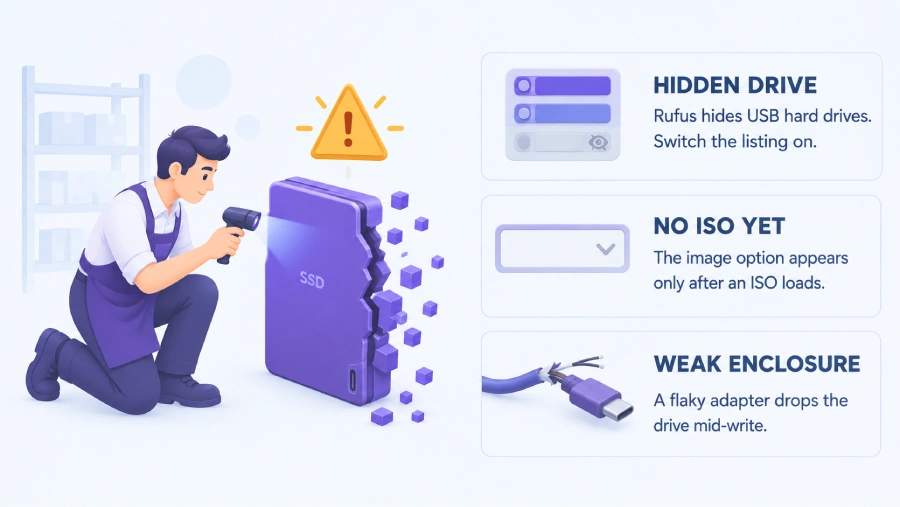
Your SSD is not in the Device list. Rufus hides USB hard drives until you tick List USB Hard Drives under Show advanced drive properties, and most external SSDs report themselves as hard drives rather than removable media.
There is no Windows To Go option. The Image option dropdown only appears once a Windows ISO is loaded, so select the ISO first. A Linux or rescue ISO will never offer it.
The drive is not in the boot menu. Look for USB boot in your firmware settings and switch it on. Do not enable CSM or legacy boot to fix this, because a GPT drive built for UEFI will refuse to start that way.
Rufus finishes but the drive still will not boot. Try a different USB port, ideally one directly on the motherboard rather than a hub or a front panel, and try a different cable before blaming the drive.
If Rufus simply will not create the drive, WinToUSB does the same job with a different engine and often succeeds where Rufus stops.
Who Should Look Elsewhere
If what you actually wanted was one stick that boots a shelf full of ISO files without rewriting it each time, that is Ventoy, and it is a completely different tool.
If you want something to rescue a PC that will not start, you want a repair environment rather than a full Windows - our guide to creating a bootable USB recovery drive is the shorter route.
And if you want to carry the Windows you already have, complete with its programs, rather than a clean one, WinToUSB can clone a running system onto the SSD instead.
Quick questions
Will this work on any computer?
Almost any PC from the last decade, as long as its firmware allows booting from USB. Macs with Apple silicon cannot boot Windows this way at all, and some work laptops have USB boot locked by an administrator.
Does it touch the computer I plug it into?
No. The host machine's own drive is left exactly as it was, and if you ticked the option to prevent access to internal disks, your portable Windows cannot even see it.
Do I need a Windows licence for this?
You can install and run it without one. It will report as not activated on most machines, which means a watermark and locked personalisation settings, but it keeps working and keeps getting security updates.
Can I use an ordinary USB flash drive instead of an SSD?
It will work and you will hate it. Windows constantly writes small scattered files, which is the exact workload flash drives are worst at, so everything from opening a folder to logging in becomes a wait.
Does Windows Update still work on a portable install?
Monthly security updates install normally. Large feature updates are less reliable on a portable drive, which is one of the reasons Microsoft stopped developing the feature itself.
Is Windows To Go still supported by Microsoft?
Not as an official feature - it was dropped from Windows 10 in 2020. Rufus and WinToUSB build the same kind of drive independently, and it still boots current Windows 11.
One dropdown, one fast SSD, and your whole Windows fits in a coat pocket.
Download Rufus and build the drive, or leave a comment telling us which enclosure worked for you.


Latest reviews
AllFree M3U Playlist for TiviMate: Legal Lists That Load Cleanl...
5/5The link isn't working. https://www.free-codecs.com/guides/free-epg-urls-for-iptv.htm
The New Fire TV Stick 4K Can't Run Kodi - Here's Which Fire ...
5/5The Vega OS shift is the biggest Firestick story of 2026. Anyone buying now needs to know: 4K Max = sideloading ...
JPEG XL Is Back in Chrome: What It Means and How to Open JXL...
5/5Brave just enabled it by default for stable users yesterday (1.97). Not specified is chromeOS will be passively gaining decode ...