AAC is not one thing - it is a family, and the two names people keep tripping over, AAC-LC and HE-AAC, are the same codec with one extra trick switched on.
The trick is worth a lot at low bitrates and costs you at high ones.
So the choice comes down to one number: the bitrate you are encoding at.
Here is where the line sits, and which free encoder can actually make each kind of file.
What AAC, AAC-LC and HE-AAC Actually Are
AAC is the family name. On its own it tells you almost nothing, in the same way that saying a car is a Volkswagen does not tell you which model turned up.
AAC-LC is the profile inside that family you have almost certainly been using for years. LC stands for Low Complexity, and it is what iTunes, YouTube and the audio track of most MP4 video files use.
HE-AAC is AAC-LC with an extra layer bolted on top. Everything in an HE-AAC file starts as an ordinary AAC-LC core, which is why the two are so often confused.
A note on the name. The correct spelling is HE-AAC, not AAC-HE, though both get typed constantly. You will also meet it sold as aacPlus, AAC+, eAAC+ and Enhanced AAC+ - all the same technology under different manufacturers' marketing.
What HE-AAC Actually Does to Your Audio
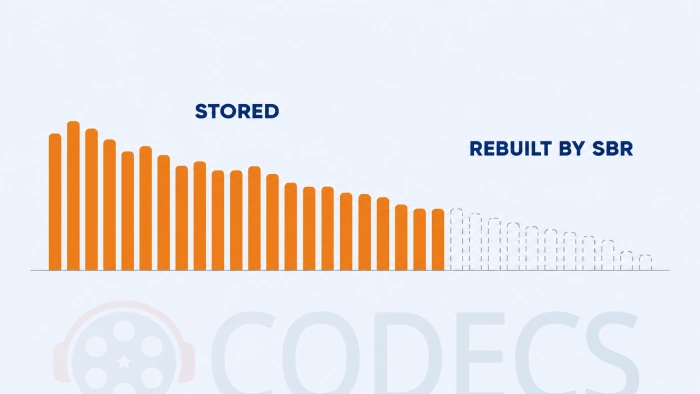
The extra layer is called Spectral Band Replication, or SBR, and the plain-English version is that it stops storing the top of the frequency range.
Instead of encoding the high frequencies properly, the encoder writes a small set of instructions describing them, and the decoder rebuilds that part of the sound from the frequencies underneath it. The instructions cost almost nothing compared with the audio they replace, which is where the saving comes from.
HE-AAC v2 goes a step further and adds Parametric Stereo, which stores one channel plus a short description of how the stereo image was arranged. That only pays off at genuinely tiny bitrates, and Apple is explicit that its benefit applies at very low bit rates only.
None of this is free. Rebuilt highs are a good imitation rather than the real thing, so the more bits you have to spend, the less sense it makes to imitate anything.
Which One to Use, by Bitrate
Apple publishes the clearest guidance anyone has, for stereo audio at 44.1 kHz, and it matches what encoder developers recommend.
| Bitrate | Use | Why |
|---|---|---|
| 16 to 40 kbps | HE-AAC v2 | Parametric Stereo is the only way to keep a stereo image this low |
| 32 to 80 kbps | HE-AAC v1 | SBR buys back the top end that plain AAC-LC cannot afford here |
| Above 80 kbps | AAC-LC | Enough bits to store the real high frequencies, so imitating them only loses quality |
The headline figure is that HE-AAC v1 at 64 kbps sounds about as good as AAC-LC at 96 kbps. That is a real saving on a radio stream and completely irrelevant on a music library.
Apple's own technical note on HE-AAC carries the full ranges if you want the source.
Which Free Encoder Can Make Which
This is where most comparison articles go wrong, because the encoders do not all support the same profiles.
| Encoder | AAC-LC | HE-AAC v1 | HE-AAC v2 |
|---|---|---|---|
| FDK AAC Codec | Yes | Yes | Yes |
| qaac | Yes | Yes | Not offered |
| FAAC | Yes | Yes, since version 2.0 | No |
FDK AAC is the Fraunhofer encoder, and it is the only one of the three that covers the whole range, including the low-delay profiles used for voice calls. If you want one tool that can make anything discussed on this page, it is that one.
qaac is a command-line front end for Apple's own encoder, the one behind iTunes, so it needs iTunes or Apple Application Support installed before it will run. That dependency puts some people off and it is the reason its output matches Apple's platforms exactly.
FAAC is the long-running open-source encoder, and it was AAC-LC only for most of its life. Version 2.0 added genuine SBR, so the widely repeated line that FAAC cannot make HE-AAC files is now out of date. It ships alongside FAAD2, the matching decoder, which reads every profile on this page including HE-AAC v2.
If a command line is not your idea of an afternoon, fre:ac gives you the same encoders behind a normal window with a file list and a convert button. FFmpeg Audio Encoder will also do the job, though whether it can reach HE-AAC depends on which encoder the build you downloaded was compiled against.
xHE-AAC, the One Nobody Mentions
There is a fourth member of the family, and it has quietly taken over the bottom of the range.
xHE-AAC holds together at bitrates where even HE-AAC v2 gives up, and it is what Apple now recommends for streaming and what Netflix moved to for mobile audio. If you are encoding for a phone on a bad connection, this is the direction the industry went.
The catch is playback. Older hardware does not know what to do with it, so it is a poor choice for anything that has to open on a decade-old device. If you want to try it, exhale is a free xHE-AAC encoder and there is very little else in that category.
Who Should Look Elsewhere
If your files have to play on old or cheap hardware, skip HE-AAC entirely and encode AAC-LC.
The tell is easy to hear rather than to look up. An HE-AAC file handed to a player that only understands AAC-LC still plays, because the LC core is sitting right there underneath - but the rebuilt top end is discarded, so the result sounds muffled, as though somebody threw a blanket over the speakers. If a car stereo, a cheap set-top box or an old phone does that to your file, the profile is the reason.
More converters and encoders live in the Audio Encoders category.
Quick questions
Is AAC the same thing as AAC-LC?
Not quite. AAC is the family and AAC-LC is a profile within it, but a file described only as AAC is almost always AAC-LC, so in everyday use the two get treated as the same thing.
Is HE-AAC better quality than AAC-LC?
Only below about 80 kbps. Above that it is the other way round, because AAC-LC can afford to store the high frequencies that HE-AAC rebuilds from a description.
Why does my HE-AAC file sound muffled on one device?
Because that device is decoding only the AAC-LC core and ignoring the layer that rebuilds the top end. It is a decoder limitation rather than a broken file, and re-encoding to AAC-LC fixes it.
Is it AAC-HE or HE-AAC?
HE-AAC is the correct name, standing for High-Efficiency AAC. AAC-HE is a common slip and you will see it everywhere, including in file names and menus.
Which free encoder should I install?
FDK AAC if you want one tool that covers every profile, or qaac if you already have iTunes installed and want output that matches Apple's platforms exactly.
Do I need a separate decoder to play these files?
Usually not, since most players handle AAC out of the box. FAAD2 is there for the cases where a program needs an AAC decoder supplied to it rather than built in.
Pick the profile from the bitrate, not the other way round, and most of the confusion around these names disappears.
Download the FDK AAC Codec and encode a test file at both settings, or tell us how you got on if you have already picked a side.




Latest comments
AllI used [link] on tivimate with the Usa m3u Playlist. I cannot get the guide to work.
Team replied Guide: Free EPG URLs for IPTV: TV Guide Links That Still Work 2 comments[link] Epg is not working on this one.
Team replied News: Free USA IPTV Playlist: The American TV That Is Really Free 1 commentSi mund te shikoj te gjitha kanalet e DigitAlb dhe Tring me url pa pagese ne Iptv Player?
Team replied Guide: Free Popular IPTV Playlist: Where to Get Fresh, Legal M3U Links in 2026 20 comments