Short answer: the question does not really have one, because DTS and AAC are almost never alternatives for the same job - and the thing most people get told about DTS is wrong.
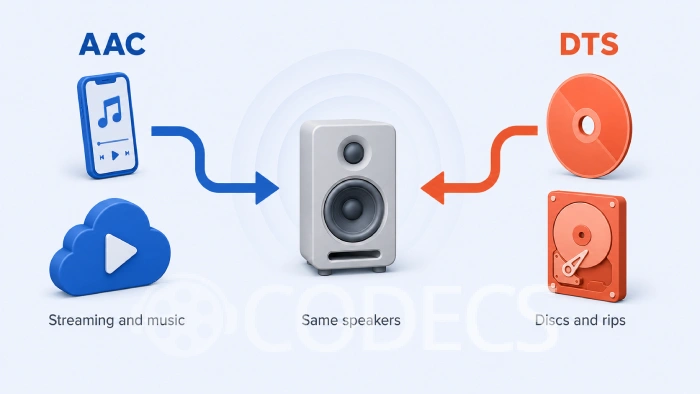
You do not usually choose between these two formats.
The file you were handed already made the choice, and your job is making sure your gear can play it.
Here is what each one is actually for, and what to do when one of them refuses to make a sound.
If you are here because a DTS track is silent. Skip to the section on why your TV refuses DTS - that is a real and growing problem, and it has nothing to do with which codec is better.
First, the Myth Worth Killing
You will read almost everywhere that DTS is uncompressed. It is not.
Ordinary DTS - the kind on DVDs, Blu-rays and most rips - is a lossy codec, capped at 1509 kbit/s. It throws data away, exactly as AAC does, just less aggressively.
There is a lossless version, DTS-HD Master Audio, found on some Blu-rays. Even that is compressed rather than uncompressed - lossless simply means nothing is discarded on the way in.
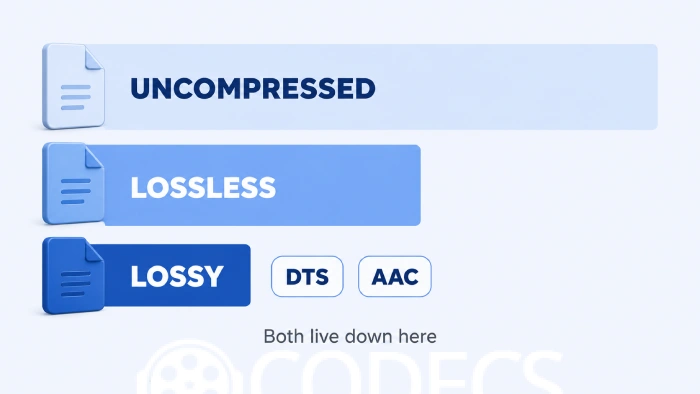
Why this matters for the comparison. Once you know both formats are lossy, "DTS sounds better" stops being a property of the codec and becomes a question of bitrate, channel count and the equipment you are playing it on.
What Each One Is Actually For
| DTS | AAC | |
|---|---|---|
| Built for | Cinema and home theatre surround | Music, streaming and general audio |
| Where you meet it | Discs, disc rips, some broadcast | Streaming services, phones, YouTube, most downloads |
| Typical channels | 5.1 or more | Stereo, though it does multichannel too |
| Usually decoded by | An AV receiver, soundbar or media PC | Essentially every device you own |
| Compression | Lossy, or lossless in the HD Master Audio version | Lossy |
| Fails when | Your TV or player has no DTS licence | Almost never |
Read down the "where you meet it" row and the point becomes obvious. These formats live in different places, and a file arrives with one or the other already baked in.
So Which Sounds Better?
At the bitrates each one is normally used at, both are good enough that the format is rarely the limiting factor.
A 5.1 DTS track at 1509 kbit/s works out at roughly 250 kbit/s per channel. AAC is generally considered transparent - meaning most listeners cannot pick it from the original - well below that figure, because it is a much newer design.
What DTS genuinely gives you is discrete surround channels mixed for a room with real speakers in it. That is a different thing from sounding better, and it only pays off if you own the speakers.
On a laptop, a phone or a TV's built-in speakers, a DTS track offers nothing over a good AAC one. The advantage is in the mix and the channel count, not the codec.
Why Your TV Refuses to Play DTS
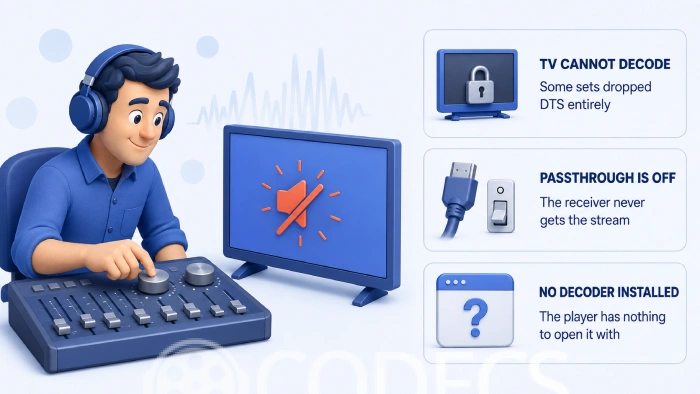
This is the problem most people actually have, and it has been getting worse rather than better.
DTS decoding costs manufacturers a licence fee, and several have decided it is not worth paying. Samsung TVs have never handled DTS passthrough, and LG removed DTS from its 2025 sets altogether.
Removed altogether is the part that catches people out. The set will not decode the track and it will not forward it to your soundbar either, so you get silence or a stereo fallback where you expected surround.
The symptom is easy to misread. A file that plays perfectly on your PC and goes silent on the TV is almost never a broken file. It is a licensing gap in the television.
There are three ways round it, and which one applies depends on your setup:
- Decode before the TV sees it. Let a PC, media box or Blu-ray player handle the DTS and send plain PCM onward - the TV will accept that happily.
- Bypass the TV. Connect the source straight to a DTS-capable receiver or soundbar, and send only the picture to the screen.
- Change the track. Swap the DTS audio for something the set does support, which takes seconds and is covered below.
Playing DTS on Windows
Windows does not decode DTS on its own, so you need one component. Any of these will do it.
- LAV Filters - the modern default. It handles DTS, AC3, E-AC3 and nearly everything else, and most current players use it already.
- DTS/AC3/DD+ Source Filter - useful when you need to open raw DTS and AC3 streams directly rather than inside a container.
- AC3 Filter - the long-standing option, with mixing and level controls some people still prefer.
Not sure which of the three you want? AC3 Filter vs LAV Audio compares them properly, and Codecs for Windows 11 covers the whole setup in one pass.
Swapping a DTS Track for Something Your Gear Accepts
If the DTS track is the only thing stopping a file from playing, you do not have to re-encode the video. You only need to deal with the audio.
MKVToolNix will strip or replace an audio track in seconds without touching the video at all. If the file already carries a second audio track - many rips do - you can simply drop the DTS one and keep the AC3 or AAC.
To convert the DTS track rather than remove it, foobar2000 handles it once you have the right components installed.
Our guides to converting audio with foobar2000 and installing its components cover both halves of that.
For encoding to AAC specifically, FDK AAC is the quality option, and there are more in the audio encoders category.
Check before you convert. Open the file in MediaInfo or the Codec Finder first. Plenty of files already carry a compatible second track, which makes converting unnecessary.
Which Should You Actually Use?
| Your situation | What to do |
|---|---|
| You have a receiver or soundbar and real speakers | Keep DTS and let the receiver decode it |
| You watch on a TV, laptop or phone | AAC or AC3 is the safer track, and you lose nothing you could hear |
| You are encoding something to share | AAC, every time - it plays on everything |
| Your TV goes silent on one file | Strip or swap the DTS track rather than re-encoding the video |
| You are archiving a disc | Keep the original DTS or DTS-HD track and add a compatible one alongside it |
Related Reading
If you want to go deeper on either side of this, the specifics live elsewhere on the site.
- AAC-LC vs AAC-HE - why AAC has several names and which one you are looking at.
- Why EAC3 matters - the format quietly replacing both on streaming platforms.
- Windows Sonic, Dolby Atmos and DTS - the spatial audio options on Windows and what they do.
- Best EAC3 players for Android - if the silent file is on a phone or tablet.
- FLAC vs MP3 - the lossy versus lossless question settled with listening tests.
For the wider picture, Best Modern Codecs covers where audio and video formats stand now, and the audio codecs category has everything else.
DTS also makes two Windows apps, DTS Audio Processing and DTS Sound Unbound. Both are post-processing and spatial-audio tools rather than decoders, so neither will make a silent track play.
If enhancing sound you can already hear is what you are after, turning on spatial sound in Windows explains what those apps actually do.
Quick questions
Is DTS uncompressed?
No. Standard DTS is lossy, capped at 1509 kbit/s. DTS-HD Master Audio is lossless, but lossless still means compressed - it just means nothing was thrown away.
Is DTS better quality than AAC?
Not as a codec. DTS carries more channels at a higher total bitrate, which matters if you have surround speakers, but AAC is the more efficient design per channel.
Why does my TV have no sound on a DTS file?
Most likely the set has no DTS licence. Samsung has never supported DTS passthrough and LG dropped it from its 2025 models, so the TV neither decodes the track nor forwards it.
Can I convert DTS to AAC without ruining the file?
Yes, and you only need to touch the audio. Strip or replace the track with MKVToolNix and the video stays exactly as it was.
Do I need DTS if I only watch on a laptop?
Not really. Two small speakers cannot reproduce a 5.1 mix, so the surround channels get folded down and the advantage disappears.
How do I play DTS on Windows?
Install LAV Filters, which most modern players already use. AC3 Filter and the DTS/AC3 source filter are alternatives if you want more control over mixing.
Which should I choose when encoding my own video?
AAC, unless you are specifically producing a surround mix for a home theatre. It plays on essentially everything, and DTS does not.




Latest reviews
AllJPEG XL Is Back in Chrome: What It Means and How to Open JXL...
5/5Brave just enabled it by default for stable users yesterday (1.97). Not specified is chromeOS will be passively gaining decode ...
The New Fire TV Stick 4K Can't Run Kodi - Here's Which Fire ...
5/5Really interesting news - I had no idea Amazon was switching the new Fire TV Stick 4K over to ...
Free Popular IPTV Playlist: Where to Get Fresh, Legal M3U Li...
5/5Hi! Thanks for creating this list, and I have a small question: why do the channels I used to ...