YouTube has no single subtitle font - its web player falls back to Roboto, and any viewer can swap that for one of seven other styles in the caption settings.
So the short answer is Roboto.
The useful answer is that Roboto is a default, not a rule.
Below is what the player really does, where to download the font, and how to make your own subtitles look the same.
The Font YouTube Actually Uses
Turn captions on in a desktop browser and the text is drawn by the player's own stylesheet, which asks for four fonts in order.
The list is YouTube Noto, Roboto, Arial, Helvetica, sans-serif, and the browser uses the first one it can find.
YouTube Noto is an internal Google build that is not installed on anyone's computer, so every browser skips straight past it. Roboto is the next name on the list, and YouTube loads Roboto from Google Fonts on every page, so Roboto is what you see.
Why this matters. The font arrives with the page rather than coming from your system, so captions look the same on Windows, macOS and Linux even though none of them ship Roboto.
Why Your Captions Might Not Look Like Roboto
Roboto is only the fallback, and the player lets every viewer override it.
Click the gear icon, open Subtitles/CC, then Options, and the first entry is Font family. It offers seven alternatives to the default.
- Monospaced Serif
- Proportional Serif
- Monospaced Sans-Serif
- Proportional Sans-Serif
- Casual
- Cursive
- Small Capitals
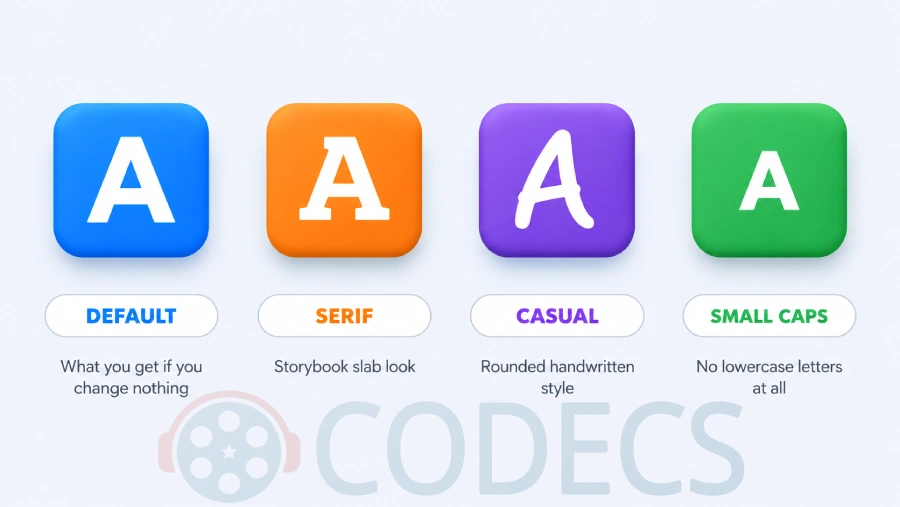
Pick one and YouTube stops using Roboto - for you only. The setting lives in your browser, not in the video, so nobody else sees the change.
The same screen also controls font colour, font size, background colour and opacity, window colour and opacity, and character edge style. That is a lot of ways for two people to watch the same video and describe two different fonts.
Phones work differently again. Android and iOS both carry system-wide caption styling under their Accessibility settings, so if captions on your phone look nothing like the desktop ones, that is the place to check.
Where to Download Roboto Free
Roboto is free for personal and commercial work, published under the SIL Open Font License.
Google Fonts is the place to get it. The current release is a variable font covering weights from Thin to Black plus condensed widths, and the Get font button hands you the whole family as a ZIP of ready-to-install files.
- Roboto on Google Fonts - the complete family, and the version to use unless you have a reason not to.
- The Roboto project on GitHub - source files and build tools, for anyone who needs them.
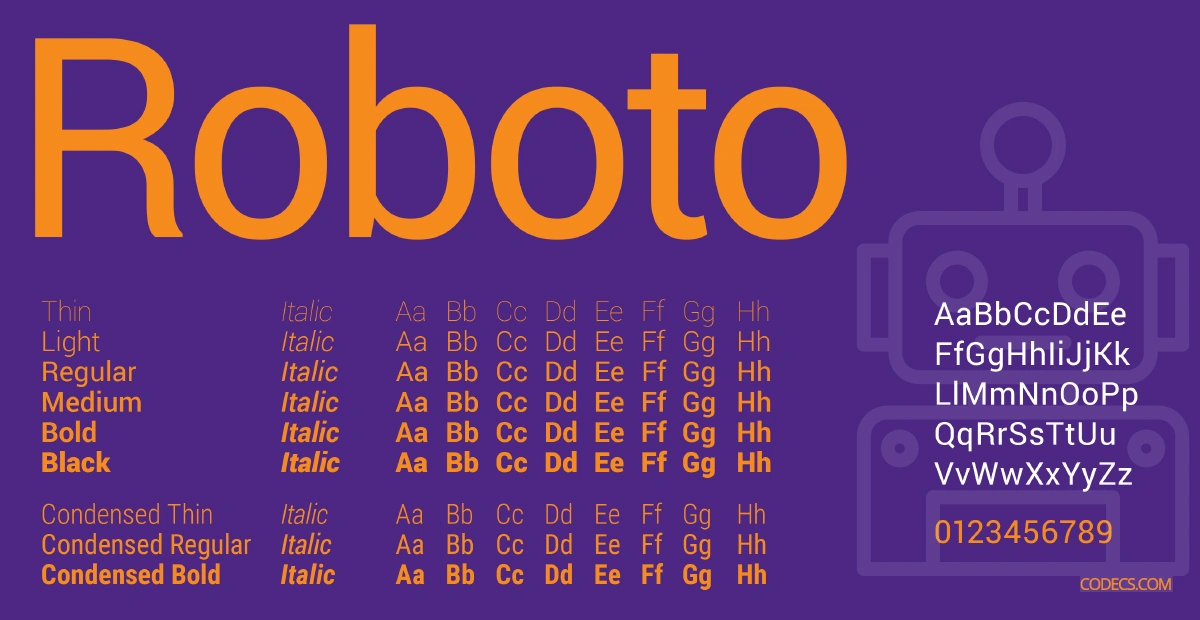
Android phones already have Roboto as their system font. Windows and macOS do not, so on a desktop you have to install it before it shows up in any editor's font menu.
How to Match YouTube's Caption Style
The font is only part of the look. YouTube's default captions are white text on a translucent black bar, with no outline and no shadow, parked at the bottom centre of the picture.
| Setting | What YouTube does | Copying it |
|---|---|---|
| Font | Roboto Regular | Install Roboto and pick the Regular weight, not Bold |
| Text colour | White | Pure white, no tint |
| Background | Black box behind the text only | Black at about 75 percent opacity, hugging the line |
| Outline | None | Turn off outline and drop shadow - the box does that job |
| Size | Scales with the player | Set it as a percentage of frame height, not a fixed point size |
| Position | Bottom centre | Centred, with a small margin below |
That last row is the one people get wrong. A subtitle set to 18 points looks right in a preview window and turns into a whisper on a 4K export, because YouTube never used a fixed size in the first place.
Putting Roboto Subtitles Into Your Own Video
Once Roboto is installed, any editor that reads system fonts can use it.
- Subtitle Edit is the free pick for styling an SRT or ASS file and previewing it against the video before you commit.
- HandBrake burns a styled subtitle track permanently into the picture, which is what you want for a platform that strips subtitle files.
- DaVinci Resolve and Final Cut Pro both pick Roboto up from the system font list after a restart.
- CapCut Video Editor is the quickest route on a phone, though its font list is its own rather than your system's.
- Subtitle Workshop Classic is the lighter alternative if Subtitle Edit feels like too much program.
Check the result in VLC Media Player before uploading anything, because a subtitle file that looks perfect in an editor can render with a different font entirely in a plain player.
Using Roboto on a Web Page
For a website you do not need to download anything. Add the Roboto stylesheet link that Google Fonts gives you on the specimen page, then set font-family: 'Roboto', sans-serif; on whatever you want it applied to.
Weight 400 is the one that matches YouTube's captions. Loading the whole family when you only need one weight is the commonest way to make a page slower for no visible gain.
Who Should Look Elsewhere
If you are handing over a separate subtitle file rather than burning the text into the picture, none of this styling survives.
The tell is easy to check: if your subtitles are a .srt file sitting next to the video rather than part of it, the player at the other end draws them with its own font, and a TV app or set-top box will ignore everything you chose. Burn them in, or accept that the look is out of your hands.
Quick questions
What font does YouTube use for subtitles?
Roboto, on the desktop web player, because it is the first font in the player's list that browsers can actually load. It is a default rather than a fixed choice, and viewers can change it.
Is Roboto free to download and use commercially?
Yes. It is published under the SIL Open Font License, which covers commercial work, and Google Fonts hosts it at no cost.
Why do my captions look different from someone else's?
Because caption appearance is a per-viewer setting. Anything changed under Subtitles/CC then Options applies only to that person's browser.
Can I change the subtitle font in the YouTube app?
Not from the player menu the way you can on desktop. Android and iOS both keep caption styling in their own Accessibility settings instead.
Do I already have Roboto installed?
On an Android phone, yes, it is the system font. On Windows and macOS it is not included, so you need to install it before it appears in a font menu.
What size should YouTube-style subtitles be?
There is no single correct number, because YouTube scales captions with the player size. Set the size as a share of the frame height in your editor so it holds up at every resolution.
Roboto is a five-minute install, and matching YouTube's caption look is mostly a matter of turning the outline off.
Download Subtitle Edit and style your first file, or tell us how you got on if you have already done this the hard way.





Latest comments
AllSi mund te shikoj te gjitha kanalet e DigitAlb dhe Tring me url pa pagese ne Iptv Player?
Team replied Guide: Free Popular IPTV Playlist: Where to Get Fresh, Legal M3U Links in 2026 20 commentsالبروتوكول (http:// أو [link] بعنوان الـ IP أو الدومين، ورقم المنفذ (مثل :8080 أو :80).• مثال لشكل الرابط: [link]
Team replied Guide: Xtream Codes Explained: How They Work and Differ From M3U 1 commentHola cuando descargo un video con mpc-hc lo descarga en formato webm en vez de mp4 o mp3
Team replied Guide: How to Stream Videos with MPC-HC 1 comment