You installed Intel Graphics Software, you clicked it, and nothing happened - no window, no error, no warning. Here is why, and what to run instead.
The Microsoft Store will install Intel Graphics Software on absolutely any Windows PC, whether or not that PC can run it.
It never checks your hardware, so you get no warning at install time and no message when you click the icon.
Your PC is fine and the app is fine - they were simply never built for each other.
Intel Graphics Software needs Intel graphics driver 32.0.101.6325 or newer, plus Xe Plus Graphics version 11 or newer or an Arc card. Miss either and the app installs but never opens.
Check the graphics name in Device Manager first. Arc, Core Ultra, or Iris Xe on 11th Gen or newer means your hardware qualifies and a driver update from the Intel Graphics Driver listing is the fix.
HD or UHD Graphics on 6th to 10th Gen is below the hardware floor, and no driver update will ever close that gap. Use Intel Graphics Command Center instead, from the Microsoft Store.
Two numbers, and you will know which reason is yours
Before changing anything, find your graphics name and your driver version. All three reasons below hang on these two.
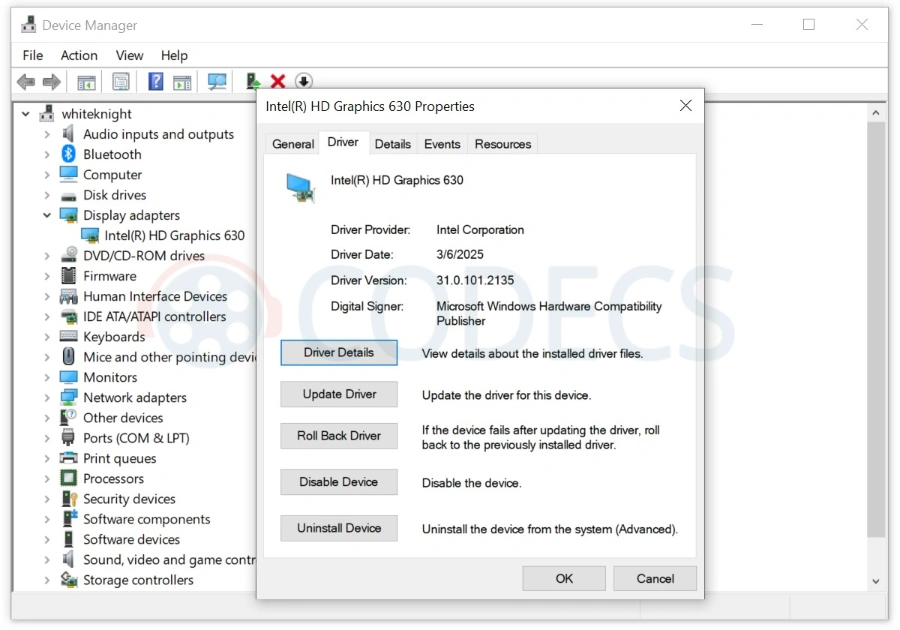
This is what you are looking for. Both boxed values come from the same place, so it is one trip into Device Manager, not two.
- Press Windows key + X and choose Device Manager.
- Expand Display adapters and read the name - Intel Arc, Iris Xe, UHD Graphics and so on.
- Right-click it, pick Properties, open the Driver tab.
- Write down Driver Version. It will look like
32.0.101.6325or31.0.101.2141.
Rather not dig through Device Manager? GPU-Z shows both on its first tab the moment it opens.
A driver starting 31. does not automatically mean you are stuck. Intel used the 31. numbering for Arc and Iris Xe too, right up until the switch to 32.
31.0.101.2xxx is the 6th to 10th Gen dead end. 31.0.101.4xxx and 31.0.101.5xxx are old Arc and Iris Xe drivers, and those machines just need updating. The graphics name is the safer test.
Reason 1: your driver is too old (fixable)
If the graphics name is Arc, Core Ultra, or Iris Xe on 11th Gen or newer, you are in the good outcome. Your hardware qualifies and only the driver is holding you back.
Update it and the app will open on the next launch. Anything at 32.0.101.6325 or above clears the floor, so you do not need to chase the newest build.
Get it from the Intel Graphics Driver listing, restart, then click the app again. Nothing else to configure.
Stick to a WHQL build if you have the choice. Intel also publishes non-WHQL previews on the same branch, and those are for people chasing a specific game fix, not for getting an app to launch.
Worth knowing: Intel bundles Graphics Software with driver 32.0.101.6325 and later. Check your Start menu after the driver install - you may already have a working copy.
Reason 2: your hardware is below the floor (not fixable)
If the graphics name is HD Graphics or UHD Graphics on a 6th to 10th Gen processor, stop here. Intel does not build 32. drivers for that hardware.
An Intel HD Graphics 630 machine, to pick a very common example, sits on 31.0.101.2xxx and always will. There is no update that closes an entire generation gap.
The requirement list, so you can check yourself:
- Intel Xe Plus Graphics version 11 or newer, or an Intel Arc dedicated card.
- Intel graphics driver 32.0.101.6325 WHQL or newer.
- Windows 10 version 22H2, or Windows 11 version 22H2 or newer.
- .NET Runtime 8 or later.
- An internet connection, for driver checks and updates.
Fail any one of those and the app stays silent. Your route is Intel Graphics Command Center, which covers resolution, refresh rate, colour and video settings perfectly well.
Reason 3: the install was incomplete (fixable)
Qualifying hardware, a current driver, and it still will not open? Then something went missing during one of the two installs, and there are only two realistic candidates.
The app. If you sideloaded an MSIX file rather than using the Microsoft Store, the missing piece is probably .NET Runtime 8, which sideloading does not pull in automatically.
Reinstalling through the Store proper handles that dependency for you. This is the single most likely fix for anyone whose hardware clearly qualifies.
The driver. A driver install that failed or was interrupted can leave the version number looking right while the pieces the app needs are not actually there.
Reinstalling the driver from the Intel Graphics Driver listing sorts this, and it is worth doing before you conclude your hardware is the problem.
So which of the three apps is actually yours?
Intel has shipped three graphics control apps since 2018 with confusingly similar names. Find your hardware here.
- Intel Arc A-Series or B-Series card, or a Core Ultra processor. You get Intel Graphics Software, the current app and the only one still gaining features.
- 11th to 14th Gen Core with Iris Xe or UHD Graphics. Graphics Software generally works from 12th Gen up, with fewer panels than an Arc owner sees, and Command Center is the reliable fallback on anything that will not cooperate.
- 6th through 10th Gen Core, or Atom, Pentium and Celeron of that era. Graphics Command Center only, because Graphics Software will never run on this hardware.
- Still on Intel Arc Control. Move to Graphics Software if your hardware allows, because Arc Control is End Of Life and will not be fixed again.
A fair warning if you do qualify: overclocking and fan control are Arc-only. On a laptop with built-in graphics those panels simply will not appear, which is not a bug.
Why chasing the highest version number backfires
Intel does not ship one graphics driver. It ships several families split by hardware generation, and they advance at completely different speeds.
Downloading the highest number you can find is a reliable way to install nothing at all. Here is the split as it stands:
- Arc Graphics and Core Ultra are on the 32.0.101.88xx family. The only actively developed one.
- 11th to 14th Gen Core are on their own 32.0.101.70xx family, which reached 32.0.101.7088 on 22 June 2026.
- 7th to 10th Gen Core are on 31.0.101.21xx, which reached 31.0.101.2141 on 6 April 2026.
- 6th Gen Core and Arc Pro workstation cards each have a package of their own again.
Do not treat any version number here as a target. Intel also pruned its Download Center in April 2026, removing 7th-10th Gen drivers older than 31.0.101.2141, so the oldest available build shifts over time.
The reliable move is Intel Driver & Support Assistant, which scans your machine and offers only the driver that fits it. It is linked from the Intel Graphics Driver page.
What "legacy" actually means for your PC
Intel uses the word legacy a lot, and it is not the same as abandoned. It has a specific meaning worth spelling out.
On 27 July 2022, Intel moved 6th to 10th Gen processor graphics to legacy support - Skylake, Kaby Lake, Coffee Lake, Whiskey Lake, Comet Lake, Ice Lake, Apollo Lake, Gemini Lake and Jasper Lake.
On 19 September 2025, it did the same to 11th through 14th Gen. Add those together and only Arc cards and Core Ultra chips remain on an actively developed driver.
In practice your machine still works, still gets security patches, and still receives the occasional driver on a roughly quarterly cadence. What it does not get is new features, or a driver tuned for a game launching next month.
The part that quietly affects your videos
Here is the consequence most guides skip, and the one that matters if you watch a lot of video.
Your graphics driver carries Intel's media stack - the components that let the graphics chip decode video instead of making the processor do it. A frozen driver family means a frozen media stack.
Roughly: hardware HEVC and VP9 decoding has been there since the 7th Gen era, so older machines handle most streaming and most 4K files without breaking a sweat.
AV1 hardware decoding arrived with the Xe generation, meaning 11th Gen and newer. On 6th to 10th Gen graphics it is not there and never will be, so AV1 falls back to software decoding.
That is why an AV1 file can hammer your processor and spin your fan up while an HEVC file of the same size plays cool.
You do not have to take that on trust. Our Browser GPU & Codec Checker tests what your machine actually decodes in hardware, right now, with nothing to install.
Getting good playback on legacy Intel graphics anyway
A legacy driver family is not a dead end for video. It just means the software around it has to do a little more of the lifting.
The simplest fix is to stop relying on what Windows ships with. The K-Lite Codec Pack installs the decoders Windows leaves out and sets sensible defaults, which covers HEVC and AV1 in software when your graphics cannot do them in hardware.
Then use a player that leans on whatever hardware decoding you do have. Our guide to the best HEVC video players covers which ones use Intel Quick Sync properly and how to check it is switched on.
And keep the driver current even on a legacy family. Quarterly is not never, and security fixes still land.
What we are deliberately not telling you to do
You will find forum threads recommending a modified INF file to force a 32. driver onto older hardware. Skip it.
The driver loads, the media stack does not match the silicon, and you end up with black video in some apps and a rollback you have to do in Safe Mode. The tell is any instruction that has you editing a .inf in Notepad or disabling driver signature enforcement.
For this specific problem we are also not sending you to a general driver-updater tool. They have their uses when a whole machine is out of date, but here you need one driver from Intel, and Intel Driver & Support Assistant picks it for free.
Quick questions
Can I force Intel Graphics Software to open on older hardware?
No. The hardware check is not a licence gate you can bypass - the app needs features that older graphics silicon does not have.
Is Intel Graphics Command Center still safe to use?
Yes. Intel ships critical legacy fixes for it, and it handles resolution, refresh rate, colour and video settings exactly as it always did.
Will uninstalling and reinstalling help?
Only if you originally sideloaded the MSIX file. Reinstall from the Microsoft Store so the .NET Runtime 8 dependency comes with it.
Does installing the app also install the driver?
No, it works the other way round. The app only controls graphics support that is already there, so the Intel Graphics Driver always comes first.


Latest comments
AllInteresting development with the Fire TV Stick 4K — losing Kodi sideloading is a big deal for a lot of users. For those ...
News: The New Fire TV Stick 4K Can't Run Kodi - Here's Which Fire Stick Still Can 3 commentsThanks genius, it worked for me. v2.4.149.0 on windows 10
Guide: How to Download HEVC Video Extension for Free 181 commentsXMediaRecode gives only the option to Copy (No convert) in Audio Mode drop down. I am trying to convert/recode the EAc3 ...
Team replied Guide: How to Convert EAC3 Audio to AC3 or AAC With XMedia Recode 1 comment