You would expect a tool first released in 1998 to be coasting on nostalgia by now. LAME MP3 Encoder spent nine years without a release, shipped two of them in a single week of July 2026, and is still what almost every free audio program reaches for when you ask it for an MP3.
MP3 is still the format that plays on everything, from car stereos and cheap Bluetooth speakers to ten-year-old phones and every podcast app ever written.
So the useful question is not whether MP3 still matters, but whether the encoder everyone standardised on is still the one to use.
It is, and in 2026 the reasons finally changed.
Yes, It Is Being Maintained Again
For years the honest description of LAME was "finished". The last release was 3.100 back in 2017, the developer mailing list carried nothing at all through 2024 and 2025, and the project's own developers page has not been edited since 2017 either.
That changed in July 2026. LAME 4.0 arrived on the 11th, the first major version in nine years, and 4.1 is being written right now.
Version 4.0 itself is not thrilling, and that is fine. It closed a buffer overflow in the old Blade-compatible library that legacy Windows programs still load, removed a bug that could hang the encoder in a loop on a malformed AIFF file, and left the sound of your files completely alone.
Nothing in your music library needs re-encoding because of it. Our news piece on what is coming in LAME 4.1 goes through the development tree properly, including the speed work and the one fix most people will actually feel.
It Still Sounds Right, Which Is the Whole Argument
The part of an encoder that matters is its psychoacoustic model, the code that decides which parts of a sound a listener will not miss. LAME's was tuned over more than two decades and has not needed changing since.
At the V2 preset, most people cannot tell a LAME MP3 from the source on ordinary equipment, which is the only test that really counts. Our best LAME settings guide gives you the exact number to type for music, podcasts and audiobooks.
That is also why nobody has replaced it. A better MP3 encoder would have to beat a target already inaudible to most listeners, on a format nobody is investing in any more, so nobody has bothered to try.
Two Ways to Spend the Bits
LAME can hold the bitrate steady or let it move with the music, and for anything you are keeping, letting it move is the better deal.
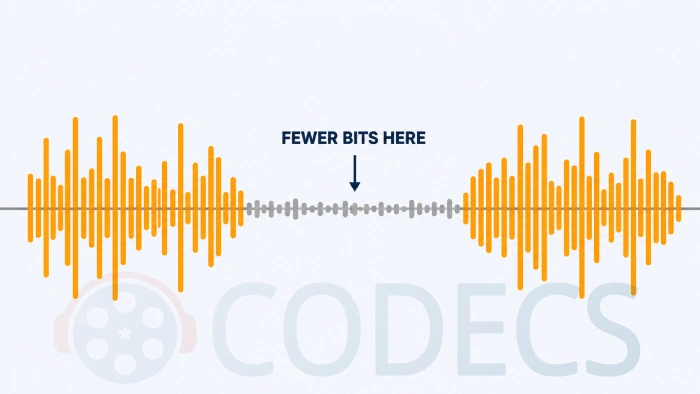
Variable bitrate spends fewer bits on a quiet passage and more on a dense one, so you get the same perceived quality in a smaller file. Fixed bitrate is for the cases where a predictable file size genuinely matters, such as broadcast and podcast delivery.
Our VBR versus CBR guide covers that trade-off properly, and the WAV to MP3 guide walks through the most common source format.
LAME has a quality dial separate from bitrate, running from -q0 at the slowest down to -q9 at the fastest. On fixed and average bitrate encodes, -q0 through -q3 have quietly produced worse results than -q4 for years, because of a noise-shaping routine left over from a model the encoder no longer uses.
Use -q4 there instead. Variable bitrate was never affected, and the correction sits in the 4.1 development tree rather than in 4.0.
You Do Not Have to Touch the Command Line
LAME is a command-line program, and almost nobody runs it that way.
LameXP bundles it alongside Opus and FLAC encoders, takes drag-and-drop batches, and puts every preset in a normal window. X Audio Converter is the lighter choice when you just want to drop a file in, pick a bitrate and get an MP3 back.
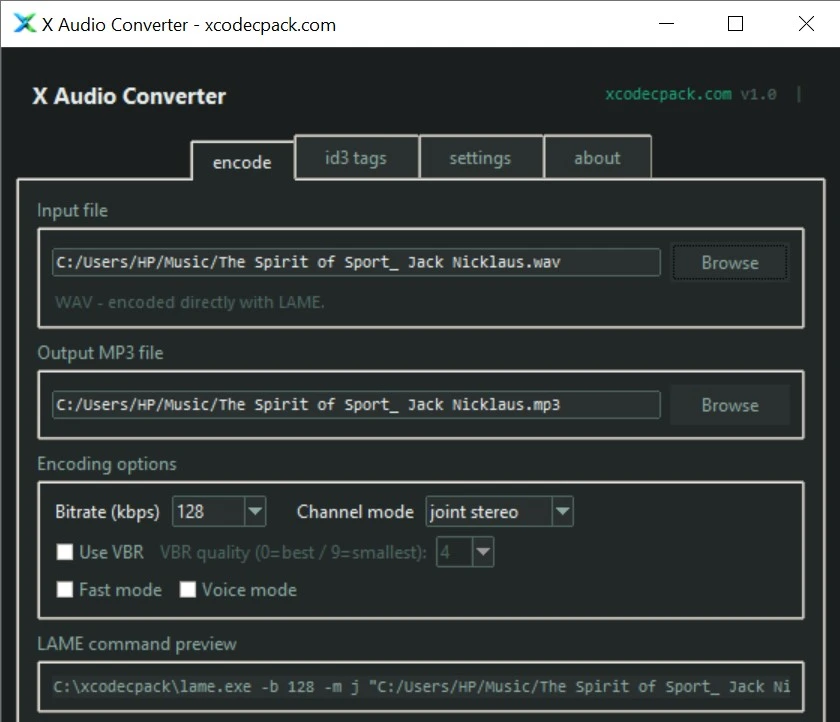
X Audio Converter comes from our partner xcodecpack.com, whose audio converter page lists every format it handles.
If you would rather install nothing at all, the site's own online audio converter does single files in the browser.
It Is Already Inside Almost Everything Else
Most people who use LAME have never heard of it, because it arrives as a component inside something else rather than as a program you install.
Audacity has bundled it since version 3.2, so its MP3 export simply works with nothing to install and no library to go looking for.
FFmpeg ships it as libmp3lame, and HandBrake uses it whenever it writes an MP3 audio track.
foobar2000 reaches for it through its encoder pack, and most free CD rippers hand their audio to it as the final step.
That is also why the security fixes in 4.0 mattered rather more than their modest headline suggested. The code sits inside a very large number of programs whose users have never heard the name.
It Runs on Whatever You Have
Windows, macOS, Linux and ARM all have builds, and on Linux it is in every package manager worth the name.
Windows on ARM machines, such as Surface and Snapdragon laptops, run LAME for Windows ARM64 natively and skip the emulation layer entirely. Mac users, Apple Silicon included, want LAME for Mac OS.
One caveat is worth knowing until 4.1 ships. LAME's hand-written speed optimisations have been silently switched off on Linux, macOS and 32-bit Windows since 3.100, so those builds have been grinding through plain unaccelerated code for nine years, which costs you time rather than quality.
Patent-Free Since 2017, and That Mattered
The MP3 licensing programme ended in April 2017, which put LAME permanently in the clear for personal and commercial work anywhere in the world.
Before that it lived in a legal grey area that kept it out of bundled installers, which is the entire reason older software used to make you fetch it separately. Our install guide for Windows still covers the handful of programs that ask for the library by name.
Who Should Look Elsewhere
The tell is where the file is going. If it will only ever be played by software you control, on your own phone, laptop or browser, then MP3 is not buying you anything and you are paying for compatibility you never use.
In that case Opus sounds clearly better at low bitrates and is the better pick for speech and podcasts. For archiving rather than distributing, FLAC keeps every bit of the original at roughly half the size of a WAV.
Our FLAC versus MP3 comparison covers that choice in plain terms, and if the audio is still sitting on a disc, the CD ripping guide is the place to start.
Who Still Reaches for LAME
- Musicians making MP3 masters for Bandcamp, SoundCloud and the distribution platforms that still want one.
- Podcast producers squeezing spoken word down to a size that downloads quickly without turning voices to mush.
- Archivists moving large libraries to something compact, from sources they are keeping anyway.
- Anyone burning or loading a car stereo, where MP3 remains the format least likely to be refused.
- Developers who need MP3 output from their own software and do not want to write an encoder.
Quick questions
Is LAME still being developed?
Yes, after a long gap. Version 4.0 shipped in July 2026, the first major release since 2017, and 4.1 is in the development tree with no release date announced.
Is LAME free to use commercially?
Yes. It is open source under the LGPL, and the MP3 licensing programme ended in 2017, so encoding MP3s carries no fee for personal or commercial work.
Do I need to download LAME separately for Audacity?
Not on Audacity 3.2 or newer, which includes it. Older releases, some portable builds and Linux builds still ask you to supply the library, which the install guide covers.
Will version 4.0 make my MP3s sound better?
No. It is a security and housekeeping release and the encoded output is unchanged, so there is no reason to re-encode anything you already have.
Is there a better MP3 encoder than LAME?
Not one you can freely download and use. LAME has been the practical default for so long that the alternatives are either commercial, unmaintained, or built on LAME themselves.
Should I re-encode my old MP3 files?
No. Re-encoding a lossy file only throws away more, so keep the originals and encode fresh copies from a lossless source when you need better quality.
More encoders, decoders and format tools sit in the audio encoders section and the wider Audio Codecs category.
A tool that stopped changing because it was finished is not the same thing as a tool nobody was looking after, and LAME turned out to be neither.
Download LAME MP3 Encoder and see how it handles your files, or tell us what you encode with if you have been using it for years.


Latest comments
AllI used [link] on tivimate with the Usa m3u Playlist. I cannot get the guide to work.
Team replied Guide: Free EPG URLs for IPTV: TV Guide Links That Still Work 2 comments[link] Epg is not working on this one.
Team replied News: Free USA IPTV Playlist: The American TV That Is Really Free 1 commentSi mund te shikoj te gjitha kanalet e DigitAlb dhe Tring me url pa pagese ne Iptv Player?
Team replied Guide: Free Popular IPTV Playlist: Where to Get Fresh, Legal M3U Links in 2026 20 comments