OpenAI is adding an invisible watermark to text written by ChatGPT and Codex in the EU, so software can later tell that an AI wrote it.
You will not see it, and it does not change how the answers read - but a detector can find it.
It is happening because of the EU AI Act, and it is part of a bigger shift that already covers AI images and Claude's text.
Here is how it works, who gets it, what it cannot prove, and how to check AI content yourself today.
What OpenAI Announced
On 5 October, OpenAI said its new text watermark, called textGrain, will reach ChatGPT and Codex users in the EU over the coming weeks, on every plan from Free upwards. The details are in OpenAI's announcement.
Outside Europe, ChatGPT is not watermarking text yet. Developers anywhere can switch it on for some models in OpenAI's API, but it is off by default.
How an Invisible Watermark Works in Text
When an AI writes, it picks each next word from several good options. textGrain uses a secret key to nudge those choices very slightly, and hundreds of tiny nudges add up to a pattern that a detector can recognise.
Think of it as a fingerprint in the word choice rather than a stamp on the page. There are no hidden characters to delete, and OpenAI says its tests showed no drop in answer quality.
Why Europe, and Why Now
Article 50 of the EU AI Act says companies behind generative AI must mark what their tools create - text, images, audio and video - in a way machines can detect. The rule applies from 2 August 2026, and tools already on sale before then have until 2 December 2026.
Breaking it can cost up to 15 million euros or 3 percent of worldwide turnover. OpenAI is not first, either: Anthropic started watermarking Claude's text worldwide in August, and Google, Meta and Microsoft have signed the same EU code.
What the Watermark Can and Cannot Do
It works best on longer text. In OpenAI's own tests it caught about 80 percent of short passages and about 95 percent of passages twice as long, but it struggles with very short answers, maths and translations.
Editing weakens it fast. Swapping one word in ten dropped detection to about 66 percent, and swapping one in four dropped it to about 17 percent.
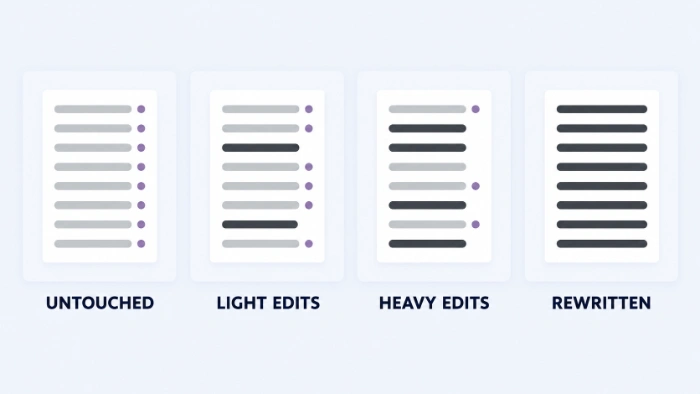
- It does not identify you - the watermark says nothing about which account or person used ChatGPT.
- It does not measure your input - it cannot tell a one-click answer from a draft you rewrote heavily.
- Its absence proves nothing - text with no watermark may still be AI-written, just short, edited, translated or from another tool.
The text detector is not public, either. For now only approved researchers and expert organisations can use it, so a teacher or employer cannot simply paste in an essay and check it with OpenAI.
About "watermark remover" sites:
Dozens of these appeared after Claude's watermark arrived, and most simply delete hidden characters from text. textGrain does not use hidden characters, so they have nothing to find - be wary of handing your writing to them.
Check AI Images Yourself Today
Text is hard to check, but images are not. Pictures made with ChatGPT and OpenAI's other tools carry Content Credentials, a labelled record of how the file was made, plus an invisible watermark in the image itself.
The quickest check is online: upload the picture to OpenAI's verify page and it will look for both signals. It also works on audio made with OpenAI's tools.
To check on your own PC instead, without uploading anything:
- Install ExifToolGui, the free point-and-click version of ExifTool.
- Open the folder with the picture and select the image file.
- Show all of its metadata and look for a field called Claim Generator.
- A value naming ChatGPT, OpenAI or another AI service means the file still carries its AI label.
No label is not proof of a real photo:
Content Credentials disappear when someone takes a screenshot, re-uploads to social media or converts the file to another format. Treat a missing label as "unknown", never as "human-made".
Metadata cuts both ways, though. Your own phone photos carry details such as GPS location and camera model, and the free EXIF Data Remover strips them in your browser before you share a picture, without uploading it anywhere.
Quick questions
Does ChatGPT watermark text outside the EU?
Not in ChatGPT itself, for now. OpenAI says it is starting in Europe to learn from real use, and developers elsewhere can turn it on in the API.
Can I turn the watermark off in ChatGPT?
OpenAI has not offered a switch for EU users. The EU rule requires the marking, so expect it to stay on.
Can my teacher or boss detect ChatGPT text now?
Not with OpenAI's tool - the detector is only open to approved researchers and expert organisations. Third-party "AI detectors" are separate products and do not read textGrain.
Does Claude watermark its text too?
Yes. Anthropic began watermarking Claude's output worldwide in August 2026, ahead of OpenAI's EU-only start.
Does the watermark make ChatGPT's answers worse?
OpenAI says watermarked answers scored the same or slightly better in its tests. You should not notice any difference when reading them.
The text watermark is hidden, but AI pictures you can check today.
Download ExifToolGui and look inside your next suspicious image, or tell us whether you have spotted one in the wild.


Latest news comments
AllInteresting development with the Fire TV Stick 4K — losing Kodi sideloading is a big deal for a lot of users. For those ...
News: The New Fire TV Stick 4K Can't Run Kodi - Here's Which Fire Stick Still Can 3 commentsBrave just enabled it by default for stable users yesterday (1.97). Not specified is chromeOS will be passively gaining decode capability too, and ...
Team replied News: JPEG XL Is Back in Chrome: What It Means and How to Open JXL Files 1 commentI didn't know it was EU, AND france. That doesn't sound like a good idea. Related to coding or privacy.
News: Meet Qwant: The Private, EU-Built Alternative to Google 1 comment