Download 3uTools 9.11.019
Direct Download Links - free, safe and fast mirrors
137
downloads this week
57.3K
all time
188MB
file size
updated
Oct 21, 2026
EXT Main LINK
3uTools 9.11.019
Windows
x64
3uTools_v9.11.019_Setup_x64.exe
EXT Main LINK
3uTools 9.11.019
Windows
3uTools_v9.11.019_Setup_x86.exe
EXT Main LINK
3uTools 9.07.007 - for macOS (Apple Silicon)
macOS
3uTools_v9.07.007_arm64.dmg
EXT Main LINK
3uTools 9.07.007 - for macOS (Intel Chip)
macOS
3uTools_v9.07.007_x64.dmg
EXT Main LINK
3uTools 9.03.003 - for Linux (.deb file)
Linux
com.3u.3utools_9.03.003_amd64.deb
EXT Main LINK
3uTools 9.03.003 - for Linux (.rpm file)
Linux
x64
cn.i4Tools-9.03.003-1.x86_64.rpm
EXT Main LINK
3uTools 3.29.009
Windows
3uTools_v3.29.009_Setup_x86.exe
EXT Main LINK
3uTools 3.29.009
Windows
x64
3uTools_v3.29.009_Setup_x64.exe
EXT Main LINK
3uTools 3.18.008 for macOS
macOS
3uTools_v3.18.008.dmg
How did it go with 3uTools?
Rate it in one click - your rating helps other readers pick the right tool.
What is 3uTools?
3uTools is a free Windows and macOS application for managing an iPhone or iPad from a computer without iTunes. It handles file transfers, local backups, firmware flashing and battery diagnostics from one interface, and it never asks for an Apple ID. Every feature is free, with no paid tier and no account to create.
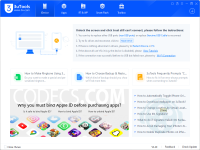
How to Download 3uTools
- 1 Click the DOWNLOAD button for your preferred link (US/EU Main or Mirror). When prompted by your browser, choose "Save" and select a destination folder.
- 2 We recommend using the mirror links (EU MIRROR / US MIRROR) first - they tend to be faster and more reliable than external sources.
- 3 Having trouble downloading 3uTools? If the download doesn't start, click the link again or try a different browser (Firefox/Chrome). Some security software may block downloads due to false positives.


