Windows still will not open an AVIF file on its own - and once you have fixed that, the viewer you install matters more than the codec does, because that is what decides whether a folder of 400 photos takes a minute or an afternoon.
AVIF files are roughly half the size of the same picture as a JPEG, which is why websites have quietly switched to them.
Windows has not caught up, so the file lands on your desktop as a blank white icon that nothing will open.
Fixing that takes two minutes. Choosing what to open it with is the part worth thinking about.
If you just need to open one file right now, our guide to viewing AVIF files on Windows has the three-minute fix, including the browser trick that needs nothing installed at all.
If you are picking a viewer to keep, you are on the right page. Read on.
First, the one thing every option below depends on
Most Windows image software does not decode AVIF itself - it asks Windows to do it, through a component called the Windows Imaging Component.
Installing the free AV1 Video Extension from Microsoft teaches Windows the format once, and everything that asks politely gets AVIF support for free: File Explorer thumbnails, Photos, Paint, and Word and PowerPoint.
Two of the viewers below do not need it, because they carry their own decoder. The table says which.
The six viewers, compared
| Viewer | Best for | Reads AVIF via | Batch convert |
|---|---|---|---|
| IrfanView | Doing something to hundreds of files at once | Its own PlugIns pack | Yes, and it is the best of them |
| XnView MP | Sorting and tagging a large photo library | Its own decoder | Yes |
| FastStone | Looking at photographs full screen | Windows, so install the codec | Yes |
| ImageGlass | Replacing the Windows Photos app | Windows, plus its own plugins | No |
| PicView | A viewer that gets out of the way | Its own decoder | Limited |
| nomacs | Comparing two versions of the same image | A bundled plugin | Yes |
If you want one answer and no reading: IrfanView if you will ever convert or resize in bulk, ImageGlass if you just want double-clicking a photo to feel instant.
IrfanView - the one to install if you convert anything
IrfanView is under four megabytes and looks like it was designed in 2003, which is roughly when it was. It is also the fastest way to do the same thing to several hundred images at once, and that has kept it installed on other people's machines for twenty years.
AVIF comes from IrfanView's own PlugIns pack, not from Windows - a separate installer on the same download page. Install it and AVIF works whether or not you added the Microsoft codec. Recent builds also read animated AVIF.
The batch dialogue handles convert, resize, crop, rename and filter in one pass, with the output format and quality set once and applied to everything.
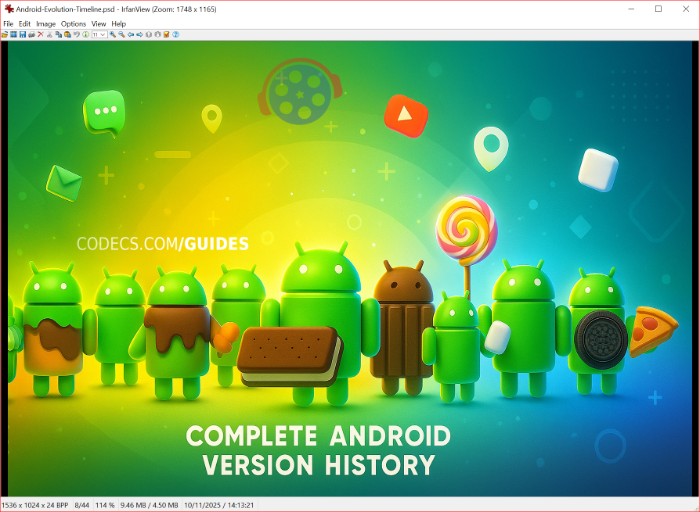
Best for: bulk conversion, resizing a folder for the web, and anyone who would rather a viewer started instantly than looked modern.
XnView MP - for a library rather than a folder
XnView MP reads somewhere north of 500 formats and is built around a browser pane rather than a single image, which is the difference between a viewer and a cataloguer.
It reads AVIF without the Microsoft codec. The batch converter handles AVIF to JPG and AVIF to PNG with a quality slider, and the batch renamer is genuinely good - patterns, counters, and EXIF fields pulled into filenames.
Best for: several thousand photographs that need sorting, tagging and renaming as much as viewing.
FastStone Image Viewer - the nicest one to actually look at photos in
FastStone Image Viewer hides everything. Full screen by default, toolbars that slide in when the mouse reaches the edge, and nothing else on the screen but the picture.
It reads AVIF through Windows, so it needs the AV1 Video Extension installed first. Beyond viewing it does red-eye removal, cropping, colour adjustment and slideshows, and there is a portable build that runs from a USB stick.
Best for: going through a holiday's worth of photographs on a big screen without an interface in the way.
ImageGlass - the Photos app replacement
ImageGlass is the one to set as your default if the Windows Photos app irritates you. It opens instantly, it looks like it belongs on Windows 11, and it handles touchscreens properly.
It reads around ninety formats out of the box and extends further through codec plugins, JPEG XL among them. Colour profiles are respected and EXIF appears on request rather than by default.
Best for: double-clicking a picture and having it on screen before you have let go of the mouse.
PicView - minimal, and on more than Windows
PicView takes the opposite approach to XnView: one image, almost no interface, and settings for anyone who wants to strip it back further.
It reads AVIF, HEIC, WebP, PSD and a hundred-odd others without help from Windows, and it runs on macOS and Linux as well, which matters if you move between machines.
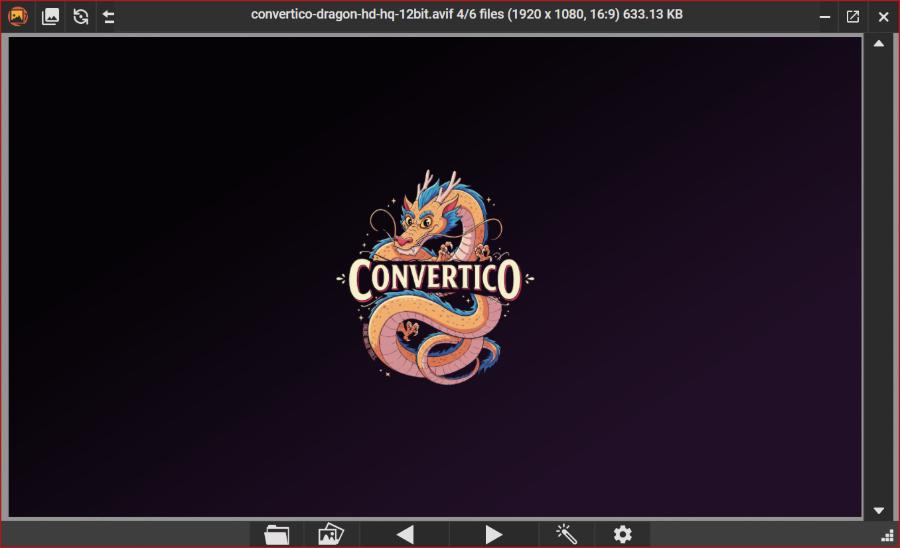
Best for: a clean default viewer, and cross-platform consistency.
nomacs - for comparing two images properly
nomacs does one thing nothing else here does: you can open two copies of it side by side and synchronise them, so panning and zooming one moves the other.
That turns "is the compressed version actually worse" from a guess into something you can see, which is the exact question AVIF raises. It ships an AVIF plugin in the box, reads images straight out of ZIP archives, and has a portable build.
Best for: checking what a conversion cost you before you delete the originals.
Converting AVIF into something else
Viewing is one problem and handing the file to somebody whose software is older is another. Three options, in order of how much you want to think about it.
Converseen exists to convert a pile of files and nothing else. Drag in a folder, pick the output format, set resize and quality once, and go. It runs on ImageMagick underneath, so the format list is enormous.
Our step-by-step guide to converting AVIF files with Converseen walks the whole thing through if you want the screenshots.
reaConverter is the one to look at if this is a recurring job rather than a one-off. Watch Folders convert anything dropped into a directory automatically, and there is a command-line interface for scripting it.
GIMP is overkill for a straight conversion and the right answer when the file needs editing on the way through - layers, masks, retouching, and then export to whatever you need.
Converting to JPEG loses quality, every time. AVIF and JPEG are both lossy, so re-encoding throws away a second helping of detail on top of what the AVIF already discarded. Use a quality setting of 90 or higher, or export to PNG instead if the file is going to be edited again afterwards.
Online, with nothing installed
On a work laptop where you cannot install software, or for a single file that does not justify a download, Convertico converts in the browser.
- AVIF to JPG - the one almost everybody wants, for sending a file to somebody whose software is older.
- AVIF to WebP - still small, and supported by a wider set of older browsers.
- JPG to AVIF - going the other way, to cut the weight of images on a site.
- GIF to animated AVIF - a far smaller file than the GIF, with proper colour.
The conversion runs on your own machine rather than on a server, so the picture is never uploaded anywhere.
Quick questions
My AVIF files still will not open. What now?
Install the AV1 Video Extension, then close and reopen whatever you are trying to view them in - most software only checks for available decoders when it starts.
If you would rather not install anything, drag the file onto an open browser window. Every current browser reads AVIF.
Why are there no thumbnails in File Explorer?
The codec enables them, but Explorer caches the blank icons it drew before you installed it and does not go back to check.
Open Disk Cleanup, pick your system drive, tick Thumbnails, and click OK. The previews rebuild as you browse.
Which viewer opens AVIF without installing the Microsoft codec?
IrfanView with its PlugIns pack, XnView MP, PicView and nomacs all carry their own decoder. FastStone and ImageGlass lean on Windows, so they need the extension.
Why is AVIF slower to open than JPEG?
AVIF squeezes the file harder, and unpacking it costs more work than a JPEG does - that is the trade it makes for the smaller size.
It is milliseconds on one photograph and noticeable on a folder of hundreds. A viewer that reads ahead while you browse, like ImageGlass, hides most of it.
Does converting AVIF to JPEG lose quality?
Yes, and there is no setting that makes it not. Both formats are lossy, so a conversion discards detail a second time.
Quality 90 or higher keeps it invisible in normal viewing. Export to PNG instead if the file will be edited again.
Is AVIF actually worth using?
For photographs on a website, yes - roughly half the file size of a JPEG at the same visible quality is a real saving.
For files you send to other people, not yet. Keep a JPEG for that, because you cannot rely on whatever they open it with.
The bottom line
Install the AV1 Video Extension so Windows stops treating AVIF as an unknown file, then pick one viewer and stop there. IrfanView if you will ever convert in bulk, ImageGlass if you only want photos to open quickly.
Everything else on this page is for a job one of those two does not do.


Latest reviews
AllJPEG XL Is Back in Chrome: What It Means and How to Open JXL...
5/5Brave just enabled it by default for stable users yesterday (1.97). Not specified is chromeOS will be passively gaining decode ...
The New Fire TV Stick 4K Can't Run Kodi - Here's Which Fire ...
5/5Really interesting news - I had no idea Amazon was switching the new Fire TV Stick 4K over to ...
Free Popular IPTV Playlist: Where to Get Fresh, Legal M3U Li...
5/5Hi! Thanks for creating this list, and I have a small question: why do the channels I used to ...