Windows does not open AVIF out of the box, and no amount of Windows Update will change that. Here are three free fixes - one instant, one permanent, one for people who live in an image viewer.
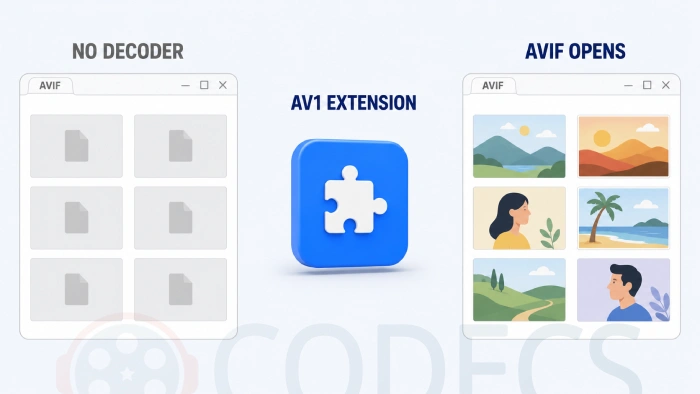
Here is a sample AVIF file to test your setup against once you have picked a fix below.
You double-click an AVIF and Windows shrugs at you.
The thumbnail is blank, Photos refuses it, and nothing you have installed seems to care.
AVIF is a still image built on the AV1 video codec, and Windows ships without an AV1 decoder. Until you give it one, an AVIF is just a file Windows cannot read.
Plenty of pages claim Windows 10 supports AVIF from version 1903 onwards. It does not, and neither does Windows 11 - there is no AVIF support in a stock install of either.
If you have already run Windows Update and nothing changed, that is expected rather than something you did wrong. Fix 2 below is the part that was missing.
Fix 1: Open it in your browser
This takes about five seconds and installs nothing, which makes it the right answer when you have one file to look at and no interest in configuring anything.
- Right-click the AVIF file and choose Open with.
- Pick Chrome, Edge or Firefox from the list.
- The image opens in a browser tab.
Every current browser decodes AVIF on its own, independently of Windows, so this works on any version including older ones. What it will not do is give you thumbnails in File Explorer or let you double-click the next one.
Fix 2: Install the AV1 Video Extension
This is the real fix, it is free, and it takes about two minutes.
The AV1 Video Extension is Microsoft's own package. Despite the name it is not only for video - installing it registers AV1 decoding with the Windows Imaging Component, which is the layer File Explorer, Photos and Paint all read images through.
Once it is in, AVIF files open by double-clicking, thumbnails appear in Explorer, and any program that asks Windows to decode an image gets AVIF for free.
- Download the AV1 Video Extension free and run it - the installer is silent and needs no configuration.
- Restart File Explorer, or just sign out and back in.
- Open an AVIF file to confirm, and check that thumbnails now render in the folder.
Windows N or KN edition?
Those editions ship with the media layer stripped out, so the extension has nothing to attach itself to. Install Media Foundation Codecs first, then come back to this step.
The same extension covers AV1 video playback, which our guide on playing AV1 video on Windows 11 goes into, and a full clean-machine setup is covered in our codec setup for Windows 11.
Fix 3: Use an image viewer that handles AVIF
If you spend your day in a dedicated viewer rather than the Photos app, this is worth doing alongside Fix 2 rather than instead of it.
- IrfanView - the popular one, and fast, but read the box below before you install it.
- XnView - the most capable of the three for batch work and format conversion.
- FastStone Image Viewer - the lightest, though older builds predate AVIF so take the current version.
This is the commonest complaint on this whole subject, and it is not a broken download. IrfanView keeps its AVIF support in a separate PlugIns package that the main installer does not include.
Install the IrfanView PlugIns pack and the error goes away. If it persists, the architectures do not match - 64-bit IrfanView needs the 64-bit plugins, and mixing them produces this exact message.
For a fuller rundown of what each viewer does well, see our roundup of the best AVIF viewers and converters, or browse the whole image viewers section.
Which fix should you use?
| Fix | Time | Gets you thumbnails | Use it when |
|---|---|---|---|
| Open in a browser | Seconds | No | One file, right now, on a machine you cannot install on |
| AV1 Video Extension | About two minutes | Yes | Almost always - this is the one that fixes it properly |
| Dedicated image viewer | A few minutes | Inside the viewer | You work with images all day and want batch tools too |
Why a picture needs a video codec
AVIF stands for AV1 Image File Format, and that is the whole explanation. It stores a still frame using the same compression as AV1 video, which is why the decoder arrives in something called a video extension.
The payoff is real: AVIF holds roughly the same quality as a JPEG at about half the file size, and it handles transparency and wide colour where JPEG cannot. Our comparison of AVIF against JPEG and WebP puts numbers on it.
The same pattern applies to iPhone photos, which arrive as HEIC and need HEIF Image Extensions alongside the HEIC Image Extension.
Would rather avoid the Microsoft Store? WIC for HEIC does the same job outside it.
Quick questions
Does Windows 11 open AVIF files without anything installed?
No. Neither Windows 10 nor Windows 11 includes AVIF support, and Windows Update will not add it - you need the AV1 Video Extension.
Is the AV1 Video Extension free?
Yes. It is Microsoft's own package, free, and about 5MB. The paid confusion comes from the HEVC extension, which is a different thing entirely.
Why does IrfanView say it cannot load AVIF.DLL?
Its AVIF support lives in the separate PlugIns package, which the main installer leaves out. Install the plugins, and make sure they match your IrfanView architecture.
Why are my AVIF thumbnails still blank in File Explorer?
Explorer caches thumbnails, so restart it or sign out and back in after installing the extension. A browser workaround will never produce thumbnails either way.
Can I just convert AVIF to JPG instead?
You can, and it makes sense for sharing with someone whose machine you cannot fix. You will lose some quality and a lot of file-size saving in the process.
Does this work in Photoshop?
Photoshop needs its own plugin rather than the Windows extension - our guide on opening AVIF in Photoshop covers it.
If you only do one thing, install the AV1 Video Extension - it is free, it takes two minutes, and it fixes AVIF everywhere in Windows at once rather than one program at a time.
Download the AV1 Video Extension and see whether your files open, or tell us how you got on if you have already tried it.

Would rather convert your images than install anything? These run in the browser, in bulk.
- AVIF to JPG - for sending a file to someone whose machine you cannot fix.
- JPG to AVIF - for shrinking a photo library.
- PNG to AVIF - keeps transparency, loses most of the file size.
- WebP to AVIF - for squeezing an already-optimised set further.


Microsoft.AV1VideoExtension_2.0.6.0_neutral_~_8wekyb3d8bbwe.AppxBundle
+
IrfanView
iview473_setup.exe
FastStone Image Viewer
FSViewerSetup83.exe
= Can't load Plugin: "AVIF.DLL"
.avif files are not opened.
Microsoft Store, HEIC to JPG = .avif files open.