If a WebP image will not open on your PC, the fix is almost never a download - it is usually one setting or one free Microsoft extension.
WebP is Google's image format, and the web is full of it because it makes small files that still look sharp.
The catch is that it arrives on your PC with an extension Windows did not always recognise.
That has changed, and most of the advice still floating around online is a few years out of date.
Try this first. Right-click any picture in your browser, choose Save image as, and double-click the saved file. If it opens in Photos, you are done - Windows already has everything it needs and nothing below applies to you.
Windows Probably Opens WebP Already
Current Windows 10 and Windows 11 machines ship with Microsoft's WebP decoder in place, so Microsoft Photos, Paint and File Explorer thumbnails all handle .webp without you doing anything.
This is the part most guides get wrong. They were written when WebP really was a stranger to Windows, and they still tell readers to install a codec that is already sitting on the machine.
So the ten-second test above matters more than any instruction on this page. Run it before you install anything.
If Windows Refuses to Open It
Older Windows 10 builds, freshly imaged work laptops and machines where the Store apps have been stripped out are the ones that still choke on WebP.
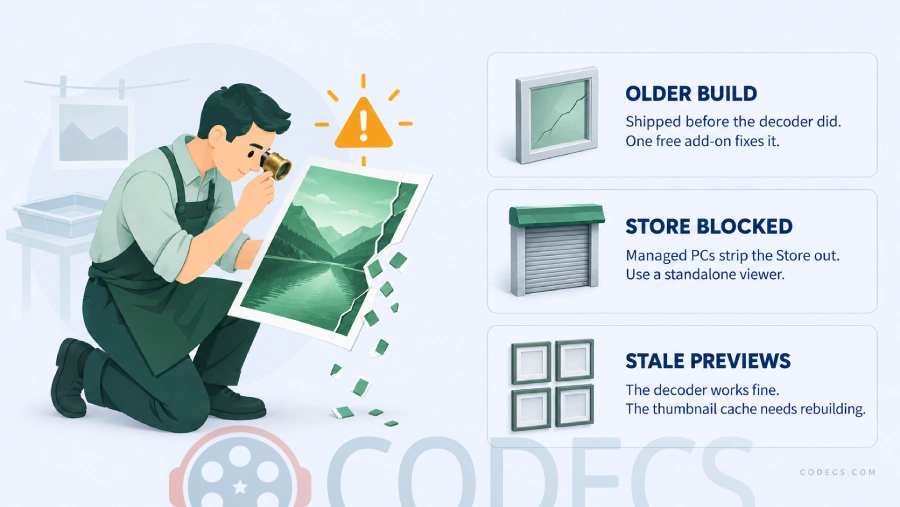
The fix is Microsoft's own free add-on, WebP Image Extensions. It is a small decoder that teaches File Explorer, Photos and other Windows apps to read the format, and it costs nothing.
- Install WebP Image Extensions and let it finish - there is no window to click through.
- Right-click a .webp file, choose Open with, and pick Photos.
- Tick Always use this app so the next one opens on a double-click.
If thumbnails still show a blank page icon afterwards, the thumbnail cache is stale rather than broken. Open Disk Cleanup, tick Thumbnails, and let Windows rebuild it.
Work or school PC. Some managed machines block the Microsoft Store entirely, which is exactly the case where a standalone image viewer is the easier route - see the table further down.
Why Your WebP Images Look Too Dark
There is one genuine bug worth knowing about, and it only bites people who brought back the old Windows Photo Viewer.
Microsoft's extension renders WebP images noticeably dark in that legacy viewer, with washed-out contrast. Photos and Paint are unaffected, so most readers will never see it.
The workaround is to swap Microsoft's decoder for Google's older WebP Codec for Windows, which plugs into the same Windows Imaging Component and renders correctly in Photo Viewer.
Only one of the two at a time. Both register as the system WebP decoder, so installing Google's codec on top of Microsoft's extension leaves Windows picking between them unpredictably. Remove one before adding the other.
Viewers That Never Needed an Extension
A standalone image viewer carries its own decoders, which means WebP opens whether or not Windows understands it.
This is the route to take on a locked-down machine, and it is the faster route generally, because these open in a fraction of the time Photos takes.
| Viewer | Licence | Pick this one if |
|---|---|---|
| IrfanView | Free for personal use | You want the one that opens absolutely everything, including batch conversion. |
| ImageGlass | Free, open source | You want a modern replacement for Photos that also reads HEIC, RAW and JPEG XL. |
| PicView | Free, open source | Speed is the point and you want it to feel instant. |
| XnView MP | Free for personal use | You are cataloguing a large photo library rather than just looking at files. |
| nomacs | Free, open source | You compare two images side by side often. |
| FastStone Image Viewer | Free for personal use | You want a viewer with real editing tools built in. |
Any of these makes the codec question go away for good, since none of them asks Windows for help decoding a picture.
When You Actually Need a Different Format
Sometimes the problem is not your PC at all - it is the thing you need to hand the file to.
Older Office builds, some printers, a few web forms and plenty of older phones still reject .webp outright, and no extension on your machine changes that.
Converting takes seconds in a browser tab, with nothing to install:
- WebP to JPG for anything that has to be universally accepted.
- WebP to PNG when the image has a transparent background to preserve.
- PNG to WebP going the other way, to shrink images for your own website.
- WebP to ICO if you are building a favicon.
Worth knowing before you convert: WebP is usually the smaller file by a wide margin, so a JPG copy of the same picture will take up more space. If you are curious how it stacks up against the newer options, we compared AVIF against JPEG and WebP separately.
Quick questions
Do I need to install anything to open WebP on Windows 11?
Usually not. Current Windows 11 installs already carry Microsoft's WebP decoder, so Photos, Paint and File Explorer previews work out of the box. Test with a saved image before installing anything.
Why do my WebP images look dark in Windows Photo Viewer?
That is a known fault in Microsoft's extension when the old Photo Viewer is doing the rendering. Google's WebP Codec for Windows displays them correctly, but do not run both decoders at once.
Can I insert a WebP image into Word or PowerPoint?
Microsoft 365 for Windows has accepted .webp since late 2021, provided the WebP decoder is present on the PC. Perpetual editions such as Office 2019 and 2021 are unreliable here, so convert to JPG or PNG first.
Why does File Explorer show a blank icon instead of a preview?
The decoder is usually fine and the thumbnail cache is stale. Run Disk Cleanup, tick Thumbnails, and let Windows regenerate them.
Do animated WebP files play in Photos?
No. Windows shows a single still frame from an animated .webp. Drag the file onto any browser window to watch it animate, or use a viewer built for it.
Is WebP safe to open?
Yes, on anything you keep patched. A serious flaw in the WebP decoding library was found in 2023 and fixed across browsers and Windows within weeks, which is a good reason to let updates install rather than a reason to avoid the format.
Test one file first, and only reach for a download if Windows genuinely says no.
Grab WebP Image Extensions if your PC is one of the ones that still needs it, or tell us how you got on if a different fix worked for you.





Latest comments
AllI used [link] on tivimate with the Usa m3u Playlist. I cannot get the guide to work.
Team replied Guide: Free EPG URLs for IPTV: TV Guide Links That Still Work 2 comments[link] Epg is not working on this one.
Team replied News: Free USA IPTV Playlist: The American TV That Is Really Free 1 commentSi mund te shikoj te gjitha kanalet e DigitAlb dhe Tring me url pa pagese ne Iptv Player?
Team replied Guide: Free Popular IPTV Playlist: Where to Get Fresh, Legal M3U Links in 2026 20 comments