Both shrink your videos and keep them sharp - but the real difference is not compression. It is whether the screen in your hand can decode them without melting the battery.
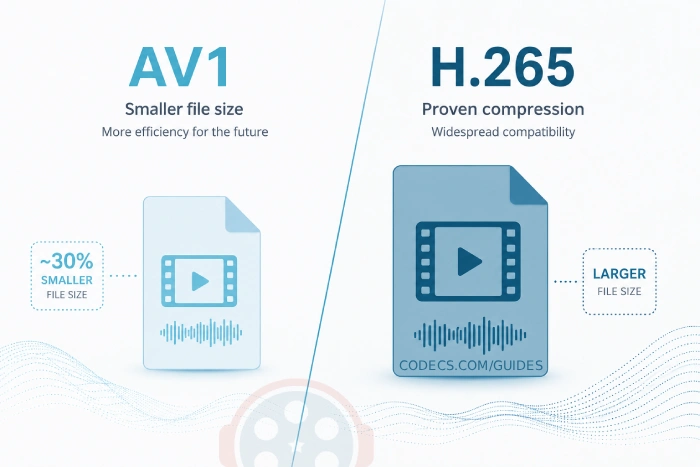
If you have been digging through video codec settings or wondering why one 4K file plays buttery-smooth while another stutters and drains your phone, you have met these two names: AV1 and H.265 (also called HEVC).
Both promise great quality at smaller sizes. The short answer to "which is better" is: it depends on what hardware is playing the file, not just which codec made it smaller.
Let's break it down in plain English so you can make the right call.
What These Codecs Actually Do
Think of a video codec as a language for compressing video. It takes huge raw footage and shrinks it down so it stores and streams without losing much quality.
H.265 (HEVC) has been around since 2013 and is the reliable standard almost everything speaks. Your smart TV, phone, tablet, and streaming stick built after 2015 almost certainly decode it in hardware.
AV1 is the newer, royalty-free codec from the Alliance for Open Media, the group behind Google, Netflix, Amazon, and Microsoft. It squeezes files even smaller than H.265 at the same quality, and it costs nothing to use, which is exactly why streaming giants pushed it.
File Size: Where AV1 Pulls Ahead
This is AV1's headline advantage. It compresses roughly 20-30% smaller than H.265 at the same quality.
In practice, a 4K movie that is 10GB in H.265 lands around 7-8GB in AV1. That gap matters for a few reasons:
- Faster uploads and downloads.
- Less mobile data burned per stream.
- Cheaper storage if you host video.
- Smoother streaming on slow connections.
H.265 is still efficient - about 50% smaller than the older H.264 codec most people used before it. It is not wasteful, just not as lean as AV1.
Picture Quality: A Near Tie
Both codecs look excellent. The differences only show up at the edges.
AV1 holds up better at low bitrates. On a weak connection or capped mobile data, AV1 keeps more detail at the same low bandwidth - useful for 4K and HDR where you want crisp edges even when the pipe is thin.
H.265 is proven at high bitrates. For Blu-ray and high-quality broadcast, where file size is not the worry, H.265 looks every bit as good and is already baked into the disc spec up to 8K.
Bottom line: both look great. AV1 wins the bandwidth-starved scenarios; H.265 owns physical media.
The Part Everyone Gets Wrong: Hardware Decode
The "AV1 kills my battery" complaint you see online is real, but it is not AV1's fault. It happens when a device has no dedicated AV1 decoder chip and falls back to software decoding, which runs on the CPU.
Software decode works, but it burns more power and runs hotter. The moment a device decodes AV1 in hardware, that penalty disappears and AV1 becomes more efficient than H.265, not less.
So the question is not "AV1 or H.265". It is "does this specific chip decode AV1 in hardware?" Here is where things stand in 2026:
- iPhone: Only the iPhone 15 Pro / Pro Max (A17 Pro) and every iPhone 16 and 17 model decode AV1 in hardware. Crucially, iOS has no system-wide software AV1 decoder, so older iPhones cannot play AV1 at all outside apps like VLC that bring their own decoder.
- Mac: M3 chips and newer decode AV1 in hardware. M1 and M2 do not.
- Android: Snapdragon 8 Gen 1 and up, Google Tensor G2 and up (Pixel 7+), Samsung Exynos 2100/2200/2400, and many MediaTek Dimensity chips decode AV1 in hardware. Qualcomm even brought it to the mid-tier Snapdragon 7 Gen 4 in 2025.
- Windows PCs: Intel 11th-gen and newer, NVIDIA RTX 30/40 series, and AMD RX 6000+ GPUs all decode AV1 in hardware.
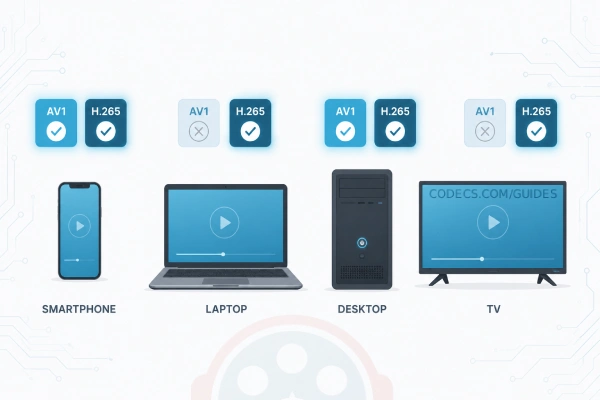
H.265, by contrast, is decoded in hardware on basically everything from the last decade. That universal coverage is still its single biggest strength.
Playing AV1 on a PC Without the Right Chip
No AV1 decoder in your GPU? You are not stuck. Software decode on a modern CPU plays AV1 fine - it just uses more power.
On Windows the simplest fix is the free AV1 Video Extension, which adds system-wide AV1 support to the Movies & TV app and Explorer. For DirectShow players like MPC-HC and MPC-BE, LAV Filters bundles the fast dav1d decoder and supports GPU acceleration where your hardware allows it.
Prefer one install that covers everything? The K-Lite Codec Pack ships both AV1 and H.265 decoding through LAV Filters, so you stop worrying about which codec a file uses.
Encoding Time: A Real Catch for Creators
AV1 is computationally heavy to encode - often 5-10 times slower than H.265. If you publish video on a schedule, that wait is felt.
H.265 encodes much faster, which is why it still rules live streaming, video calls, and anything where you cannot wait hours for a file to finish.
For people who only watch video, none of this matters. For creators, it is a genuine workflow decision.
Cost: AV1's Quiet Advantage
AV1 is royalty-free. No licensing fees, no patent-pool paperwork. For platforms operating at scale, that adds up fast and is a big reason Netflix and YouTube lean on it.
H.265 carries licensing fees for companies building products around it. Individual viewers never see a bill, but the cost is one more reason platforms prefer AV1 under the hood.
So Which Should You Choose?
Choose AV1 if:
- You stream on the web (YouTube, your own site) where browsers handle AV1.
- Your audience is on 2023-or-newer hardware with AV1 decoders.
- You want the best compression and can absorb longer encode times.
- You are building something and want to avoid licensing costs.
Choose H.265 if:
- You need maximum compatibility across every device, old and new.
- You work with live video or need fast turnaround.
- Your audience includes older TVs, phones, and tablets.
- You are making content for physical media like Blu-ray.
For most people just watching: you do not have to choose. YouTube, Netflix, and the rest send AV1 to devices that can decode it and fall back to H.265 when they cannot.
For creators: start with H.265 for reach, then add AV1 versions as your audience's hardware catches up. Many platforms now accept both so each viewer gets the best fit.
AV1 is the future - better compression, no fees, and hardware support spreading to every device tier each year. H.265 is the present - already in nearly everything you own. Neither is "better" everywhere.
The winner is whichever one the screen in front of you can decode in hardware.


Latest reviews
AllJPEG XL Is Back in Chrome: What It Means and How to Open JXL...
5/5Brave just enabled it by default for stable users yesterday (1.97). Not specified is chromeOS will be passively gaining decode ...
The New Fire TV Stick 4K Can't Run Kodi - Here's Which Fire ...
5/5Really interesting news - I had no idea Amazon was switching the new Fire TV Stick 4K over to ...
Free Popular IPTV Playlist: Where to Get Fresh, Legal M3U Li...
5/5Hi! Thanks for creating this list, and I have a small question: why do the channels I used to ...